Stardock Magazine: May 2020 discussion
Published on Tuesday, May 26, 2020 By Brad Wardell In Stardockians
This will be the feedback and discussion thread to the upcoming May edition of Stardock Magazine.
This will be the feedback and discussion thread to the upcoming May edition of Stardock Magazine.
This month we are releasing version 4.0 along with a new DLC called Worlds in Crisis.
Designed by Derek Paxton, the creator of the Fall from Heaven Civ IV mod, Worlds in Crisis is designed to enrich the galaxy with lots of new planet types, planet traits and plenty of new planetary events to test the player’s resolve to their chosen ideology.
For today’s journal, I’m going to do a playthrough after action report (AAR).
It is the year 2242. United Earth has constructed an immense shipyard orbit near the asteroid field. Its first interstellar ship, the T.A.S. discovery, newly equipped with the FTL system called “hypderive” prepares begin its mission.

Earth in 2242

Researchers are focusing on artificial gravity

Earth is constructing a massive industrial center in central Asia.

The shipyard is constructing Earth’s first colony ship.
It doesn’t take long for the discovery to encounter something unexpected. A massive relic to a long gone civilization. The relic appears designed to increase the consciousness of its users. A request is sent back to Earth to send a ship to further investigate it.

A mysterious relic of some pre-cursor civilization.
The next week the Discovery makes it to Charlotte’s Star. There, they find a world in which the virus vs. bacteria wars had a conclusion: The viruses won. The world is absolutely sterile from a bacteria point of view. The viruses are harmless to humans but a world without bacteria has many other issues. This “sterile” world would be ideal for colonizing for scientific purposes even if it would be difficult to live on (colonists would be required to constantly import and take probiotics).

A Sterile world
The TAS Destiny, Earth’s first colony ship, reaches Charlotte III. Filled with scientists, they find a world devoid of life but otherwise, absolutely inhabitable by humans. The planet’s rich oxygen-nitrogen seems to defy the fact that there is no bacteria on the world (which means, where did the oxygen come from?.

Scientists are dispatched to the world to begin setting up all manners of experiments.
Meanwhile, the TAS Discovery continues to seek out a world that human colonists might actually enjoy living on.
Later that Summer (Earth time), the Discovery encounters an alien space probe. Communication is impossible at this stage but we are able to translate enough to determine that they call themselves the “Korath Clan”.
The leading scientists on Earth have assured us that any civilization capable of space travel will certainly be peaceful. We expect to become great friends with these “Korath”.

Humanity’s first contact. We are confident in becoming great friends.
Sure enough the TAS Discovery found a great world for people to live on. This world was literally built. Built by the same strange precursor civilization that built the relics we keep finding.

An amazing world. But not natural.

Genetically engineered beasts of burden live on the surface
With the colonization of a third planet, United Earth becomes the Terran Alliance. Humans are now a multi-star civilization!

To help Morgan’s world, Earth sends a massive supply ship with equipment to help speed up its growth.
Our scientific endeavors were making it clear that many of the new technologies we needed would require exotic resources. At first, this caused a great deal of consternation because it was thought that these resources would require super-colliders to produce. However, the four key types of resources we would need were beginning to be found naturally (even if they were still extremely rare).
Promethion comes from failed stars. These massive gas giants almost became stars but the fusion reaction stopped almost immediately. Promethion stars were only theoretically considered until we actually found a star with two of them. Only trace amounts of the exotic material exist on these star/worlds but it is sufficient for our efforts.
Thulium was another theoretical exotic material that came from failed stars. Instead of becoming gas giants like Promethion, they instead became hyper-dense dwarf planets. The hyper dense material is extremely useful in many applications.
Anti-matter is long well understood. However, finding it outside a lab is challenging. However, a small dwarf blackhole near Aturus has two microscopic sources of it.
Elerium is the last and exists near nebula. Elerium is an energy whose natural state is a plasma. Controlling these resources will be necessary to continue our technological advancement.

Promethion being harvested near Athena (previously Sir-19c)
After a year of exploration and colonization, we have encountered more civilizations. These civilizations have begun effectively claiming these resources. Given their rarity and importance, we are hopeful that we can trade for them if necessary.
With the invention of the universal translator, diplomacy and trade are now possible.

We’ll give you stuff…for money
Thus far, we have met four other civilizations.

A peaceful place
As expected, any civilization capable of interstellar travel has to be peace loving. Right? The goal of the Terran Alliance is to create a United Planets – a permanent interstellar alliance. Only time will tell how successful this endeavor will be.
Part of the strategy to accomplish that is top open the galaxy to trade and our rich culture.
The cute Mowlings are attacking the Trandals. How is this possible? War is an artifact of the past.

We can’t help. We don’t even have a single armed ship.
This event caused the Terran Alliance to begin considering the possibility that it should probably have some sort of defense forces.
With nine colonies, the Terran Alliance didn’t possess a single ship with so much as a missile on it.

The Mowlings are not very reassuring
Nevertheless, Earth has little infrastructure in place to even consider building some sort of “space navy”. The very idea of having ships fight in space seems like something out of science fiction.
Protests on Earth begin as people demand we not emulate “Star Wars”.
Nevertheless, it is decided we will construct a war ship. Besides “space rockets” we have the ancient singularity cannon we found on Morgan’s World. Hopefully a single, heavily armed, ship will be enough of a deterrent.

The Deterrent class destroyer. Armed with the Precursor Singularity weapon found on Morgan’s world.

We also agree to provide defensive systems to the Trandals.
The planet Koinzell III has been dealing with mutations from Precursor nanites.

What should we do?
Most of the mutations are actually beneficial. But not all. Because of the growing fear of falling behind technologically, it is decided that we will need to be…pragmatic in how we deal with the situation.
The crisis also forces Earth to confront the fact that the colonies are starting to become large enough that they want a more equal voice in government rather than being simply run by Earth appointed governors.

The Terran Alliance becomes an interstellar Republic

Meanwhile, Konzell III has its crisis resolved. It is also given a new name – Mutania (don’t judge me!)
The lengthy construction of the TAS Deterrent was complete. Its completion demonstrated a major problem with the strategy of the Terran Alliance -- time. Six weeks to travel between star systems would make it worthless in being able to respond to any threat. This resulted in the project known as “The Great Space Coaster”.

TAS Deterrent on the way to Earth from Morgan’s World
Specifically, the construction of a series of hypergates – massive gates that would create a near void between them that would increase the efficiency of Hyperdrive.

These hypergates are incredibly large
The project took almost three years to complete.

When completed, it created a highway between Morgan’s World, Earth, and Einstein (previously Charlotte).
Mutania was cut off from the hypergate system still. Worse, it was being culturally encroached on by the Trandals.

Trandal influence was beginning to dominate our far off colonies.
However, we had an ace in our sleeve. When Mars was colonized, we found an ancient artifact known as the Echoing Heartstone. The effect is that it greatly increases the transmissions of a target world which greatly spreads its influence.

This ancient artifact will allow us to increase the influence of Mutania.

Shortly after using it, the Trandal colony was already wanting to join the amazing, culturally exciting, Terran Alliance.
Meanwhile, to help police the the trade occurring between colonies, the Terran Alliance finally, reluctantly agreed to a “Constable force. Each planet would be allowed to have a single, 12 x 11 meter ship.

It has…a laser beam.

You can almost see the slight bump in military might.
The Constables were strictly for law enforcement. The backbone of the Terran Alliance military remained its single “Deterrence” destroyer.
Meanwhile, observers on Delta Glaldius, homeworld of the Trandals, continue to report on the destruction of the Trandal civilization. Once a multi-star civilization, it has been reduced to fighting in its home star system where its last armed ship has been destroyed.

The Trandals are about to be destroyed by the Mowlings.
The warm relationship the humans have with the Mowlings made many believe that there was no need to build up a military. Hopefully, this would prove to be a wise decision. Instead, the humans focused on building their diplomatic corp. The dream of a united galaxy built on mutual respect remained the focus.

With the Trandals on their knees, the Mowlings look at the Drath

The Mowlings expect our support…and we find we must give it to them.
Needless to say, no one on Earth expected the peace loving Korath Clan to be the ones who would declare war on us. What we did to offend them we’ll never know.

Is this the face of an evil civilization?
The TAS Deterrent would need to be sent out. In the meantime, Earth’s engineering had not been idle even if its weapon program was non-existent.

Yorktown class.
Equipped mostly with reverse engineered mass-drivers from the Precursor tech, it was not a powerful ship in terms of weapons and defenses. But it was big and it could take a beating.
Meanwhile, the Deterrent was being deployed to Korath space. Perhaps a show of force would make them rethinnk their attitude.

TAS Deterrent in 22244
Looking at the Terran Alliance in 2244 reveals a complex situation.

We are friendly with 4 of the 5 other powers.

Our economy has been heavily boosted by trade and tourism and we maintain a healthy tax rate of only 25%.

Morgan’s World is the jewel of our civilization (though it needs more cities)

The TAS Hornet heads to Einsten to protect the sector.

Our area of space is well populated

We control the blue area. The Drath are the orange-ish. The Mowlings ae the red.

The Mowlings are war like but we now have a non-aggression pact with them.
The goal now was to create a partial universal alliance. The Korath would not be a part of that.
The Korath’s equivalent to the Constable class is no match for the Deterrent Class.

The TAS Detrerrent punishes the Korath

The Trandals are gone

And the TAS Deterrent visits the homeworld of the Korath

While it only has the single Precursor weapon we found, its flak cannons are home-grown and sufficient to block the opening barrages of the Korath.

By contrast, the Deterrent’s Precursor Singularity driver delivers 15 megajoules of damage every strike making short work of the Korath destroyer.
The Deterrence annihilates the Korath space navy. While much larger in number, they are no match for the Deterrence.
The challenge with uniting everyone is that the Drath are at war with everyone. We have close relations with the Drath and friendly relations with the Altarians and the Mowlings.
One way or another, the universe was going to change soon. The Altarians had collected 9 Precursor ascension crystals. Our scientists believe that this Precursor civilization “ascended” to a higher level of existence and built these devices to do the same. The problem for us is, what would the ascended Altarians do to everyone left? We either needed to ally with everyone or destroy the Altarians or accept our diminished role as a species.

The Altarians are about to ascend!
What we need to is to ally with everyone. This would mean that we needed to push pressure on the Korath.

The Korath surrender

The Surrender ceremony is held on Kora with the Deterrence in orbit.
So as 2245 nears, Earth faces a real challenge:
If one of them were destroyed, this would remove the barrier for alliance. However, will that happen before the Altarians ascend?
The TAS’s fledgling space navy consisting of Enterprise, Yorktown, Wasp, Hornet and of course Deterrence could be given to the Drath which would help them finish off the Mowlings. However, doing so would leave us defenseless.

The Mowlings ultimately surrender to the Drath but in the surrender they make the Terran Alliance their inheritors.

We are now the proud owners of Moop.
With any luck we can ally with the Drath and end this before our alliance with the Altarians forces us to go to war with the Drath.


Just in time
The key was investing so many diplomats to the Drath but it was enough!

And so an a permanent alliance of the 3 major powers would usher a new era of peace.
In time, the United Planets would integrate more fully with each of the species becoming specialists according to their natural gifts. Other galaxies would now be open to exploring.
None of this is meant to imply that any of them were bad experiences. Just that some were more enjoyable than others.
Last year, Microsoft released “Dark Mode” to Windows 10 users. Dark Mode gave users an alternative color and style option to the Windows GUI.
Now, Stardock is preparing to release a new customization program called Curtains. Curtains works similarly to the modes that Microsoft has implemented. Any app that already supports the existing dark and light modes will automatically benefit from Curtains.

Stardock Curtains
Stardock Curtains includes several new styles such as Graphite, Crystal, Sky, and Midnight. It also includes styles that give users the ability to change Windows to look like previous versions of Windows (XP, Windows 95, etc.), as well as alternative operating systems.
Stardock is well known for its customization programs including Fences, Groupy and Start10. It also is the developer of classic GUI “skinning” apps such as WindowBlinds. Unlike WindowBlinds, which is far more comprehensive, Curtains doesn’t take over the painting of the Windows GUI but instead works akin to how Dark and Light mode on Windows 10 works. This means that it inherently takes advantage of different DPI settings and is able to leverage apps that already support Dark and Light Mode.
For Creators
Another big difference between Curtains and WindowBlinds is the complexity of a Style versus a WindowBlinds skin. Because WindowBlinds essentially takes on the responsibility of drawing the GUI of windows, skins must include all of the GUI controls. One missing element or one poorly designed control and a WindowBlinds skin can look incomplete. By contrast, Curtains only needs to supply a handful of images and settings. It’s simple enough that style modifying and creating is part of its configuration.

It is very simple to create or modify existing styles
Availability
Curtains will be going into beta on Stardock’s Object Desktop suite of Windows enhancements tools next week (late April 2020). A stand-alone version is expected later in the Spring.
Visit www.objectdesktop.com to get it.
Screenshots

Fluent Peach (Peach Mode)

Dark Waters

Crystal

Fluent Red (Red Mode)

Workbench

MacMono

Midnight

Warp

The first 3 rows are ones I set.
The second 3 rows are just ones MS’s “frequently used” populated.
edit: columns!!!
This early, I haven’t used much.
These are the apps I first install onto a new PC. What are the first apps you install?
So we are on the road to v4.0. It's hard to believe that GalCiv III was released five years ago. We've made a lot of changes since then.
Version 4.0 is designed to do a lot of different things. I won't go over all the changes here but instead will take you on a bit of a guided tour.
Most of the changes are for users of Retribution which is the latest expansion. If you don't have that, I highly recommend getting it.
Turn 1
On your first turn you're going to likely notice some subtle but important changes.

First, more food. There are a lot more fertile tiles in general that you can use either for farming or plow away to build other things.
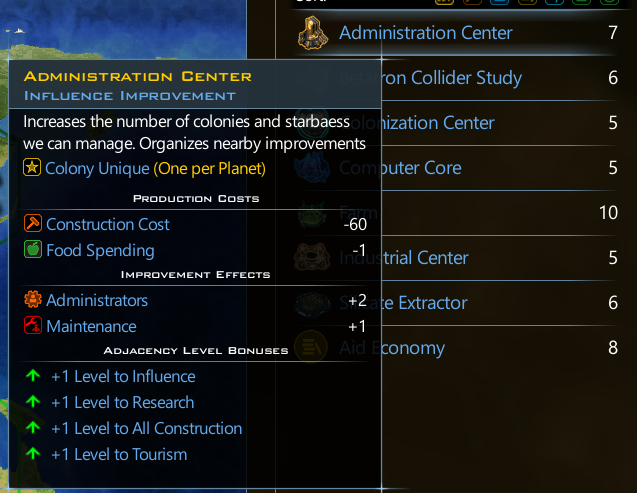
There is also an Administrative Center that you can have 1 per planet with. It gives you 2 admin points but it's also useful because it enhances adjacent structures.

There has also been a slight tweak to the costs of planetary improvements (on Retribution). You also end up with a fuller set of choices.

Not only have asteroid fields been made bigger but Durantium is more common as well.

Technologies have been tweaked so that more administrative points are handed out and a lot more trade routes are handed out. For instance (Retribution), Xeno Commerce now provides 5 trade routes instead of 2.
Early game changes

Resources like Promethion are somewhat more common as well.
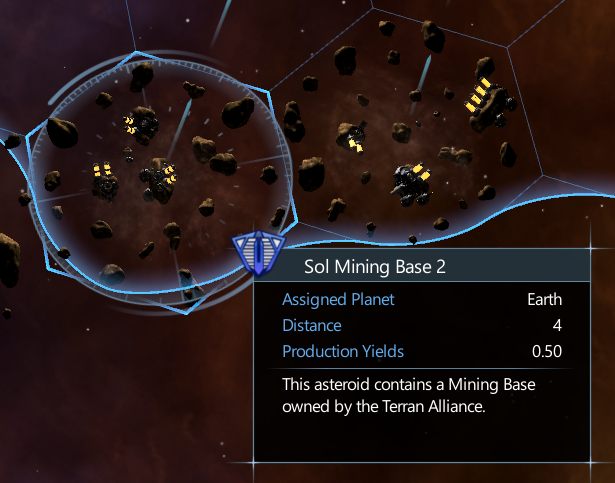
On the other hand, while we've added more asteroids, we've reduced the amount of raw resources mining bases give from 1.0 to 0.50. As many know, by late game, a disproportionate amount of raw resources ends up coming from the asteroids which was not the intent.
Instead, because food is so much more common, players will tend to have much larger populations which do provide, over time, more production.

Planets themselves have gotten a bit of a make-over. More interesting layouts and more interesting cosmetics.
Even Mars.
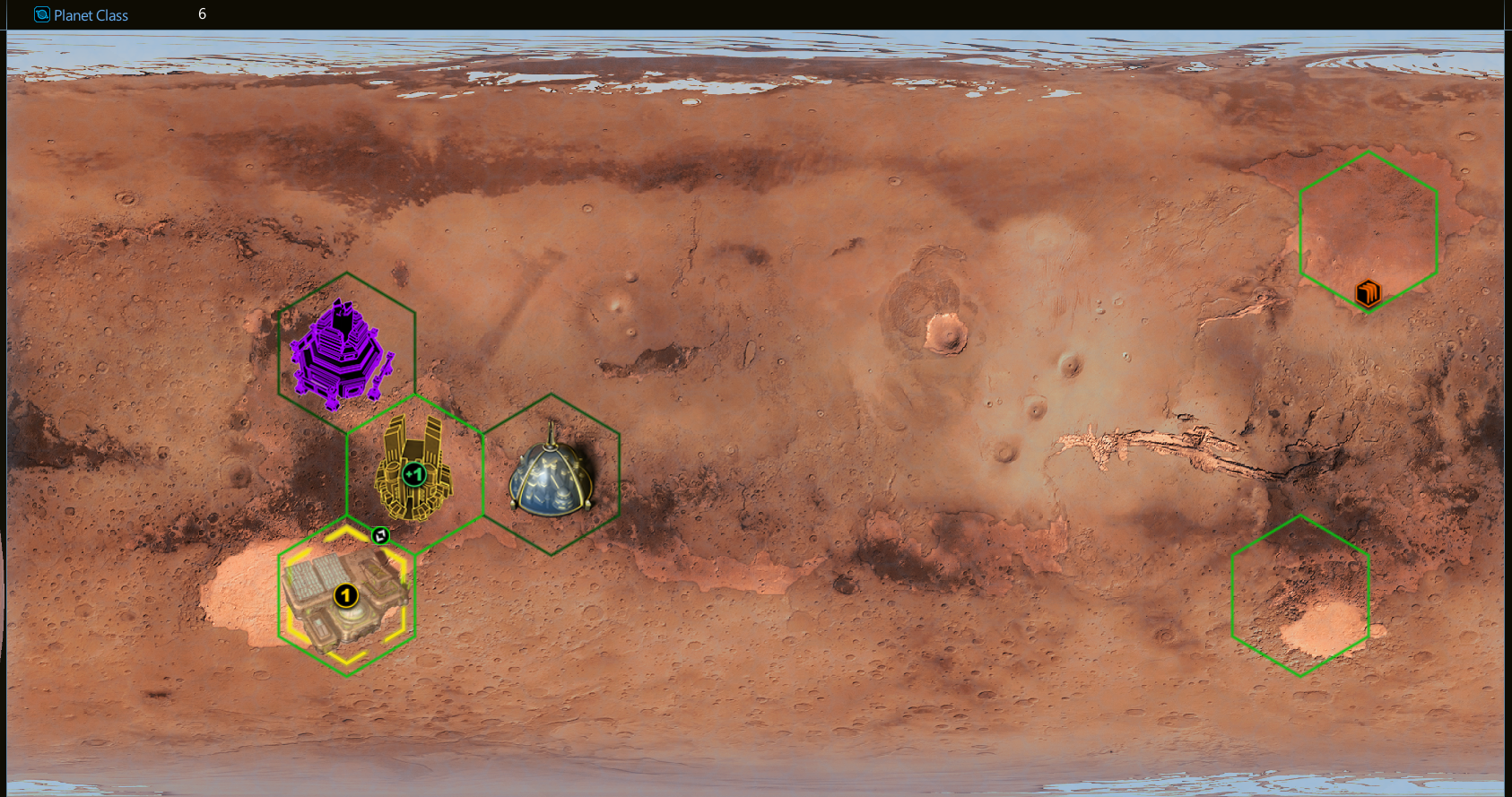
And this is all in the first 20 turns or so. We will discuss more as we get closer.
Highlighted feature
A lot of users have asked for the ability to turn OFF the colonies auto-upgrading structures.

Coming in v4.0 in May!

This PC is using Windows 10. But not just Windows 10 on its own. It's been upgraded a bit with Object Desktop. That's what Object Desktop does. A lot of the things in Windows we see today first showed up in Object Desktop. A few examples include transparencies, shadows, gadgets, ZIP files as folders, GUI skinning, etc. There is a natural progression to the operating system.
On this screenshot I have Groupy, CursorFX, Fences, Start10 and a new app that hasn't been announced yet.
The PC of the future series is going to explore where we think the desktop is going. This PC has 64 CPU cores and 128 logical processors. It has 128 GB of memory and an extremely fast GPU. So what are we going to do with this hardware? That’s what this series will explore.
Edit: Additional screenshots below.


This week’s update to the Political Machine adds Ronald Reagan. He’s the first candidate that includes a scoring handicap which means that your score is modified slightly because he’s a bit easier to win with than other candidates. We’ll show you here.

The update also includes AOC, Al Gore, and Barry Goldwater.
The Reagan Era
Ronald Reagan was one of the last Presidents we had before the hyper politicization of American life really took hold. In 1980 and 1984 he won California, something that would not be possible today regardless of whether he had been governor or not.
Simulating Reagan

In this simulation, we have Reagan going up against Hillary Clinton. It’s not very close.

This is where the handicap comes in. It takes a lot of testing and tweaking here. For example, we have a _Credibility stat which affects how persuasive someone is on a given issue. Hence, Reagan, who is pro-life is able to take Abortion Rights and get most people who care one way or the other on the issue to vote for him. He does less well on Lower Taxes and this has to do with how each campaign spends their time campaigning for (or against) certain issues.
In the example here, it would be safe to say that we need to adjust Reagan’s score handicap further.
So there you go. Reagan returns!
With our state on lockdown, our offices are empty.
This gives me a rare opportunity to give a little tour of our offices with almost no one here.
A little bit about Stardock
So I started Stardock from my dorm room back in 1991 and incorporated it in 1993. The building we’re in now, we bought in 2005. We own it, so we are able to do whatever we want with it. It’s about 20,000 square feet and we’ve had the opportunity to try out various working area styles.
The Welcoming Committee

As you enter the main lobby of Stardock...

This is Cheesecake. An essential employee. We allow dogs at work. 

Stardock has 3 floors. This is the lower floor in an area called Lab-2 (Lab-1 is upstairs). The team is working from home. We let people check out their PCs and take them home.

This is also part of Lab-2. Lab-2 has the workstation area. It’s not an open floor plan, but rather a hybrid, where everyone gets their own workstation area. There are also 3 offices connected to it – Senior Producer (oversees schedule) – Senior Publisher (oversees the “biz” side) and Senior Designer (the lead designer on the project). We mix the artists and engineers together so that they can work seamlessly together.

This is the office I’m occupying down here. I’m currently on a new project that won’t be ready for a couple years. This is the first time I’ve been the senior designer on a game project since GalCiv II from the start.

This is part of our Cafe.

Sitting area for the Cafe. The nice thing about this area is that there’s a presentation area up front.

This is on the main floor. This is where the Impulse team used to be back in 2011. We occasionally use it for podcasts, but it’s been unfilled since 2011.

Also on main floor. Has been empty since we sold Impulse to GameStop.

Biz Conference room. I spend a lot of time here, unfortunately.

The fitness room. Empty. So sad.

My office. Empty now that I’ve moved to the senior designer office.

Gamer’s Bill of Rights.

Wife and kids.

Back of my office. There’s a little framed box of the “contract” between Chris Taylor and I on Demigod. It’s on a napkin.

Upstairs Lab-1 with Agile wall (Scrum wall). So empty.

Kristy’s workstation isn’t empty at least!

Cleanest this area has been in years. The IT area.

Play-testing lab.

Derek Paxton, upstairs in Lab-1’s Senior Designer office.

The kids of the QA area. Today, just making sure everyone else is able to work from home.

Obligatory picture of gender neutral bathroom. We have gender-specific bathrooms on every floor but we also installed this along with an area for employees who have just had children to take care of things (and we did this back in 2005).
The general goal is to create an environment that is welcoming and comfortable. We have extremely low turn-over and I think a big part of that is our company environment.
And with that, back to work!