Brad Wardell's Blog


IE down to 56% of WinCustomize userbase

Published on Sunday, November 19, 2006 By Brad Wardell In WinCustomize News

WinCustomize.com gets millions of visitors a month. But of those millions of users, fewer and fewer of them seem to be using Internet Explorer.  At one time, over 90% of our users were using IE.  Now, it's down to 56%.

Of that 56%, about a third of them have already upgraded to IE 7. The rest are using IE6.


Gamespot Hands on Preview of Dark Avatar Beta 1

Published on Saturday, November 18, 2006 By Brad Wardell In GalCiv II News

Gamespot got a copy of beta 1 and has just posted their hands on preview of the expansion pack to Galactic Civilizations II.

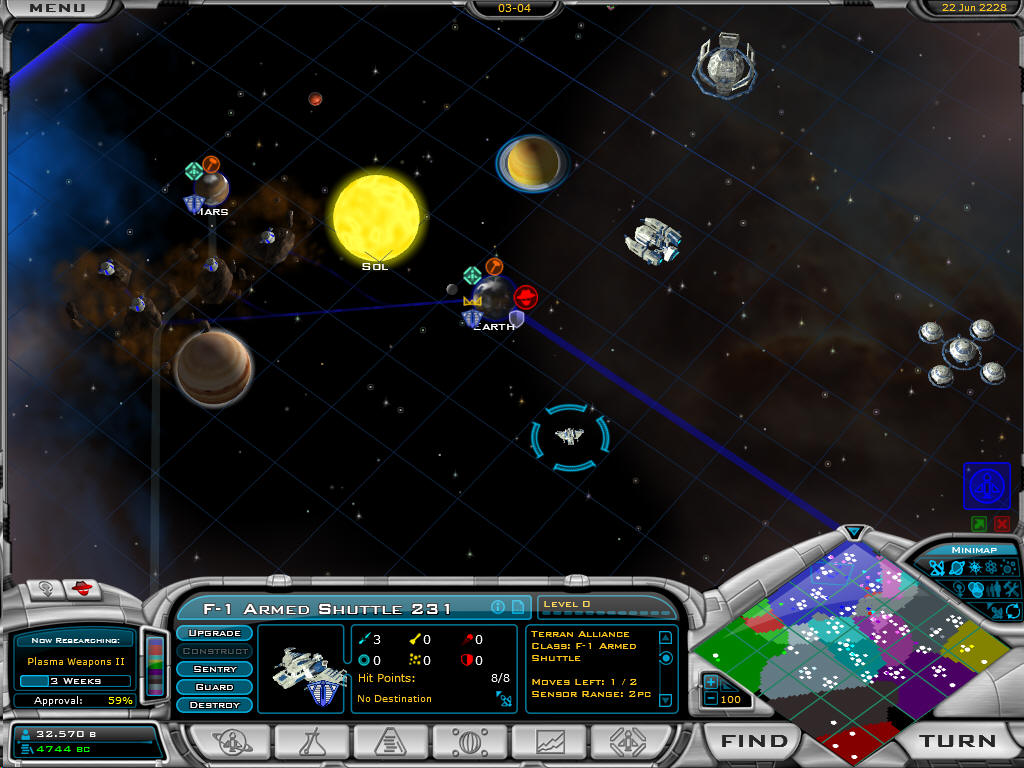
In Galactic Civilizations II: Dark Avatar, we have gone in and added a ton of new features to the base game that radically change the gameplay in ways we hope are for the better.

They conclude: "Dark Avatar has an impressive amount of new content, enough really to merit it being a sequel.."

The expansion pack is due for release in February.

A busy November week at Stardock

Published on Friday, November 17, 2006 By Brad Wardell In Work Reports

It's been an insane week this week at Stardock. Insane. Cats and dogs living together and everything. For this reason, I'm sending this to you to let you know what's been going on.

Monday

On Monday, Stardock announced a new graphics design team called Stardock Design. It pulls together skinners from SkinPlant and Pixtudio and combines them together.  The idea is to start making skinning much more mainstream and the first thing that was released with it was a branded desktop for Florida State University. A ton of other things are in the works too. If you're reading this, you're probably one of the people who were at the forefront of the cutting edge of desktop customization -- skinning.

Stardock Design also created a consumer oriented suite called Texas Holdem. You definitely should check this out because not only does the suite have a WindowBlinds skin, icon package, boot screen, and logon screen it also has a card game gadget!

Stardock Design: https://www.stardockdesign.com

Texas Holdem: https://www.stardock.com/products/themes/texasholdem/


Tuesday

Tuesday was the day that ObjectDock 1.5 was released. This was the most significant update to ObjectDock since it was originally released. If you have Object Desktop, you can get ObjectDock at a discount.

The new version of ObjectDock supports .Dockzips, has a new resizing algorithm that's faster, works on Windows Vista, has a new image search feature, screen edge reserving, tons of new drag and drop features, and dozens of other features and tweaks.

If you haven't ever tried ObjectDock, give it a shot. It's second only to WindowBlinds in terms of popularity. Last week it passed the 3 millionth download mark on CNET.

ObjectDock home page: http://www.objectdock.com

ObjectDock 1.5 Guided Tour: https://www.wincustomize.com/Articles.aspx?AID=136176


Wednesday

WindowBlinds for Windows Vista was the main event of Wednesday. This came in the form of WindowBlinds 5.5 BETA (5.49 on Stardock Central). As a beta, it's only available to Object Desktop users. Not too many people have Windows Vista yet but if you do, this is the first (and only) way to change the way Windows Vista looks and feels. It makes full use of the new Windows Vista compositor for maximum performance. 

If you have WindowBlinds stand-alone, you can upgrade to Object Desktop at a discount by going to the link below.


Object Desktop Home Page: http://www.objectdesktop.com

Upgrade to Object Desktop from WindowBlinds: https://www.stardock.com/products/odnt/odnt-upgrade.asp

WindowBlinds 5.5 Guided Tour: https://www.wincustomize.com/articles.aspx?AID=136284


Thursday

On Thursday, the beta for Galactic Civilizations II: Dark Avatar was released. There's far too many new features to list here but if you have Galactic Civilizations II, you'll definitely want to check this out. If you don't have Galactic Civilizations II, you can get it at your local store or you can get it at the Galactic Civilizations II home page.

The expansion pack beta is available to anyone who has pre-ordered the expansion pack. This way, players can help give feedback on what sorts of changes and tweaks they'd like before it's released.


Galactic Civilizations II home page: https://www.galciv2.com

Dark Avatar expansion home page: https://www.galciv2.com/darkavatar


Friday

And of course there's Friday. And on Friday Stardock released the Aquarium Desktop 2007.  Aquarium Desktop is similar to those fish screen savers you see seemingly everywhere except these fish exist on your Windows desktop and you can interact with them (grab them, move them around, open chests, move plants around, etc.).  It's been designed to keep from using up very much CPU when covered up so that it doesn't get in the way of your work.

As a bonus, Aquarium Desktop 2007 comes with a brand new very cool WindowBlinds skin. If you have an older version, there are some great discounts to getting the new one.


Aquarium Desktop Home Page: https://www.stardock.com/products/aquarium/

Screenshots: https://www.stardock.com/products/aquarium/screenshots.asp


The end of the week...

And now it's the end of the week. The insanity is over. If you're reading this you already know that Stardock's a relatively small company. We're located up in Plymouth Michigan. Typically, a company like ours would have one product that we just update every year. We should be making some sort of insurance application or maybe a data manager or something that we release minor updates each year. That's what a normal software company of our size would be doing. 

If you are interested in talking to anyone from Stardock in person, feel free to visit us on #stardock on irc.stardock.com (you can reach it through Stardock Central).  You can also interact with us on the Stardock forums.


Stardock Corp. 15090 Beck Rd. Plymouth MI 48170. www.stardock.com.

Managing start up programs in Windows Vista

Published on Friday, November 17, 2006 By Brad Wardell In Help

Windows Vista for me is a must-have upgrade for many different reasons. But some of the reasons it's so compelling are not being trumpeted enough.  Windows Vista includes with it a host of new tools for knowing a lot more about your computer than previously available.

For starters, open control panel:

Under programs look at "Change start up programs".  Under XP there was MS Config but Windows Defender is much nicer about this. Now you can actually control what is getting loaded up on your computer. 

As you can see here, I can now see what loads on start-up. The most common problem normal users run into is that after a period of time, their start up gets clogged full of junk and managing this can be really tedious.  In Vista, that problem goes away thanks to the integration of Windows Defender into Control Panel.  More advanced users will probably want something like TweakVista but as something that you know is there out of the box, this is very handy.

Welcome to the Dark Avatar Beta!

Published on Thursday, November 16, 2006 By Brad Wardell In Beta Reports

The BETA of Galactic Civilizations II: Dark Avatar is available now for users who have pre-ordered it.  We are slowly processing all the pre-orders for it.  As usual, we under estimated how many people would pre-order (especially in the last week) since our estimates were based on the pre-orders of GalCiv II.  So it's going to take awhile.

There is no change log. If you've seen the changelogs of 1.1 or 1.2 and such then you can imagine how long the change log is to something we charge money for. 

The features on the Dark Avatar page only go over the major stuff, there's so many changes throughout that it's going to take some time for us to get a handle on even describing them (and documenting them). For example, someone allegedly asked to have control over which tile ships leaving orbit would appear in. So it's in now. But it's not documented.

Here are a few major gameplay changes to be aware of:

  1. The combat system has been rewritten. It is now based on weapon instead of ship. That means a given ship could strike N opponents where N is the # of weapons on the ship. Logistics and cost of larger ships have been adjusted to keep fleets of small ships viable.
  2. Factories produce a LOT less than they used to. But there are now power plants that magnify production. More emphasis is being put on getting resources from asteroid fields and starbases.
  3. There will be a lot of enemy agents floating around. Even in Dread Lords there were agents in your empire, you just didn't know about them. No you actually see them on your worlds. Be wary of trying to swat every last agent on your planet at the expense of your economy.  Agents remain how you are supposed to also learn about a civ overall (i.e. if you have them on an alien world, you automatically start to learn stuff).

Here are the known issues:

  1. Alt-escaping/alt-tabbing isn't reliable. If you alt-esc out of the game, it'll likely go boom. We're working on it. (bloody evil developers always play in a window)
  2. The actual values and pacing are stand-ins. Don't get used to the economy, cost of things, size of things, or anything. What we want to avoid is anyone getting attached to how much things cost and then yell when we put in the balanced values.
  3. Please DO NOT post generated epic stories. They're only partially working and we don't have that much text in.
  4. The computer AI hasn't really been updated much. Oh, it handles spies and such but the good stuff really hasn't gotten started yet.

What we do want to hear about are:

  • Crashes. This beta shouldn't crash. Ever. If you get a crash, go to the beta forum and post your debug.err and what you were doing at the time. It would also be VERY helpful if you install Smart Exception which is in the "free stuff" area of Stardock Central.
  • Bad UI or confusing UI. Is there some way the game plays that does't make sense to you?
  • Broken feature. Is there a feature that isn't working right?

The Beta forum can be found HERE.

The Dark Avatar Beta Arrives...

Published on Thursday, November 16, 2006 By Brad Wardell In GalCiv II News


The BETA of Galactic Civilizations II: Dark Avatar is available now for users who have pre-ordered it.  We are slowly processing all the pre-orders for it.  As usual, we under estimated how many people would pre-order (especially in the last week) since our estimates were based on the pre-orders of GalCiv II.  So it's going to take awhile.

There is no change log. If you've seen the changelogs of 1.1 or 1.2 and such then you can imagine how long the change log is to something we charge money for. 

The features on the Dark Avatar page only go over the major stuff, there's so many changes throughout that it's going to take some time for us to get a handle on even describing them (and documenting them). For example, someone allegedly asked to have control over which tile ships leaving orbit would appear in. So it's in now. But it's not documented.

Here are a few major gameplay changes to be aware of:

  1. The combat system has been rewritten. It is now based on weapon instead of ship. That means a given ship could strike N opponents where N is the # of weapons on the ship. Logistics and cost of larger ships have been adjusted to keep fleets of small ships viable.
  2. Factories produce a LOT less than they used to. But there are now power plants that magnify production. More emphasis is being put on getting resources from asteroid fields and starbases.
  3. There will be a lot of enemy agents floating around. Even in Dread Lords there were agents in your empire, you just didn't know about them. No you actually see them on your worlds. Be wary of trying to swat every last agent on your planet at the expense of your economy.  Agents remain how you are supposed to also learn about a civ overall (i.e. if you have them on an alien world, you automatically start to learn stuff).

Here are the known issues:

  1. Alt-escaping/alt-tabbing isn't reliable. If you alt-esc out of the game, it'll likely go boom. We're working on it. (bloody evil developers always play in a window)
  2. The actual values and pacing are stand-ins. Don't get used to the economy, cost of things, size of things, or anything. What we want to avoid is anyone getting attached to how much things cost and then yell when we put in the balanced values.
  3. Please DO NOT post generated epic stories. They're only partially working and we don't have that much text in.
  4. The computer AI hasn't really been updated much. Oh, it handles spies and such but the good stuff really hasn't gotten started yet.

What we do want to hear about are:

  • Crashes. This beta shouldn't crash. Ever. If you get a crash, go to the beta forum and post your debug.err and what you were doing at the time. It would also be VERY helpful if you install Smart Exception which is in the "free stuff" area of Stardock Central.
  • Bad UI or confusing UI. Is there some way the game plays that does't make sense to you?
  • Broken feature. Is there a feature that isn't working right?

The Beta forum can be found HERE.


And if you want to get the beta and final game, you can pre-order it from us. We'll be letting people who pre-order get the beta for another week at least.  GO HERE TO GET THE BETA. 

WindowBlinds 5.5 Vista skinning format updates

Published on Thursday, November 16, 2006 By Brad Wardell In WindowBlinds

WindowBlinds 5.5 supports some new Vista controls. Below are the new fields for your .UIS file to support Vista content.

For many of these, see the Vista Images directory. If the sections do not exist, WB will use predefined defaults from the Vista Images directory, or make a suitable image by recolouring something else.

[Vista.Shell]

This section is used for the bar under the address bar in explorer windows & file dialogs. Supports per pixel etc. 1 image.

[Vista.ShellSide]

This section is used for the side of the control panel windows & the WBConfig window. WB will use a recoloured toolbar background image for this if it is not defined. 1 image

[StartMenu.ExtraArrow]

Used for the small arrow next to the logoff / shutdown buttons on the startmenu. The bad news is the buttons next to this are not skinnable currently, so this section should probably not be defined in the skins.

3 images.

[TabClose.IE7]

IE7 X button on the tabs. 3 images

[Tabs.IE7]

IE7 tabs. Be aware that the bar under them is not skinnable which limits what you can do. 5 images

[AeroWizard.DownArrow]

Used in some wizards. Down arrow. 4 images

[AeroWizard.LeftArrow]

Used in some wizards. Left Arrow, 4 images.

[AeroWizard.RightArrow]

Used in some wizards. Right arrow. 4 images

[TaskDialog.Arrow]

Up/Down arrow used to expand some task dialogs. 6 images.

[TaskDialog.Buttons]

Button image used for the options on a task dialog. 6 images

[TaskDialog.ButtonArrows]

Arrow image used on task dialogs. 5 images

[DragDrop.Arrows]

Used when dragging icons around. 7 images

[DragDrop.Rect]

Used when dragging icons around on the startmenu. 1 image

[DragDrop.Icon]

Used when dragging around icons. 1 image

[AltTab.Button]

Used on the alt-tab window. 2 images

There is also 1 new attribute for UIS sections. If you add ApplyColour = 1 then WB will recolour that image based on the skins COLOR_HIGHLIGHT colour. This is intended for use by the VistaExtras.uis file.

Dark Avatar beta eve..

Published on Wednesday, November 15, 2006 By Brad Wardell In GalCiv Journals

I'm weary. Weary to the marrow of my bones. It's been a long time since I've been this fatigued.  Part of it is obviously getting this beta out but things have been really busy elsewhere with Windows Vista ready.

This whole year really is absurd. But November to January in particular is just out of control.  Windows Vista ships in January and is already starting to perkle out there.  Nintendo Wii this month. Playstation 3 this month.  There's just SOOO much going on that the noise is deafening.

And as I work on tweaking the AI and trying to get some semblance of balance in the values, I feel the fatigue taking over.

So here's my review of the Dark Avatar beta (I'm biased but my work has been purely on AI lately):

  1. I think most people are going to like it a LOT if they remember it's a beta.
  2. It's pretty stable. No crashes on me yet tonight.
  3. The new graphics are very nice. I notice all the explosions and such look nice.
  4. Some of the new weapons effects are really nice (big shout out to Stefan who donated some new effects there too -- thank you!)
  5. Agents. Wow. This is going to be tough to balance. Very tough.  How much they cost, how much they affect the game, etc.  I think at a certain point players will need to recognize that they will probably have agents on their planets and that they'll need to live with that unless they are dominating.  At first, I tried to eliminate every agent placed on my planets by the alien players but eventually I realized that I could "live" with a few on my planets as long as they weren't on key structures. Otherwise I'm just spending way too much of my economy battling them and not using it to do harm to my opponents.
  6. The AI needs a LOT of work still.  I've got a huge list in front of me. There are more new strategic elements going from II to DA than there was going from Galciv 1 to Galciv II. Spies, asteroid fields, planet environments, lots of new techs, treaties.  It really is a whole new -- better -- game.
  7. I don't like the pacing yet.  It needs work.  We've made some changes to things -- factories produce a LOT less to make the asteroid fields matter more and to encourage fusion power plants and the like.  But that also means the AI needs to get a lot better at asteroid mining, starbase building, etc.

Stay tuned...