Brad Wardell's Blog


Customizing the Windows desktop: A primer

Published on Friday, November 18, 2005 By Brad Wardell In OS Customization

The Skinning Primer

A comprehensive look at Windows customization


2006 Edition


by Brad Wardell


Don't be a drone. Don't let your desktop look like this!


Be an individual! Make your desktop YOUR desktop!


Disclaimer: I work at Stardock. I'm a guy who is so into messing around with the OS that I made it a large part of my career. But since I work at a company that makes this stuff, I obviously have my own biases and such. I've written this as objectively as I can.


Terminology -- what the heck is a "skin"?

Skins, themes, suites, styles, oh my! What is all this stuff?  Let's agree on some termilogy...

Skin.  A skin is a collection of graphics designed to replace the default user interface graphics of a program. That means its push buttons, title bars, scrollbars, radio buttons, check boxes, etc. Skins that are explicitly designed to change the actual OS's user interface are called visual styles.

Theme. A theme is a set of elements designed to change aspects of your desktop. It is often used to describe skins as well. A theme typically corresponds with a single program.

Suite. A suite is a full set of skins and themes used to change your entire desktop. A suite may rely on skins and themes from a variety of different programs in order to achieve the desired effect.  For instance, a suite might include a skin to change your Windows GUI, a wallpaper, and an icon package.

What about the types of software?

Skins, themes and suites are content. They are the stuff -- the artwork -- that is applied to change the system.  But something has to change it.  This article will talk about several different types including:

  • GUI Changers. These are programs that change the look & feel of the operating system's graphical user interface.
  • Desktop Extenders. These are programs that add bits and pieces to your existing desktop that let you customize how it looks and functions.
  • The Super Desktop Extenders.  These are programs that totally remake the way your existing desktop looks and functions.
  • The Shell Replacements. These are programs that simply replace the entire Windows shell with their own.
  • Icons. Gotta talk about things that change, create, and enhance those pretty little pictures on your desktop.
  • Instant Messengers. Customizing and customizable instant messaging.
  • Media Players.  Skinnable media players!

A brief history of Windows customization

Once upon a time some user, some where, noticed that their computer looked exactly like everyone else's computer. And that just didn't make sense to them. After all, everything else is personalized based on the individual needs and tastes of the consumer -- cars, phones, shoes, appliances, houses, etc.  Yet computers, in which people spend so much time in front of, looked exactly the same. 

This user started looking at what they could do on their computer to change it to be more their own.  They changed the background of their desktop (called a wallpaper).  And then they tried to change their icons and found they could change a few of them but not most of them.  Then they tried to change the color of their title bars. Then they tried to change the way their Start bar worked and what it looked like and found they couldn't really do that.

This user wasn't alone. There were thousands like him.  People of all ages from around the world had the same desires and no way to address them.  But nature abhors a vacuum and pretty soon the pieces started coming together.

A new company called Nullsoft made a program called Winamp. Winamp wasn't the first program to play music files called MP3s. What made it special was that users could change the way it looked by applying a new graphical interface called a "skin".  Across the country, some guys in Michigan were trying to make a Windows version of their popular desktop enhancement suite that they had made on OS/2 called Object Desktop. And they were finding that Windows was a lot harder to customize than OS/2 was. And so the call went out and this company, called Stardock (where I work), began bringing together the "best and brightest" developers to tackle the problem.  Pretty soon a program was made that could change the actual graphical user interface of Windows and it was called WindowBlinds.

Of course, neat software on its own, even with cool capabilities means nothing if there's no place for users to get these "skins".  Two websites were started around the same time. One was called Customize.org and the other one Skinz.org. They let users download skins and wallpapers for these apps.  These websites also helped encourage other developers who had their own ideas on what to create to help customize Microsoft Windows.  Some people wanted to replace the actual shell (the desktop itself) with their own. The first popular one was called Litestep.  Another company wanted to replace the desktop menu with their own, this came to be called NextStart.  And Stardock added a program that could change all the icons on Windows and it was called IconPackager.  Soon after it added a program that could put interesting objects on the desktop that could give information, provide simple functionality, and looked really cool and it was called DesktopX.

By 2000, the basics of the skinning world were set.  Other programs were made that would compete with the above programs. New programs were made to support new ideas others had.  And in 2001, Microsoft itself started really getting into skinning in its own right with a skinnable Windows Media Player and a new version of Windows that was much easier to skin called Windows XP.


Icons

Next to changing your wallpaper, one of the most obvious things to change would be your icons. Icons are the little pictures on your desktop that represent things.  How do we change them? How do we make them? Here's how!

IconPackager

Here's the deal -- on Windows you can change some of your icons -- but not most of them.  And even if you could change all your icons, it would be a pain in the butt to try to change them all individually.

Back in 1997, Stardock released a Windows equivalent of a program they had made on OS/2 a few years before -- IconPackager.  IconPackager lets users change all their icons by applying "packages" of icons.  It enables users to change virtually every icon on Windows. And once a user changes all their icons, they can package it all up and share with others so that others won't have to sit there and change every icon individually.  A truly complete icon package might have 150 icons in them!

IconPackager has continued to be regularly updated to support changing more and more icons and even works on Windows Vista.


Microangelo Creation

Replacing your icons is great but what if you want to actually make your own icons?

That's where Microangelo Creation comes into play. It's a graphics design tool unto itself. You can do everything you need in order to create icons.  It includes full-blown editing.

IconWorkshop

In all fairness you have to also include Axialis Software's IconWorkshop.  Like Microangelo's Creation, it's a full blown graphics design package as well.
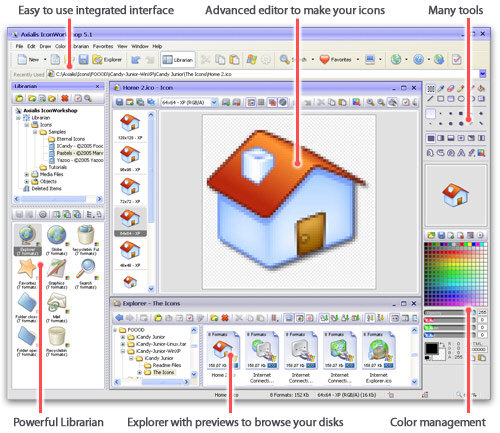
Simply put, IconWorkshop is a one-stop shop for icon creation.

IconDeveloper

IconDeveloper takes a totally different strategy towards icon creation than IconWorkshop and Microangelo.  It assumes that people will create their artwork in professional design programs like Photoshop, Illustrator, Corel Draw, etc. and then want to turn them into icons at that point.

As a result, IconDeveloper simply takes your artwork in nearly any format and then turns that into an icon. It automatically generates all the common icon formats for the user and has some very sophisticated algorithms to make sure that the icon looks good at any size.  It even supports batch converts so users can take an entire directory of images and quickly turn them into icons.

IconX

IconX doesn't create icons. It doesn't apply icons.  It makes your existing desktop icons..better.  Common problem -- you have really fancy icons that you want to have be nice and big on your desktop but not huge everywhere else. No problem, IconX can do this and much more.  IconX can put shadows under your icons, make them react to mouse-over events (like grow in size when you put your mouse over the icon). It can also enhance your icon labels.

Windows Vista will likely be very good news for IconX since icons in Windows Vista are natively 256x256 which means that users are going to want to make use of those icons on their desktop more than ever.  The mouse-over events and enhanced labels are a simple way to beautify your desktop.  Simply turn on IconX and your desktop icons will look even better.


Skinning the Windows GUI

After having changed your wallpaper and changed your icons, one of the next things you'd likely look at is the actual Windows graphical user interface (GUI). The Windows GUI can be described as being the title bar, borders of a window, buttons, dialogs, Start bar, and other controls found in Windows.  How do we change the way those look and feel? What if I want to make Windows look like another OS? What if you wanted to make Windows look like a Mac?

On Windows 98, ME, NT, and 2000, the OS wasn't natively skinnable. It wasn't designed to have its user interface altered by anyone. This is particularly true of Windows 98 and ME which are not well suited for customization because of their GDI limit (Windows 98 and Windows ME only support having 128K --Kilobytes-- of memory used for GUI related graphics, if this memory is used up, the system can become unstable).  But Windows XP supported skinning natively which enabled programs to change the way it looked much more completely and reliably.

Users install the program WindowBlinds onto Windows XP, Windows ME, Windows 98, or Windows 2000 and it extends the existing skinning features (in the case of Windows XP) or provides the complete skinning engine (in the case of other versions of Windows).

The most popular way to skin the Windows GUI is using the program WindowBlinds. It runs on Windows Vista, XP, 2000, ME, and 98. It applies what are called "visual styles". A visual style being a skin designed specifically to change the actual OS user interface.  WindowBlinds has been around a long time and earlier versions of it were mostly used on Windows 98Draginol and suffered from performance and stability issues.  But as Windows 2000 and later Windows XP became dominant, WindowBlinds has evolved into being a very fast, reliable and resource light program for changing the GUI. 

The visual styles (skins) created are made by individual authors usually using a skin editor such as SkinStudio (www.skinstudio.net).  SkinStudio allows skinners to make visual styles without the pain that used to be involved in creating a nice skin. The finished skins are then uploaded to websites that allow others to enjoy the hard work by the skin author.

WindowBlinds's is flexible enough that people can create skins for it that make Windows look like other operating systems too.

With the release of Windows XP, Stardock and Microsoft worked together to make skinning more seamless. Microsoft provided new APIs in Windows XP that can accelerate skinning.  Stardock also worked with nVidia and ATI so that WindowBlinds could take advantage of hardware acceleration on those video cards. The result is WindowBlinds visual styles are hardware accelerated.

WindowBlinds on XP lets XP's visual style engine use WindowBlinds visual styles

WindowBlinds was the first program to let users change the Windows GUI completely. But it's not the only way to do it.  If you're feeling pretty technical, you can patch the system file uxtheme.dll and then apply patched versions of luna.msstyles that change the images inside along with some of the metrics. While not as flexible or powerful as WindowBlinds, it has the advantage of being free.  Some companies have made programs that patch these same files in memory but charge money for it. They aren't actually providing a skinning engine, they're simply patching the digital signature verification that prevents users from messing with the msstyles files.  My view is that there's nothing wrong with patching your uxtheme file, but don't pay money to do it.


The Desktop Extenders

Where the GUI changing programs like WindowBlinds customize the look and feel of your existing Windows interface, desktop extenders are designed to add new functionality to them.  They don't so much replace what you already have but rather extend what they can do.

DesktopX

The first popular desktop extender on Windows was called DesktopX.  Released in 2000, DesktopX enables users to literally build their own desktop.  Users can create entire desktops and export them as .desktop files, export parts of their desktop as widgets, or export individual objects as objects.


DesktopX widgets in action


DesktopX objects in action


DesktopX .desktops in action

While DesktopX can do these 3 things, there are programs that specialize on individual parts...

DesktopX also comes in a Pro version that allows the creation of gadgets.  Gadgets are the same as widgets except they don't require the user to download and install the creation program.  That is, gadgets are stand-alone programs.  The main downside of widgets is that if you see a cool widget that may only be 300k, you first have to download the 9 megabyte parent program (DesktopX, Konfabulator, etc.).  Gadgets don't have this issue.

Konfabulator

Konfabuator aka Yahoo Widgets (widgets.yahoo.com)  specializes on creating widgets.  And it does it very well.  Originally released on the Macintosh in 2003, the program became popular thanks to being cross-platform and a little help from the Macintosh community.  Its popularity on the Mac was enough that Apple incorporated a similar feature into MacOS X Tiger.  In 2005, the program and in fact the company that makes it was acquired by Yahoo.

Typical widgets include clocks, system resource monitors, RSS feeds, weather monitors, stock tickers, and widgets that display information gathered from the Internet.  They have gathered a very loyal following over the past couple of years.

Kapsules

Kapsules (http://www.widgetforge.com/) is very similar to Konfabulator except that rather than relying solely on Javascript for creating widgets, it is a .NET based program which means users can create their widgets using any .NET supported language.


SysMetrix

Whereas DesktopX widgets and Konfabulator widgets are totally free form, SysMetrix specializes on very specific types of widgets. SysMetrix focuses on displaying system resources and other specific bits of information. You wouldn't, for instance, make a game with SysMetrix or an MP3 player. It displays info and it does it very well.


Samurize

In a similar vein to SysMetrix, there is Samurize. Samurize is the result of developers who have access to a time machine. The developers went ahead to the year 2008, saw how visual-oriented software is made, and then returned back to the year 2002 and developed it.  In the future, a lot of software will be created using Microsoft's Sparkle.  Samurize is basically Sparkle -- today in many respects.  Users build their desktop using an advanced editor. When the user is done creating their widget or their desktop, they can export them. 

In many respects, Samurize is similar to DesktopX. The main difference is in packaging and how content is created.  DesktopX users create their stuff on their desktop. Samurize users create their stuff using the included Samurize editor. The Samurize editor is so similar to Microsoft's Sparkle that one must wonder if Microsoft saw Samurize (to be fair to Sparkle, it supports 3D but to be fair to Samurize, live 3D isn't really possible on XP).


Making Samurize desktops/widgets is done using a sophisticated editor


Final creation exported out for end users.

Samurize doesn't have the following that the other programs have. But that's not its fault. It's an issue of marketing more than anything.  There is also, of course, the intense competition in this area right now. But all these programs will have an opportunity to shake things up when Windows Vista shows up and the playing field is re-leveled.

Avedesk

Avedesk doesn't quite do widgets but its content are more than simple desktop objects. Its author calls them Desklets which seems to be appropriate.

Desklets are sort of like super icons that users put on their desktop.  DesktopX objects can do much the same but there's a key difference -- desklets are much easier for users to configure.

Here's the thing about widgets - you like that widget? Right? Looks great? Want to change it? TOUGH.  Desklets don't suffer this limitation. The limitation on desklets is that you really don't create new desklets (you can but it's very difficult).  Instead you customize the two dozen or so desklets that are already available to look and feel how you want them to.  Deskets, IMO, are better than widgets. They are a better idea.  The reason I say that is because in the final analysis, there's only about two dozen different types of widgets.  You've got your calendar widget, your drive space widget, your weather widget, your stock ticker widget, your sticky note widget, your to-do list widget, and so forth.  Widgets are open ended so on the surface they seem much more flexible than desklets since in theory you have no limit on the # of widgets you can create.  But since the release of DesktopX back in 1999, we've only seen a few dozen different types of widgets ever made. There's thousands of widgets out there but most of them are derivative of other widgets (i.e. Konfabulator might have 2000 widgets but how many of them are clocks?).

So the reason I think Desklets are better boils down to the fact that it's easy for people to "skin" the different desklets to have different looks to them.  By contrast, widgets can't really be skinned. If you want to make your own widget you can but it's a lot harder to create a widget than to simply skin an existing desklet.

The only thing really holding Avedesk back from massive popularity is that it doesn't really have a headquarters. It's one of the community apps on Aqua-Soft.  It also doesn't have a lot of original artwork since it's being done on a shoe-string budget.  Where DesktopX and Konfabulator can battle it out with their own staffs of graphics designers, Avedesk has to go with what the community provides.  It's a testament, however, of how good an idea desklets are that it's as popular as it is despite having so much fewer resources backing it.

ObjectDock

ObjectDock started its life as a simple dock program for putting short-cuts and optionally displaying running tasks.  It is similar in many respects to docks on other operating systems such as MacOS X but is designed for the Windows environment.

Over the years, it has continued to advance and is, by far, the most popular dock program.  There are other dock programs out there such as the discontinued yZ Dock. Other programs exist as well but they all largely make use of content either made for ObjectDock or yZ Dock.  ObjectDock is a free program that lets you throw on docklets (which are essentially the same as desklets), short-cuts, and running tasks.  It's very simple to set up and use and very useful. 

In 2004, Stardock released a Plus version of ObjectDock which added tabbed support.

ObjectDock tabs can be used to help organize your screen without it getting in the way:


See the tabs on the edges of the screen?

ObjectDock Plus can also display the system tray which is quite handy for those who want to hide their Start bar entirely and just use ObjectDock as their way of navigating through Windows.  As pretty as ObjectDock and ObjectDock Plus are, they are probably some of the most useful of the enhancement programs out there. 


The SUPER Extenders

Super Extenders is a word I made up. Just now. At this very second. I did in order to describe a class of desktop customization software that can be used to build your own desktop shell environment or be a shell on its own.  They aren't..quite shells but they are designed to typically jettison most of the Windows explorer environment and use their own. The Super Extenders came out in the age before widgets and desklets and some of their thunder has been stolen by the latest generation of desktop extenders.   That's because the desktop extenders are far more targeted.

As skinning has become more popular, the market for more specialized programs has been created and what we've seen so far is that the more specialized the program, the better it tends to do since it's focusing on one thing.  The programs discussed below have had a harder time as a result since they try to do a lot of things that some specialist programs are better at.  That isn't to say that these programs don't still have a following -- they do.  It's just that their momentum isn't quite as much as it once was and as a result they haven't gotten quite the same level of updates as they used to.

ObjectBar

ObjectBar lets people do some major surgery on the Windows desktop if they so choose.  Essentially, it lets people create their own Start bars. It provides all the functionality that one would ever need to create their own environment. It has features that are akin to what's available on Linux, MacOS X, and elsewhere and with it, users have created some neat stuff.

Unfortunately, ObjectBar 2 has been in development for years and still hasn't come out.  Stardock keeps putting out new beta releases but it's still not quite ready for release at the time I'm writing this (it's getting close).  ObjectBar 2 promises to bring some pretty neat features such as the ability to embed widgets into a bar and the ability for users to export their creations as their own programs (EXEs).  That way, someone can make their own perfected Windows environment, export it, and send it to others to use.

ObjectBar 2 is Stardock's answer to the changing ecosystem of Windows customization.  Rather than trying to be all things to all people, it has narrowed its focus to allow people to create fantastic specialized things and export them. 

The idea behind ObjectBar 2 is to merge the benefits of desklets and widgets together.  Users can export their creations as EXEs and users who use those creations can skin and customize them how they see fit.  So one could imagine a little power bar that displays a calendar, local weather, drive info, most frequently used programs and a bunch of links to a website. Users can then easily skin it using ObjectBar skins or WindowBlinds skins into it and modify it as they see fit.  Whether this strategy works out remains to be seen. 


NeXTStart

NeXTStart has been around a long time. It has traditionally specialized in letting users create their own desktop menus.  Over time, it has expanded to do more and more to the point that it and ObjectBar essentially are competitors with a touch of ObjectDock for good measure. 

NeXTStart adds pop up and permanent menus to Windows. It can extend your existing shell or take it over.

NeXTStart 3 was originally released back in 2003 and 3.4 was released in late 2005.  The latest versions can replace nearly every element of the Explorer environment. 

Another program that seems to have been discontinued is Hoverdesk.  In the age of DesktopX, AveDesk, Konfabulator, etc. the super extenders have had a tough time. They've had to evolve and that has involved a great deal of work.  The super extenders are kind of stuck between the extenders and the full-blown shell replacements.  But NextStart and ObjectBar pesevere.


Shells & Alternative Environments...

Okay, maybe you think that the Windows desktop is just too bad to even try to extend. Maybe it's time to throw it all out and start over. That's where alternative environments and shells can come in.

Here are some of the shells replacements and shell environments.

Litestep

Litestep is a freeware, open-source replacement shell for Windows.  At one time, it was the defacto alternative shell.  But in recent years, it has seen its popularity wane.  This isn't so much the fault of Litestep as opposed to the reality that Windows XP is pretty solid and memory is no longer an issue.  When Litestep was in its prime, the Windows shell was bloated and buggy and crash-prone.  Now, it's still bloated but most people don't really notice anymore.  Sure, Explorer may use 30 megs but with most people having systems with nearly a gigabyte or more of memory, it's not an issue.


Talisman

Talisman is a commercial shell replacement made in Russia.  It has a lot of features built into it that allow people to create some pretty rich and specialized desktops.

Talisman's strategy has been to try to incorporate those key two dozen or so widget concepts into its base feature set and then allow users to create their own skinned shells that have those features. It's a solid idea IMO and Talisman's longevity tends to imply that it must be working decently enough.


Aston Shell

AstonShell is Talisman's competitor in every sense of the word. They have very similar strategies and which one is better depends on who you talk to. Like Talisman, Aston is a commercial program (i.e. it's not free).   But for those who are really serious about completely revamping Windows, it's something to bear in mind.

Aston and Talisman also loosely compete against the super desktop extenders as well as the normal desktop extenders.  One can almost imagine the path a new user would take:

First they would change their GUI and icons.  Then they would try a desktop extender.  Then they might get a super desktop extender and then eventually decide to toss out the entire shell and start with a fresh one such as Aston or Talisman.

According to Aston, there's 5 main reasons to use it: Speed, Reliability, Power, Beauty, and Flexibility.  I don't personally think speed is that much of a consideration at this point for most people. Contrary to their website, most modern desktop enhancements don't slow down your computer. The days of Windows 98 are long gone for most people. 

Much of the challenge for alternative shells is to justify themselves in a Windows XP world.  With Windows Vista around the corner, which has a 3D composited desktop and new shell, it will be a challenge for these shells to evolve in that brave new world.  What I like about Aston Shell is that it has focused on robustness over features.  It hasn't fallen into the trap of "Hey, some user in Croatia says we should have a feature in which we can monitor the user's CPU temperature on Windows 64!"  Instead they've focused on trying to provide a good out of the box experience that won't scare off novice users.


Mouse Cursors

CursorXP

CursorXP is designed to let Windows XP and Windows 2000 users to apply nicer cursors to their system. The advantage of CursorXP is that its cursors can be alpha blended, this means that they blend into whatever is behind them making them appear much smoother than the standard Windows cursors. The other advantage is that they can be of any size the user wishes (Windows cursors are locked into specific sizes). Combine this with fluid animation and you can get some really cool looking cursors. (www.cursorxp.com)


Media Players

WINAMP

WinAmp started it all. Not enough good things can be said about Nullsoft. They started it. WinAmp is an MP3 player that is skinnable. It is in its third generation. Skinning is good business. WinAmp wasn't the first MP3 player, but it was the first one that was skinnable. And that helped make it the most popular one which led to AOL purchasing Nullsoft for many millions of dollars. (www.winamp.com). Winamp has had a bit of a tough year. It went to version 3 with a lot of publicity and with almost equal publicity had to go back to the 2.x version. Which is a bit unfortunate because the technology behind Winamp 3 was incredible.

Winamp 5 though combines what was good about Winamp 3 and Winamp 2.

Download GVG750 Superbike

Windows Media Player

Microsoft saw how popular skinnable MP3 players was that they decided to make their media player. The good news is that Windows Media Player skins are very powerful and really pretty. The bad news is that they are really really hard to create. So there aren't very many of them.

Windows Media Player skin.


Logon Screens

Logon screens on Windows XP can be replaced in one of two ways -- you can literally patch the logonui.exe on your hard disk (either do it yourself or use a front end that replaces your logonui.exe with one you download).  The other way is to use LogonStudio.  Since the former way involves violating copyright laws, we'll focus on the latter.

LogonStudio (.LogonXP)

LogonStudio is a program that lets users apply new logon screens to their Windows XP systems. It can also edit and create new logons as well from a built in editor. (www.logonstudio.com).   It is a free program and was largely created so that people could replace their logon screens with data files (.logonxp files) rather than trading warez (logonui.exe) back and forth.

The future of LogonStudio (and indeed all logon programs) is murky.  Microsoft has told us that they are taking steps to make it very difficult if not impossible for third parties to customize the logon screen.  For Microsoft, it's a branding issue.  That isn't to say that it would be impossible to do change it, but the amount of effort involved may be much higher than today.

That said, Stardock is working on a LogonStudio 2 that it hopes will work for Windows Vista when the time comes:


LogonStudio 2


Instant Messengers

Trillian

Trillian is a skinnable instant messenger that supports most of the major instant messaging clients as well as having IRC built in. It's very popular (most of the people at work use it). It started out as purely freeware but as it has become more popular (and expenses started to mount) its developers have begun to offer a "Pro" version with additional features. Trillian is now the independent instant messenger to beat.

XFIRE

Xfire is a instant messenger designed specifically for games.  It's skinnable and doesn't really have a skin site yet (WinCustomize.com plans to create a section).


Boot Screens

Boot screens have become pretty popular. I must admit as someone who only boots a few times per month, I don't see the appeal. But like I said, they are very popular with other people and so I cover them here.

The most popular program for doing this is called BootSkinIt's free and was created because people were changing their boot screens by patching their NTkernel (the Windows XP kernel file!). Just the thought that someone was patching their OS kernel to have a new boot screen sends shivers down my spine.  The idea behind BootSkin was to change the boot screen safely.


Suites

A suite is a file that contains all of the above into a single file that can then be applied at once.  It's very convenient but as you can imagine, suites can be pretty big in size. 

Suites are applied by a program called Theme Manager:

Theme Manager comes in several forms.  There's Theme Manager Free which simply acts as a front end to all the programs mentioned above.  There's Theme Manager Plus which bundles WindowBlinds & IconPackager and applies specialized themes and there's Theme Manager OEM which is licensed by companies who want to deliver branded desktops to their customers (Microsoft, Nintendo, Alienware, NASCAR, and countless others have licensed Theme Manager OEM).

Here are some examples:

Companies such as Microsoft, Nintendo, Warner Bros., and many others have found that skinning is a powerful marketing / branding tool.


Websites that support customization

So you've got Windows XP and want to get some skins for it or you have Windows 98, ME or 2000 and want to start customizing. Where do you go? There are dozens of websites out there that let people download skins and themes. But there's only a handful that are really dedicated to it and have the bandwidth to support lots of users.

WinCustomize.com (www.wincustomize.com)

WinCustomize is the Walmart of Windows customization. It specializes only on the most popular skinnable programs and is designed to make it easy for users and skinners to get and submit skins, themes, icons, walls, etc. It is also owned by Stardock which makes popular skinnable programs such as WindowBlinds, ObjectBar, DesktopX, IconPackager, etc. This has helped make it the most popular "skin site" in the world. WinCustomize has tended to highlight its sections as the applications that have made it to the "big leagues". For users looking for skins for little known programs, WinCustomize wouldn't be the place to go. But if you're looking for icons or PNGs or Windows Media Player skins or wallpapers or WB visual styles or SysMetrix skins and so forth, WinCustomize would be the place to go.

deviantART (www.deviantart.com)

deviantART isn't a skin site. It's an art community that happens to have skins. And over the past year, it has come to be the world's most popular art site. Its popularity has been earned the old fashioned way - it was simply vastly better than other similar sites that existed and over time it won over users from around the world. If WinCustomize is Walmart, deviantART is the art wholesaler. While not a "skin site" per se, it does contain a wealth of skins, themes, and icons as part of its overall mission of supporting art in all forms.

ArtUproar (www.ArtUpRoar.com)

ArtUproar used to be called LotsOfSkins. At some point, most customization sites reach a fork in the road. Is their constituency the artists who create the content or the users who use the content? At some point, LotsOfSkins made that choice -- a place for artists to hang out and became ArtUpRoar. It has remained quite popular though obviously over shadowed by deviantART. On the other hand, it provides a bit more intimate atmosphere for artists and users alike to hang out and interact. Highly recommended.

SkinBase (www.skinbase.org)

SkinBase could be called Encyclopedia Themica. That's because it offers the most comprehensive support for skinnable programs of any site. It contains statistics of all kind that are useful to both skin/theme authors and users alike. It recently went through a heavy redesign which integrated some good ideas from other sites (such as a much cleaner interface) combined with its own innovative twists that make surfing the site very easy and efficient. Another nice thing about Skinbase is that like LotsOfSkins, it's a very friendly place. Anyone who surfs the net long enough knows how nasty parts of the Internet can be. Going to a site like Skinbase can feel like getting into shelter from a downpour. You have to visit it to see what I mean, it's just a very friendly place to be at.

Skinz.org (www.skinz.org)

Skinz.org has a long and inconsistent history. It has changed hands many times and the newest owners are working to try to bring it back to a semblance of its former glory. It has an up hill climb, however. Sites like deviantAR and WinCustomize have effectively carved up the niches that Skinz.org used to specialize in.

Customize.org (www.customize.org)

Customize.org was really the first dedicated skin site. It has changed owners over the years but the mission has remained the same. What makes Customize.org unique versus other sites is that its library is the oldest. That means you can actually go back and find the very first skins ever created. For me, that's a big deal because it's fun to see how far things have come. It doesn't hurt that it serves as a reminder to the "commercial software is evil" zealots that programs like WindowBlinds were here at the start. So what was the first WindowBlinds skin on there? Oh the shock, a skin that combined BeOS and MacOS from December 1998 (5 years ago!).

The others...

There are other sites on the net that have skins and themes but we focused on sites that have at least a half dozen different sections (otherwise we'd be stuck having to cover every wallpaper site or every theme site which would be painful). But there are other interesting sites on the net that are worth checking out. There's Neowin.net which is a tech site but has arguably the best message forums on the net. There's ThemeXP which has lots of logons, boot screens, msstyles, and wallpapers. There's also Hardware Geeks which is like a sister site to Neowin. Where Neowin specializes in talking about software technology and more, Hardware Geeks focuses a bit more on the hardware aspects. There's also eMaculation.com whose admin regularly rips on me but that doesn't change the fact that the site has lots of useful informaton. There is also Aqua-Soft which is full of tips and content that help you transform Windows into looking like MacOS X.


Conclusions

Hopefully this little primer will help you get started. This is by no means the definitive answer to skinning, theming or customization in general. Heck, as a Stardockian, it would be best if someone else wrote this, but no one has and I get so many email from people asking for help and information on what is what that it was time for someone to write something on this to get people started.

Email me: Bradley Wardell

PowerUser.TV: Episode 15

Published on Thursday, November 17, 2005 By Brad Wardell In WinCustomize News

PowerUser Episode 15 is now out!  This week we talk about the Sony root-kit debacle, worst software bugs in history, a preview on the new game "The Movies", and more.

Go listen to them or you'll make us all cry! You don't want that on your conscience do you?

Home Page: www.poweruser.tv


I just..don't..have it...

Published on Thursday, November 17, 2005 By Brad Wardell In Business

I am talentless. It's true.  I have no natural talents.  I have interests though. Lots of them. And that's part of my problem.  My obsessive compulsive nature tends to allow me to focus on becoming decent at a lot of things but never attain any masterhood.  Not that I could anyway because -- like I said -- I have no natural talents and to become a master at anything, you really need to have a talent in that area.

Just looking around where I work I see it all the time.  I can do graphics design for instance.  I've been using Corel Draw, Photoshop, Photo Paint, and countless other graphic tools since the early 90s.  But I'm a padawan compared to Mormegil who sits only a few feet from me.  He started using Corel Draw at about the same time as I do, but he's actually got talent and has focused on getting better and better.  So even though I know how to do some of this stuff, my output is so much poorer in quality that my skill  may not as well exist.

I also know how to write. I type 120 words per minute roughly. And so I can crank stuff out.  I actually enjoy writing.  But I don't write anywhere near as well as Cordellia whose office is a stone's throw away from where I sit.  In fact, she tops me in a number of areas.  I considered myself a pretty decent video and sound editor too but again, my skills are eclipsed by hers.

I can also do web design. I webmaster Stardock.com and have since the beginning.  I know HTML reasonable well. But I can't hold a candle to Darkstar who sits not that far away from me.  He's much better and besides, if he's busy, there's MikeB who can crank it out better anyway.

Then there's software development.  I know C, C++, C#, some VB, but beyond computer AI and some algorithm design, that's better off being done by other people.   10 years ago, I did all the art, programming, documentation, and more for our software (or at least most of our products).  Now I'm relegated to computer AI and game play coding because -- wait for it -- there's others that are so much better at it that my skills might as well not exist.

My job also involves a great deal of financial analysis, budgeting, etc.  But I'm no accountant.  And I'm not sure I'd want to be one.  So while I may have some natural talent at financial modeling and projections, it's not an area I really want to explore.

This scattershot nature shows up here on JoeUser too.  I want to be a "big time" blogger. Yet I can't quite dedicate the time and energy to do what it takes to do that.  And besides that, there's writers who are so much better.  Guys like Steven Den Beste have more blogging talent in their finger than I do all over and he's given it up. 

Anyway, it's not a pity party I'm throwing here but rather a warning to others.  I happen to be very fortunate that I can get away with being semi-skilled in a whole lot of areas but talented in none because I'm surrounded by supremely talented people who make up for my myriad of short-comings.  Perhaps it's time to outsource myself.

It is important to focus on what you enjoy and are good at. Stick to something if you can to develop your skills.  Otherwise, one day you'll wake up and realize that your varied interests have made you "jack of all trades but a master of none".

Engineers can blame themselves for outsourcing

Published on Thursday, November 17, 2005 By Brad Wardell In Business

A friend of mine and I have debated about companies using H1B visas to get skilled technical people into the US.

Stardock uses H1B visas a lot.  But only 65,000 of them are given out by the US government.  Politicians, who typically have no understanding of business, think that these tight limits will encourage companies to look harder for Americans to fill positions.  That's incredibly naive.  The reality is that companies who find talented people overseas that they can't bring over just open up foreign offices which in turn end up depriving Americans of jobs because of infrastructure that ends up being built to support engineers working in other countries.

Today's Wallstreet Journal talks about this issue and gives a generally even-handed (though not very well researched IMO) treatment of the issue.  On the one hand, the # of engineers graduating has gone up -- same for CS majors.  But by a pretty paltry amount (~11,000 more engineers graduated last year compared to 1999, w00t). 

American politicians want to have it both ways too -- they embrace the global economy when it comes to goods and services but demand companies ignore the global economy when it comes to labor and expertise.  At Stardock, we're pretty much always hiring all-year round at this point.  Web developers, engineers, software developers, 3D modelers, artists, sales engineers, etc.  And what I can tell you is that the # of qualified people who are willing to relocate to this part of the country (Michigan) is not high.

Qualified is subjective so let me give you an example. This week we're looking for web developers.  We've been interviewing for months.  The technology today in these areas requires (for us) them to have ASP.NET, C#, and VB.NET experience.  Our sites use this stuff.  We pay competitively with other companies so price isn't so much the issue as opposed to finding people who meet our requirements.

In the WSJ article, "Companies are looking for a five-pound butterfly. Not finding them doesn't mean there's a shortage of butterflies," says Richard Tax, president of the American Engineering Association, which campaigns to prevent losses of engineering jobs."

To which I say: Oh boo-hoo.  I'm sorry but let's say I'm trying to find someone to mow the lawn. If one requirement is that they be able to mow it in less than 2 hours am I asking too much simply because the candidates who apply only know how to use scissors and are unfamiliar with "lawn mowers"?

Again: It's a global economy.  To compete, I need guys who know ASP, VB.NET, etc.  That's life. If the government wants to shut out foreign competition on goods and services and consumers want to pay more, then hey, knock themselves out.  But obviously no one wants that.  And the fact is, if I want, I an get people -- lots of people -- overseas who know this stuff within the industry norm salary requirement.  So at some point in the hiring process, we start looking at overseas and trying to get them a visa.  If we can't get them the visa, then it's just overseas entirely.  And so hundreds of thousands of dollars end up being sent overseas now to pay people who we wouldn't be able to get a visa for due to qualifications or because of the 65,000 yearly limit on visas issued. 

The WSJ article contends that there's lots of American engineers and technical people who have been out of work for a long while looking for jobs.  Yep and I've met some of these guys during interviews.  Here's the deal: If you choose to be an engineer or other technical profession, then it's your responsibility to keep up with the latest technology in your field.  Don't come applying to a software company demanding $80k per year if you only know some ancient web development technology or have only recently starting "toying around with" C++ (C++ is a given, do you know C#?).  The further behind in tech you get, the fewer job opportunities you'll have.

Of course, even on this point the WSJ article wants to have it both ways.  They contend that the unemployment rate for engineers is only 2.5%.  So it does lend credence of the difficulty in finding engineers and other technical professionals.

The bottom line is that the US economy is moving to an technology based economy.  Manufacturing jobs are moving overseas and if the we want to maintain our lead in technological production, we need to encourage more people to become engineers, computer scientists, and other technical professions.  And we need those people to put more effort into keeping up with the latest trends in their fields -- not just when they graduate but for their entire careers. 

In addition, the US government should hand out visas like candy in technical fields. Technical jobs are even easier to outsource than manufacturing jobs.  Don't put companies in the position of having to go without a job (or hire an overpaid, under qualified local for the position) and having to simply employ the talented overseas engineer because the latter will nearly always be the decision.

"

Aliens & Turtles

Published on Wednesday, November 16, 2005 By Brad Wardell In GalCiv Journals

So how are the different civilizations in Galactic Civilizations different?

The easiest way to illustrate the difference that I can think of is how each of the civilizations would deal with the scenario in which they are driving a car down the road and there's a turtle trying to cross...

The Drengin would swerve onto the shoulder in order to squash the turtle.

The Arceans would run over the turtle if it were on the road, otherwise they would drive past.

The Humans would swerve on the road to miss the turtle if they could.

The Altarians would stop their car, get out, pick up the turtle gently and move it to the other side of the road.

The Korx would stop their car, get out, pick up the turtle, and then sell it to the local pet store.

The Torians would run over the turtle and then justify that the turtle had it coming anyway.

The Yor woud not be aware if they ran over the turtle or not since they don't really distinguish between living and non-living things.

Skin Primer 2006 (draft)

Published on Wednesday, November 16, 2005 By Brad Wardell In Community

I've been revamping the Skin Primer for 2006.  It's been a pretty heavy-duty rewrite.

So let me know what you think so far.  It's been a lot of work and I included a screenshot of LogonStudio 2 in there.

..

The Skinning Primer

A comprehensive look at Windows customization


2006 Edition


by Brad Wardell


Don't be a drone. Don't let your desktop look like this!


Be an individual! Make your desktop YOUR desktop!


Disclaimer: I work at Stardock. I'm a guy who is so into messing around with the OS that I made it a large part of my career. But since I work at a company that makes this stuff, I obviously have my own biases and such. I've written this as objectively as I can.


Terminology -- what the heck is a "skin"?

Skins, themes, suites, styles, oh my! What is all this stuff?  Let's agree on some termilogy...

Skin.  A skin is a collection of graphics designed to replace the default user interface graphics of a program. That means its push buttons, title bars, scrollbars, radio buttons, check boxes, etc. Skins that are explicitly designed to change the actual OS's user interface are called visual styles.

Theme. A theme is a set of elements designed to change aspects of your desktop. It is often used to describe skins as well. A theme typically corresponds with a single program.

Suite. A suite is a full set of skins and themes used to change your entire desktop. A suite may rely on skins and themes from a variety of different programs in order to achieve the desired effect.  For instance, a suite might include a skin to change your Windows GUI, a wallpaper, and an icon package.

This article is designed to help you figure out what does what and how to get it.


A brief history of Windows customization

Once upon a time some user, some where, noticed that their computer looked exactly like everyone else's computer. And that just didn't make sense to them. After all, everything else is personalized based on the individual needs and tastes of the consumer -- cars, phones, shoes, appliances, houses, etc.  Yet computers, in which people spend so much time in front of, looked exactly the same. 

This user started looking at what they could do on their computer to change it to be more their own.  They changed the background of their desktop (called a wallpaper).  And then they tried to change their icons and found they could change a few of them but not most of them.  Then they tried to change the color of their title bars. Then they tried to change the way their Start bar worked and what it looked like and found they couldn't really do that.

This user wasn't alone. There were thousands like him.  People of all ages from around the world had the same desires and no way to address them.  But nature abhors a vacuum and pretty soon the pieces started coming together.

A new company called Nullsoft made a program called Winamp. Winamp wasn't the first program to play music files called MP3s. What made it special was that users could change the way it looked by applying a new graphical interface called a "skin".  Across the country, some guys in Michigan were trying to make a Windows version of their popular desktop enhancement suite that they had made on OS/2 called Object Desktop. And they were finding that Windows was a lot harder to customize than OS/2 was. And so the call went out and this company, called Stardock (where I work), began bringing together the "best and brightest" developers to tackle the problem.  Pretty soon a program was made that could change the actual graphical user interface of Windows and it was called WindowBlinds.

Of course, neat software on its own, even with cool capabilities means nothing if there's no place for users to get these "skins".  Two websites were started around the same time. One was called Customize.org and the other one Skinz.org. They let users download skins and wallpapers for these apps.  These websites also helped encourage other developers who had their own ideas on what to create to help customize Microsoft Windows.  Some people wanted to replace the actual shell (the desktop itself) with their own. The first popular one was called Litestep.  Another company wanted to replace the desktop menu with their own, this came to be called NextStart.  And Stardock added a program that could change all the icons on Windows and it was called IconPackager.  Soon after it added a program that could put interesting objects on the desktop that could give information, provide simple functionality, and looked really cool and it was called DesktopX.

By 2000, the basics of the skinning world were set.  Other programs were made that would compete with the above programs. New programs were made to support new ideas others had.  And in 2001, Microsoft itself started really getting into skinning in its own right with a skinnable Windows Media Player and a new version of Windows that was much easier to skin called Windows XP.


Skinning the Windows GUI

The Windows GUI can be described as being the title bar, borders of a window, buttons, dialogs, Start bar, and other controls found in Windows.

On Windows 98, ME, NT, and 2000, the OS wasn't natively skinnable. It wasn't designed to have its user interface altered by anyone. This is particularly true of Windows 98 and ME which are not well suited for customization because of their GDI limit (Windows 98 and Windows ME only support having 128K --Kilobytes-- of memory used for GUI related graphics, if this memory is used up, the system can become unstable).  But Windows XP supported skinning natively which enabled programs to change the way it looked much more completely and reliably.

Users install the program WindowBlinds onto Windows XP, Windows ME, Windows 98, or Windows 2000 and it extends the existing skinning features (in the case of Windows XP) or provides the complete skinning engine (in the case of other versions of Windows).

The most popular way to skin the Windows GUI is using the program WindowBlinds. It runs on Windows Vista, XP, 2000, ME, and 98. It applies what are called "visual styles". A visual style being a skin designed specifically to change the actual OS user interface.  WindowBlinds has been around a long time and earlier versions of it were mostly used on Windows 98Frogboy and suffered from performance and stability issues.  But as Windows 2000 and later Windows XP became dominant, WindowBlinds has evolved into being a very fast, reliable and resource light program for changing the GUI. 

The visual styles (skins) created are made by individual authors usually using a skin editor such as SkinStudio (www.skinstudio.net).  SkinStudio allows skinners to make visual styles without the pain that used to be involved in creating a nice skin. The finished skins are then uploaded to websites that allow others to enjoy the hard work by the skin author.

WindowBlinds's is flexible enough that people can create skins for it that make Windows look like other operating systems too.

With the release of Windows XP, Stardock and Microsoft worked together to make skinning more seamless. Microsoft provided new APIs in Windows XP that can accelerate skinning.  Stardock also worked with nVidia and ATI so that WindowBlinds could take advantage of hardware acceleration on those video cards. The result is WindowBlinds visual styles are hardware accelerated.

WindowBlinds on XP lets XP's visual style engine use WindowBlinds visual styles

WindowBlinds was the first program to let users change the Windows GUI completely. But it's not the only way to do it.  If you're feeling pretty technical, you can patch the system file uxtheme.dll and then apply patched versions of luna.msstyles that change the images inside along with some of the metrics. While not as flexible or powerful as WindowBlinds, it has the advantage of being free.  Some companies have made programs that patch these same files in memory but charge money for it.


The Desktop Extenders

Where the GUI changing programs like WindowBlinds customize the look and feel of your existing Windows interface, desktop extenders are designed to add new functionality to them.  They don't so much replace what you already have but rather extend what they can do.

DesktopX

The first popular desktop extender on Windows was called DesktopX.  Released in 2000, DesktopX enables users to literally build their own desktop.  Users can create entire desktops and export them as .desktop files, export parts of their desktop as widgets, or export individual objects as objects.


DesktopX widgets in action


DesktopX objects in action


DesktopX .desktops in action

While DesktopX can do these 3 things, there are programs that specialize on individual parts...

DesktopX also comes in a Pro version that allows the creation of gadgets.  Gadgets are the same as widgets except they don't require the user to download and install the creation program.  That is, gadgets are stand-alone programs.  The main downside of widgets is that if you see a cool widget that may only be 300k, you first have to download the 9 megabyte parent program (DesktopX, Konfabulator, etc.).  Gadgets don't have this issue.

Konfabulator

Konfabuator aka Yahoo Widgets (widgets.yahoo.com)  specializes on creating widgets.  And it does it very well.  Originally released on the Macintosh in 2003, the program became popular thanks to being cross-platform and a little help from the Macintosh community.  Its popularity on the Mac was enough that Apple incorporated a similar feature into MacOS X Tiger.  In 2005, the program and in fact the company that makes it was acquired by Yahoo.

Typical widgets include clocks, system resource monitors, RSS feeds, weather monitors, stock tickers, and widgets that display information gathered from the Internet.  They have gathered a very loyal following over the past couple of years.

Kapsules

Kapsules (http://www.widgetforge.com/) is very similar to Konfabulator except that rather than relying solely on Javascript for creating widgets, it is a .NET based program which means users can create their widgets using any .NET supported language.

 

SysMetrix

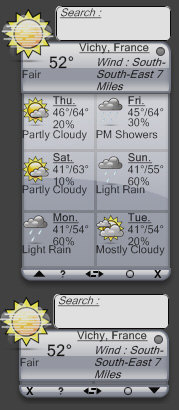
Whereas DesktopX widgets and Konfabulator widgets are totally free form, SysMetrix specializes on very specific types of widgets. SysMetrix focuses on displaying system resources and other specific bits of information. You wouldn't, for instance, make a game with SysMetrix or an MP3 player. It displays info and it does it very well.


Samurize

In a similar vein to SysMetrix, there is Samurize. Samurize is the result of developers who have access to a time machine. The developers went ahead to the year 2008, saw how visual-oriented software is made, and then returned back to the year 2002 and developed it.  In the future, a lot of software will be created using Microsoft's Sparkle.  Samurize is basically Sparkle -- today in many respects.  Users build their desktop using an advanced editor. When the user is done creating their widget or their desktop, they can export them. 

In many respects, Samurize is similar to DesktopX. The main difference is in packaging and how content is created.  DesktopX users create their stuff on their desktop. Samurize users create their stuff using the included Samurize editor. The Samurize editor is so similar to Microsoft's Sparkle that one must wonder if Microsoft saw Samurize (to be fair to Sparkle, it supports 3D but to be fair to Samurize, live 3D isn't really possible on XP).


Making Samurize desktops/widgets is done using a sophisticated editor


Final creation exported out for end users.

Samurize doesn't have the following that the other programs have. But that's not its fault. It's an issue of marketing more than anything.  There is also, of course, the intense competition in this area right now. But all these programs will have an opportunity to shake things up when Windows Vista shows up and the playing field is re-leveled.

Avedesk

Avedesk doesn't quite do widgets but its content are more than simple desktop objects. Its author calls them Desklets which seems to be appropriate.

Desklets are sort of like super icons that users put on their desktop.  DesktopX objects can do much the same but there's a key difference -- desklets are much easier for users to configure.

Here's the thing about widgets - you like that widget? Right? Looks great? Want to change it? TOUGH.  Desklets don't suffer this limitation. The limitation on desklets is that you really don't create new desklets (you can but it's very difficult).  Instead you customize the two dozen or so desklets that are already available to look and feel how you want them to.  Deskets, IMO, are better than widgets. They are a better idea.  The reason I say that is because in the final analysis, there's only about two dozen different types of widgets.  You've got your calendar widget, your drive space widget, your weather widget, your stock ticker widget, your sticky note widget, your to-do list widget, and so forth.  Widgets are open ended so on the surface they seem much more flexible than desklets since in theory you have no limit on the # of widgets you can create.  But since the release of DesktopX back in 1999, we've only seen a few dozen different types of widgets ever made. There's thousands of widgets out there but most of them are derivative of other widgets (i.e. Konfabulator might have 2000 widgets but how many of them are clocks?).

So the reason I think Desklets are better boils down to the fact that it's easy for people to "skin" the different desklets to have different looks to them.  By contrast, widgets can't really be skinned. If you want to make your own widget you can but it's a lot harder to create a widget than to simply skin an existing desklet.

The only thing really holding Avedesk back from massive popularity is that it doesn't really have a headquarters. It's one of the community apps on Aqua-Soft.  It also doesn't have a lot of original artwork since it's being done on a shoe-string budget.  Where DesktopX and Konfabulator can battle it out with their own staffs of graphics designers, Avedesk has to go with what the community provides.  It's a testament, however, of how good an idea desklets are that it's as popular as it is despite having so much fewer resources backing it.

ObjectDock

ObjectDock started its life as a simple dock program for putting short-cuts and optionally displaying running tasks.

But over the years, it has continued to advance and is, by far, the most popular dock program.  There are other dock programs out there such as the discontinued yZ Dock, but they all largely make use of content either made for ObjectDock or yZ Dock.  ObjectDock is a free program that lets you throw on docklets (which are essentially the same as desklets), short-cuts, and running tasks.  It's very simple to set up and use and very useful. 

In 2004, Stardock released a Plus version of ObjectDock which added tabbed support.

The tabs really helped make the case for ObjectDock Plus because it could be docked to an edge of the screen with only the tabs sticking out:


See the tabs on the edges of the screen?

ObjectDock Plus can also display the system tray which is quite handy for those who want to hide their Start bar entirely and just use ObjectDock as their way of navigating through Windows.  As pretty as ObjectDock and ObjectDock Plus are, they are probably some of the most useful of the enhancement programs out there. 


The SUPER Extenders

Super Extenders is a word I made up. Just now. At this very second. I did in order to describe a class of desktop customization software that can be used to build your own desktop shell environment or be a shell on its own.  They aren't..quite shells but they are designed to typically jettison most of the Windows explorer environment and use their own. The Super Extenders came out in the age before widgets and desklets and some of their thunder has been stolen by the latest generation of desktop extenders.   That's because the desktop extenders are far more targeted.

As skinning has become more popular, the market for more specialized programs has been created and what we've seen so far is that the more specialized the program, the better it tends to do since it's focusing on one thing.  The programs discussed below have had a harder time as a result since they try to do a lot of things that some specialist programs are better at.  That isn't to say that these programs don't still have a following -- they do.  It's just that their momentum isn't quite as much as it once was and as a result they haven't gotten quite the same level of updates as they used to.

ObjectBar

ObjectBar lets people do some major surgery on the Windows desktop if they so choose.  Essentially, it lets people create their own Start bars. It provides all the functionality that one would ever need to create their own environment. It has features that are akin to what's available on Linux, MacOS X, and elsewhere and with it, users have created some neat stuff.

Unfortunately, ObjectBar 2 has been in development for years and still hasn't come out.  Stardock keeps putting out new beta releases but it's still not quite ready for release at the time I'm writing this (it's getting close).  ObjectBar 2 promises to bring some pretty neat features such as the ability to embed widgets into a bar and the ability for users to export their creations as their own programs (EXEs).  That way, someone can make their own perfected Windows environment, export it, and send it to others to use.

ObjectBar 2 is Stardock's answer to the changing ecosystem of Windows customization.  Rather than trying to be all things to all people, it has narrowed its focus to allow people to create fantastic specialized things and export them. 

The idea behind ObjectBar 2 is to merge the benefits of desklets and widgets together.  Users can export their creations as EXEs and users who use those creations can skin and customize them how they see fit.  So one could imagine a little power bar that displays a calendar, local weather, drive info, most frequently used programs and a bunch of links to a website. Users can then easily skin it using ObjectBar skins or WindowBlinds skins into it and modify it as they see fit.  Whether this strategy works out remains to be seen. 


NeXTStart

NeXTStart has been around a long time. It has traditionally specialized in letting users create their own desktop menus.  Over time, it has expanded to do more and more to the point that it and ObjectBar essentially are competitors with a touch of ObjectDock for good measure. 

NeXTStart adds pop up and permanent menus to Windows. It can extend your existing shell or take it over.

NeXTStart 3 was originally released back in 2003 and 3.4 was released in late 2005.  The latest versions can replace nearly every element of the Explorer environment


Shells & Alternative Environments...

Okay, maybe you think that the Windows desktop is just too bad to even try to extend. Maybe it's time to throw it all out and start over. That's where alternative environments and shells can come in.

Here are some of the shells replacements and shell environments.

Litestep

Litestep is a freeware, open-source replacement shell for Windows.  At one time, it was the defacto alternative shell.  But in recent years, it has seen its popularity wane.  This isn't so much the fault of Litestep as opposed to the reality that Windows XP is pretty solid and memory is no longer an issue.  When Litestep was in its prime, the Windows shell was bloated and buggy and crash-prone.  Now, it's still bloated but most people don't really notice anymore.  Sure, Explorer may use 30 megs but with most people having systems with nearly a gigabyte or more of memory, it's not an issue.


Talisman

Talisman is a commercial shell replacement made in Russia.  It has a lot of features built into it that allow people to create some pretty rich and specialized desktops.

Talisman's strategy has been to try to incorporate those key two dozen or so widget concepts into its base feature set and then allow users to create their own skinned shells that have those features. It's a solid idea IMO and Talisman's longevity tends to imply that it must be working decently enough.


Aston Shell

AstonShell is Talisman's competitor in every sense of the word. They have very similar strategies and which one is better depends on who you talk to. Like Talisman, Aston is a commercial program (i.e. it's not free).   But for those who are really serious about completely revamping Windows, it's something to bear in mind.

Aston and Talisman also loosely compete against the super desktop extenders as well as the normal desktop extenders.  One can almost imagine the path a new user would take:

First they would change their GUI and icons.  Then they would try a desktop extender.  Then they might get a super desktop extender and then eventually decide to toss out the entire shell and start with a fresh one such as Aston or Talisman.

According to Aston, there's 5 main reasons to use it: Speed, Reliability, Power, Beauty, and Flexibility.  I don't personally think speed is that much of a consideration at this point for most people. Contrary to their website, most modern desktop enhancements don't slow down your computer. The days of Windows 98 are long gone for most people. 

Much of the challenge for alternative shells is to justify themselves in a Windows XP world.  With Windows Vista around the corner, which has a 3D composited desktop and new shell, it will be a challenge for these shells to evolve in that brave new world.  What I like about Aston Shell is that it has focused on robustness over features.  It hasn't fallen into the trap of "Hey, some user in Croatia says we should have a feature in which we can monitor the user's CPU temperature on Windows 64!"  Instead they've focused on trying to provide a good out of the box experience that won't scare off novice users.


Back to Top

Icons

Well we don't want to forget about your icons right?  Next to changing your wallpaper, one of the most obvious things to change would be your icons.

IconPackager

Here's the deal -- on Windows you can change some of your icons -- but not most of them.  And even if you could change all your icons, it would be a pain in the butt to try to change them all individually.

Back in 1997, Stardock released a Windows equivalent of a program they had made on OS/2 a few years before -- IconPackager.  IconPackager lets users change all their icons by applying "packages" of icons.  It enables users to change virtually every icon on Windows. And once a user changes all their icons, they can package it all up and share with others so that others won't have to sit there and change every icon individually.  A truly complete icon package might have 150 icons in them!

IconPackager has continued to be regularly updated to support changing more and more icons and even works on Windows Vista.


Microangelo Creation

Replacing your icons is great but what if you want to actually make your own icons?

That's where Microangelo Creation comes into play. It's a graphics design tool unto itself. You can do everything you need in order to create icons.  It includes full-blown editing.

IconWorkshop

In all fairness you have to also include Axialis Software's IconWorkshop.  Like Microangelo's Creation, it's a full blown graphics design package as well.

Simply put, IconWorkshop is a one-stop shop for icon creation.

IconDeveloper

IconDeveloper takes a totally different strategy towards icon creation than IconWorkshop and Microangelo.  It assumes that people will create their artwork in professional design programs like Photoshop, Illustrator, Corel Draw, etc. and then want to turn them into icons at that point.

As a result, IconDeveloper simply takes your artwork in nearly any format and then turns that into an icon. It automatically generates all the common icon formats for the user and has some very sophisticated algorithms to make sure that the icon looks good at any size.  It even supports batch converts so users can take an entire directory of images and quickly turn them into icons.

IconX

IconX doesn't create icons. It doesn't apply icons.  It makes your existing desktop icons..better.  Common problem -- you have really fancy icons that you want to have be nice and big on your desktop but not huge everywhere else. No problem, IconX can do this and much more.  IconX can put shadows under your icons, make them react to mouse-over events (like grow in size when you put your mouse over the icon). It can also enhance your icon labels.

Windows Vista will likely be very good news for IconX since icons in Windows Vista are natively 256x256 which means that users are going to want to make use of those icons on their desktop more than ever.  The mouse-over events and enhanced labels are a simple way to beautify your desktop.  Simply turn on IconX and your desktop icons will look even better.


Mouse Cursors

CursorXP

CursorXP is designed to let Windows XP and Windows 2000 users to apply nicer cursors to their system. The advantage of CursorXP is that its cursors can be alpha blended, this means that they blend into whatever is behind them making them appear much smoother than the standard Windows cursors. The other advantage is that they can be of any size the user wishes (Windows cursors are locked into specific sizes). Combine this with fluid animation and you can get some really cool looking cursors. (www.cursorxp.com)


Media Players

WINAMP

WinAmp started it all. Not enough good things can be said about Nullsoft. They started it. WinAmp is an MP3 player that is skinnable. It is in its third generation. Skinning is good business. WinAmp wasn't the first MP3 player, but it was the first one that was skinnable. And that helped make it the most popular one which led to AOL purchasing Nullsoft for many millions of dollars. (www.winamp.com). Winamp has had a bit of a tough year. It went to version 3 with a lot of publicity and with almost equal publicity had to go back to the 2.x version. Which is a bit unfortunate because the technology behind Winamp 3 was incredible.

Winamp 5 though combines what was good about Winamp 3 and Winamp 2.

Download GVG750 Superbike

Windows Media Player

Microsoft saw how popular skinnable MP3 players was that they decided to make their media player. The good news is that Windows Media Player skins are very powerful and really pretty. The bad news is that they are really really hard to create. So there aren't very many of them.

Windows Media Player skin.


Logon Screens

Logon screens on Windows XP can be replaced in one of two ways -- you can literally patch the logonui.exe on your hard disk (either do it yourself or use a front end that replaces your logonui.exe with one you download).  The other way is to use LogonStudio.  Since the former way involves violating copyright laws, we'll focus on the latter.

LogonStudio (.LogonXP)

LogonStudio is a program that lets users apply new logon screens to their Windows XP systems. It can also edit and create new logons as well from a built in editor. (www.logonstudio.com).   It is a free program and was largely created so that people could replace their logon screens with data files (.logonxp files) rather than trading warez (logonui.exe) back and forth.

The future of LogonStudio (and indeed all logon programs) is murky.  Microsoft has told us that they are taking steps to make it very difficult if not impossible for third parties to customize the logon screen.  For Microsoft, it's a branding issue.  That isn't to say that it would be impossible to do change it, but the amount of effort involved may be much higher than today.

That said, Stardock is working on a LogonStudio 2 that it hopes will work for Windows Vista when the time comes:


LogonStudio 2


Instant Messengers

Trillian

Trillian is a skinnable instant messenger that supports most of the major instant messaging clients as well as having IRC built in. It's very popular (most of the people at work use it). It started out as purely freeware but as it has become more popular (and expenses started to mount) its developers have begun to offer a "Pro" version with additional features. Trillian is now the independent instant messenger to beat.

XFIRE

Xfire is a instant messenger designed specifically for games.  It's skinnable and doesn't really have a skin site yet (WinCustomize.com plans to create a section).


Boot Screens

Boot screens have become pretty popular. I must admit as someone who only boots a few times per month, I don't see the appeal. But like I said, they are very popular with other people and so I cover them here.

The most popular program for doing this is called BootSkinIt's free and was created because people were changing their boot screens by patching their NTkernel (the Windows XP kernel file!). Just the thought that someone was patching their OS kernel to have a new boot screen sends shivers down my spine.  The idea behind BootSkin was to change the boot screen safely.


Suites

A suite is a file that contains all of the above into a single file that can then be applied at once.  It's very convenient but as you can imagine, suites can be pretty big in size. 

Suites are applied by a program called Theme Manager:

Theme Manager comes in several forms.  There's Theme Manager Free which simply acts as a front end to all the programs mentioned above.  There's Theme Manager Plus which bundles WindowBlinds & IconPackager and applies specialized themes and there's Theme Manager OEM which is licensed by companies who want to deliver branded desktops to their customers (Microsoft, Nintendo, Alienware, NASCAR, and countless others have licensed Theme Manager OEM).

Here are some examples:

Companies such as Microsoft, Nintendo, Warner Bros., and many others have found that skinning is a powerful marketing / branding tool.


Websites dedicated to skins and themes

So you've got Windows XP and want to get some skins for it or you have Windows 98, ME or 2000 and want to start customizing. Where do you go? There are dozens of websites out there that let people download skins and themes. But there's only a handful that are really dedicated to it and have the bandwidth to support lots of users.

There are two main skin sites and 3 smaller dedicated sites. Each one has its own pros and cons and my suggestion to you, the reader, is to try them all out and see which one suits your needs. The two big ones are WinCustomize and DeviantArt. The 3 smaller ones are LotsOfSkins, Customize.org, and SkinBase.

WinCustomize.com (www.wincustomize.com)

WinCustomize is the Walmart of Windows customization. It specializes only on the most popular skinnable programs and is designed to make it easy for users and skinners to get and submit skins, themes, icons, walls, etc. It is also owned by Stardock which makes popular skinnable programs such as WindowBlinds, ObjectBar, DesktopX, IconPackager, etc. This has helped make it the most popular "skin site" in the world. WinCustomize has tended to highlight its sections as the applications that have made it to the "big leagues". For users looking for skins for little known programs, WinCustomize wouldn't be the place to go. But if you're looking for icons or PNGs or Windows Media Player skins or wallpapers or WB visual styles or SysMetrix skins and so forth, WinCustomize would be the place to go.

deviantART (www.deviantart.com)

deviantART isn't a skin site. It's an art community that happens to have skins. And over the past year, it has come to be the world's most popular art site. Its popularity has been earned the old fashioned way - it was simply vastly better than other similar sites that existed and over time it won over users from around the world. If WinCustomize is Walmart, deviantART is the art wholesaler. While not a "skin site" per se, it does contain a wealth of skins, themes, and icons as part of its overall mission of supporting art in all forms.

ArtUproar (www.ArtUpRoar.com)

ArtUproar used to be called LotsOfSkins. At some point, most customization sites reach a fork in the road. Is their constituency the artists who create the content or the users who use the content? At some point, LotsOfSkins made that choice -- a place for artists to hang out and became ArtUpRoar. It has remained quite popular though obviously over shadowed by deviantART. On the other hand, it provides a bit more intimate atmosphere for artists and users alike to hang out and interact. Highly recommended.

SkinBase (www.skinbase.org)

SkinBase could be called Encyclopedia Themica. That's because it offers the most comprehensive support for skinnable programs of any site. It contains statistics of all kind that are useful to both skin/theme authors and users alike. It recently went through a heavy redesign which integrated some good ideas from other sites (such as a much cleaner interface) combined with its own innovative twists that make surfing the site very easy and efficient. Another nice thing about Skinbase is that like LotsOfSkins, it's a very friendly place. Anyone who surfs the net long enough knows how nasty parts of the Internet can be. Going to a site like Skinbase can feel like getting into shelter from a downpour. You have to visit it to see what I mean, it's just a very friendly place to be at.

Skinz.org (www.skinz.org)

Skinz.org has a long and inconsistent history. It has changed hands many times and the newest owners are working to try to bring it back to a semblance of its former glory. It has an up hill climb, however. Sites like deviantAR and WinCustomize have effectively carved up the niches that Skinz.org used to specialize in.

Customize.org (www.customize.org)

Customize.org was really the first dedicated skin site. It has changed owners over the years but the mission has remained the same. What makes Customize.org unique versus other sites is that its library is the oldest. That means you can actually go back and find the very first skins ever created. For me, that's a big deal because it's fun to see how far things have come. It doesn't hurt that it serves as a reminder to the "commercial software is evil" zealots that programs like WindowBlinds were here at the start. So what was the first WindowBlinds skin on there? Oh the shock, a skin that combined BeOS and MacOS from December 1998 (5 years ago!).

The others...

There are other sites on the net that have skins and themes but we focused on sites that have at least a half dozen different sections (otherwise we'd be stuck having to cover every wallpaper site or every theme site which would be painful). But there are other interesting sites on the net that are worth checking out. There's Neowin.net which is a tech site but has arguably the best message forums on the net. There's ThemeXP which has lots of logons, boot screens, msstyles, and wallpapers. There's also Hardware Geeks which is like a sister site to Neowin. Where Neowin specializes in talking about software technology and more, Hardware Geeks focuses a bit more on the hardware aspects. There's also eMaculation.com whose admin regularly rips on me but that doesn't change the fact that the site has lots of useful informaton. There is also Aqua-Soft which is full of tips and content that help you transform Windows into looking like MacOS X.


Conclusions

Hopefully this little primer will help you get started. This is by no means the definitive answer to skinning, theming or customization in general. Heck, as a Stardockian, it would be best if someone else wrote this, but no one has and I get so many email from people asking for help and information on what is what that it was time for someone to write something on this to get people started.

Email me: Bradley Wardell

Civilization Manager

Published on Tuesday, November 15, 2005 By Brad Wardell In GalCiv Journals

This week we're starting to work on the Civilization Manager.  Galactic Civilizations I didn't have a Civilization manager and some people thought that was definitely something we should have.  And we agree.  BTW, the screenshot doesn't have anything to do with it, just wanted to have something pretty to go along with this blog entry.

So what does the Civilization Manager have on it?  Four things:

Civilization Summary

This is a screen that displays in brief information about your civilization. What your form of government is, what your ethical alignment is, what your political party is along with what advantages/disadvantages those things give you. It should also provide you with some basic information on how well your civilization is doing in various categories (basically duplicating what's on the stats screen on domestic policy).

Planet Summary

The second tab displays the planets in your civilization. While there is a button that lists ships and planets, the point of this is to provide much more details summary information in a full screen way. You can change what you're building on these planets and see your approval and production all in a nice big table.

Time Line

The third tab displays a full screen view of all the available line graphs on all the civilizations. This is similar to what is available in the mini-context area at the bottom if you click on empty space except this is a full screen window with some configuration options.

Victory

This fourth tab displays what your victory status is. That is, how close you are to achieving victory in the various available paths.  This gets to the heart of this discussion -- the real heart of GalCiv IMO is that it truly has multiple paths to victory. More play testing is put into balancing this than any other part of the game.  Strategy games typically include multiple ways to win but as a practical matter, there is an "easiest" way that everyone always ends up either choosing to use or feeling forced to use as the difficulty increases.  In Galactic Civilizations there are 4 paths to victory:

  • Military Conquest. This is the tried and true wipe them all out strategy.  Conquer everyone else and you win.
  • Technology Domination. In GalCiv II, there is a technology path that takes you down to a technology victory.  You can take this path though it is incredibly expensive to do and requires that you sacrifice many other areas of research. But if you can hold off your enemies long enough, it's achievable.
  • Influence Victory. This is where your civilization's influence has spread over nearly the entire galaxy.  Influence can best be described as your culture.  You can extend your influence in a multitude of ways but the most obvious is through cultural starbases.
  • Diplomatic Victory. This is where you build an alliance with all the remaining players.

The technology tree in Galactic Civilizations is designed to allow people to pursue very distinct strategies. Each path is supposed to be equally challenging to achieve.  Depending on the player, some paths will seem easier than others. But the goal is for all the paths to be objectively equally challenging to achieve.

Christmas Skinning Preview

Published on Tuesday, November 15, 2005 By Brad Wardell In WinCustomize News

With Halloween over and Christmas on its way, November always seems like a month that doesn't know quite what to do with itself.  With Thanksgiving day tucked in there, things seem to go into a kind of limbo state.  The week after Thanksgiving marks the hurried Christmas rush in the United States.

Somewhere in this time frame is the impending release of WindowBlinds 5.  Feedback from the beta group has been very positive and the newest build seems to have cleaned up most of the last remaining known issues. 

We're also working on the desktop pet which we're trying to get out before Christmas.  The pet is incredibly cool. Developed by Green Reaper and Stardock Media on the art side, the pet is far more sophisticated than I had expected.  It has a "virtual brain" in which it lives out its life - eating, sleeping, pooping, playing and just interacting with your desktop in interesting ways.  It's not just the pet, it's a whole slew of things that exist on your desktop.  Depending on how well it does, we have a whole bunch of different additions we'd like to make to it.  Remember to empty your recycle bin as the pet will play in the garbage and get sick if you forget to feed him.  The little screenshot can't do it justice though, it's the animation that I think really makes it rock, definitely the most advanced desktop "thing" ever made IMO.

There's also beta of WindowFX 3 in the works, the beta release of KeepSafe, the release of the Stardock Virtual Desktops, the release of Control Center, a new build of ObjectBar.

As some probably can imagine, the labs at Stardock have some pretty cool stuff in them.  What typically comes out the door is the result of literally years of work.  Even as we get ready to release a whole slew of products for Christmas, there's stuff in the pipeline for 2006 and beyond.  With Windows Vista coming, a whole new set of opportunities arise.  We've been dissecting the betas and playing with the latest tools.  I discussed a bit of some of the stuff that Microsoft is working on here.  We've got some killer stuff scheduled for Christmas next year assuming Windows Vista stays on target.

Going through WinCustomize's galleries and you can see it's an interesting time in skinning.  The # of new icon packages coming out lately has been a bit disappointing. The quality has been good at least.  A good icon package typically has over 50 icons.  But I think some appeal needs to be made to icon artists to start packaging their icons more.  I skim the web and I see icon collections, typically only 15 to 20 icons thrown together in ZIPs. Those would still make decent icon packages.

One of the sites I frequent is called Aqua-Soft.  It's a site dedicated to helping make Windows look and feel more like MacOS X.  One of the things they do, that we don't do, that I wish we did do, is provide nearly daily updates to what's going on on the site.  Though for some reason, they almost never link to WinCustomize for downloads. I'm not sure why since there's a lot of content here and we link back automatically.  For example, if someone links to this Quicktime PNG image then in the referrals area under it it will automatically link back.  This way, people who link to us automatically get a link back to them.

Speaking of  Mac emulation, with WindowBlinds 5 now supporting per-pixel alpha blended titlebars and borders with buttons on the left, one wonders how long it'll be until someone makes a more authentic MacOS X like skin in which inactive title bars are semi-transparent and the edges are alpha blended with a shadow. 

Meanwhile, Paul Boyer is hoping to finish his newest premium icon package -- Apogee! This will finish his first trilogy of premium icon packages -- Orion and Utopia.  The new icons look fantastic and they're being designed to work both on existing versions of Windows and on Windows Vista.  They support up to 256x256 but still look great all the way down to 16x16.

We are also working on an update to the Logika Suite.  Originally created by Pixtudio, this time Voo and MikeB are teaming up with the original Pixtudio content to bring it up to 2006 level which means WindowBlinds 5 features, an icon package, and some other enhancements.  We hope to have that out by Christmas too.  It's going to be an incredibly busy month and a half.

As for myself, I will be busy trying to get Galactic Civilizations II beta 5 out by Christmas and our team there is just going crazy trying to get everything in there.  I'm also working on the 2006 version of the Skin Primer.  Every time I update it, someone screams "Hey! You work fer Stardock!!!11! You're biased" To which I say "Well, duh."  But it's not like others have stepped forward.  I actually didn't update it last year to see if someone else was going to do some comprehensive guide to all of the skinning world and nobody did.  So I'm working on a pretty heavy revamp of it.  A lot has happened in the past couple of years.


Microsoft Sparkle the next universal skin format?

Published on Tuesday, November 15, 2005 By Brad Wardell In XAML

What year is it again? Oh yea, 2005 I think.  I've been coding a lot lately on Galactic Civilizations II.  I work mostly on the computer AI.  So if it seems like I haven't been around a lot, the main reason for that is that I haven't.  Lots of coding. 

For GalCiv, we are using DesktopX as our way of designing the user interface.  Using DesktopX is kind of like our secret weapon. Next time you play a game, any game, notice how primitive the user interfaces, dialogs, and other non "action" areas of the game are. Even on huge mega-budget titles like Battlefield 2 or Age of Empires III or on console games, the parts of the game that have buttons, text, and other information/UI elements are typically very primitive.  By contrast, in Galactic Civilizations II, they look really nice.  And the kicker is, it probably takes less time for us to create a screen and hook it up than it does in those games with the more primitive UIs.  That's because, as any DesktopX user can tell you, when you're designing your creation in DesktopX, it's live all the time.  Literally.  For GalCiv, we wrote a DirectX 9 UI engine that takes .DXPacks (DesktopX packages) and runs them in 3D.  For instance, here's the Alert dialog as a DXPack.

To save this is the wave of the future is probably a cliché but it's true.  Microsoft certainly believes it.  For Windows Vista, Microsoft is delivering a new suite of software development tools called Expression.  One of these tools is called "Sparkle".  The idea is to split the GUI development part away from the coding part.  Anyone who has made an advanced Winamp skin or Windows Media Player skin or a DesktopX widget knows that there are plenty of cases where the artist and coder are two different people because it takes two very different types of expertise to get that down pat.  That's what Sparkle is to do. 

In some respects, one might argue that Sparkle is a DesktopX killer.  And if DesktopX doesn't evolve, then in the long term, Sparkle will kill DesktopX.  Here's why:  When you create something with DesktopX you save it as either a gadget/widget (.exe), a .dxpack, or a desktop (.desktop).  In realty, it's all pretty much the same with the file extension being there more to tell the system how to launch the thing.  Inside the given file is typically an XML file that describes visually the object, a VB Script (of Javascript) for the code and PNG files for the images.  The idea with Sparkle is that a user creates their UI and exports it as XAML (XML for applications).  XAML can be used to describe virtually anything visually. It's resolution independent and can handle 3D formats (3D Studio, Maya, etc.).  Then someone would use Visual Studio 2005 to create the C# or VB.net for the coding make use of the XAML as a resource.  It's very similar to what DesktopX does. 

So what does DesktopX need to do? It will (and should) evolve.  Vista marks a new generation for software development.  Sparkle and Visual Studio 2005 are way over-kill for the kinds of things people currently use DesktopX for.  I'm skeptical of how many people really are going to want to have to use those programs to create gadgets and such.  But DesktopX will need to embrace XAML in a big way IMO.  When you export your creations, they should be XAML inside.  That will mean they'll only work on XP and Vista but I think by end of 2006, Win2K/98Frogboy will be so legacy as to not be much of a factor.

For users and skinners, it'll be a glorious day.  For 3D artists it'll be a golden age.  And for developers it will mean being able to bring their visions to fruition.  One can imagine websites like WinCustomize.com having huge sections for people to upload XAML creations. In some respects, XAML could become a universal skinning format for applications.  In a sense, that's what it's designed for.  At that point you'll have two different kinds of skinning formats: WindowBlinds for the Windows GUI and XAML for everything else (only reason not to use XAML on the Windows GUI is because the GUI of the OS and its native UI apps is preset).

Stay tuned to WinCustomize.com as Sparkle gets closer to release.  And be prepared for a ton of software (both from companies like Stardock to many other third parties) to make use of this.  With a universal skinning format, the customization communities will likely become more unified and applications won't be starved for content.