Brad Wardell's Blog


Be wary of "free" health care

Published on Thursday, September 23, 2004 By Brad Wardell In Politics

The universal health care issue is such an emotionally charged issue that it's difficult to have a rational discussion about it. The problem with universal health care isn't specific to health care but rather to any solution that involves 100% coverage.

So to try to move the discussion away from a hot topic like health care, let's instead look at it in a way that more people will understand without emotion kicking in.

After being elected emperor, I decide everyone should have a television.  Because I have only so much to pay for these televisions, everyone receives a 35 inch TV.  After all, we couldn't afford to give everyone 60 inch plasma TVs and 35 inch TVs are pretty good.

So now everyone has a 35 inch TV.  But what about those people who want a plasma TV? Well, the price has gone up because you no longer have economy of scale working in your favor. Enough people are satisfied with the 35 inch TV that sales of the higher end ones plummet and so the cost of higher end TVs goes way up.

You then end up with a small group of rich people who get the big plasma HDTVs and the rest have the "free" TV.  But what's wrong with that?

Well it gets worse. So time passes and because sales of the higher end TVs are so low, the TV manufacturers have cut back on R&D.  And since the government has agreed to give everyone 35 inch TVs, there's no incentive for the manufacturers to lower their price on those TVs. In fact, they can slowly increase the cost on those TVs over time since, after all, what is the government going to do about it? And what does the government care anyway when "Caring" is measured in dollars spent, not results (look at federal education spending).

So rather than having seen increasing sales of higher end TVs in our reality that would bring the cost of older generation TVs down, we instead are stuck with these 35 inch TVs year after year after year.

This is precisely what happens in socialistic countries. The more socialistic it is, the slower the improvements are. Why make 1 inch thin, 75 inch HDTV displays when few people will buy them? Why even try when you know that the government is going to buy millions of the 35 inch displays each year?

Over time, the result is that we all end up with crummier TVs. At first, it wasn't so bad, everyone got a free 35 inch TV. Not too shabby. But by taking individuals making their own purchase choices out of the equation we effectively eliminate the incentive to innovate. 

We also effectively limit competition.  If the government goes with a single supplier such as Sony (or worse, builds its own TVs) then other TV producers will effectively be driven out of business or to the fringes. Or if the government goes with a confederation of providers, you end up with an artificial competition with only 1 buyer -- the government and the rest colluding on price (which is what happens in other industries).

Now this example is obviously an over-simplification. But you get the general idea. Any system that guarantees 100% coverage is artificial by definition and results in a slowing of improvement and quality of service. After all, in a capitalistic market, you can walk away - you can choose not to buy a product or service. But in a socialistic market, you are forced to buy -- you have to pay your taxes.

The reason why the United States enjoys the best material standard of living in the world is because it made a fundamental cultural decision long ago: Individual are on their own.  As a culture, we have decided that we can live with a small percentage of people failing utterly so that the rest of society can move forward. It sounds harsh and cruel on the surface but the alternative is a system in which all people are treated equally cruel.

Improvements in health, medicine, consumer goods, and services are almost always the result of individual initiative and the best way to encourage that is to create a system of self-interest -- where individual initiative is rewarded. That the selfishness of the individual benefits society.  That is, in effect, the goal of regulated capitalism.

In the United States, most people have health care. In fact, over 90% of the people in the United States either have health care or could easily afford it if they chose to. That is an impressive accomplishment in a capitalistic society such as ours.

It is a system that enables someone who is diagnosed with a heart condition to get in and have surgery within that week. It allows someone (like me) who wants to get Lasik to get an appointment and have it done within a couple of weeks. It allows someone who has the flu to make an appointment and get in that day to see the doctor. And it does this at a relatively reasonable cost.  And it does this with an incredible array of improvements being made technologically all the time (most improvements come from the United States btw -- nations with socialized health care make relatively little medical progress and find their improvements largely as a result of taking advantage of breakthroughs from the USA).

So the question you have to ask yourself is, how much are you willing to give up so that the last 10% of the citizenry receive "free" health care (free in the sense that you're paying for it). Keep in mind, right now, most Americans literally pay nothing for their healthcare. It's part of their job compensation and they don't have to claim it as taxes (and many companies let you opt out of it and take it as direct money compensation). Whereas a "free" system means you'll be paying it in taxes not just for yourself but for others too. And for vastly inferior service and a slowing rate of improvement.

ObjectDock - Media Guide

Published on Thursday, September 23, 2004 By Brad Wardell In OS Customization

Executive Summary

ObjectDock is a program that enables users to organize their programs and running tasks into a dock. ObjectDock enables users to have more control over how they organize their desktop. Rather than have a bunch of icons on the desktop, these icons can be put into docks. ObjectDock can also be used to replace the Start bar entirely freeing up valuable screen real-estate.

ObjectDock comes in two forms:

  1. ObjectDock Freeware, which is a free download for all users.

  2. ObjectDock Plus, which adds additional features such as tabbed docks, system tray support, taskbar grouping, multiple dock support, multiple monitor support, fly-out menus and more. ObjectDock Plus is $19.95.

Users can download ObjectDock at http://www.objectdock.com.

ObjectDock Features: Standard Dock

ObjectDock has two types of docks - the standard dock which is essentially a single "tray" or "wharf" that can hold short-cuts, running tasks, docklets, and system tray items.  The other type of dock is the tabbed dock. This section deals with the standard dock.

Highly flexible visual appearance

At a basic level, ObjectDock is simply a container for items. It's been designed to be as flexible as possible to enable users to easily drag and drop their programs and documents onto it. It is also very flexible in enabling users customize the way it looks and feels.

ObjectDock supports more than just programs and running tasks, it also supports "docklets". These are mini-applications that reside on the dock that are created by third parties. There are docklets for telling you the weather, your email status, network traffic, CPU usage, memory usage, clock, WiFi connection strength, calendar, and many more.  Docklets let users add useful information to their docks.

Docks can be both vertical (such as in this screenshot) or horizontal on the top or bottom of the screen. They can be aligned to the middle of the screen or to the left or right. The background (skin) of the dock can easily be changed with hundreds of additional skins available on-line to make your dock appear as anything you'd like it to be.

Mouse-Over Zoom effects

Another popular feature of ObjectDock is the ability to have the icons grow on mouse over.  When the mouse is moved over a given icon on the dock, it starts to grow.

This effect can be a "narrow" effect or a "wide" effect to determine how many near by icon are affected by the mouse over.

Easy replacement of icon images

A minor but key feature of ObjectDock is its ability to allow you to change the icons of items on the dock. Since many icons don't look good when enlarged, ObjectDock enables users to replace those icons with either other icon files or .PNG files. The popular customization site, WinCustomize.com, includes thousands of replacement icons for virtually every program out there.


Optional Start Bar replacement

ObjectDock can hide the Windows Start bar if the user chooses and take over all of its functionality (ObjectDock Plus supports taskbar grouping and system tray items as well as well).


ObjectDock Plus feature: System tray (see on the right of the dock). Hold down the mouse button on a system tray item for a few seconds to change the appearance of its icon.


ObjectDock Features: Tabbed Dock

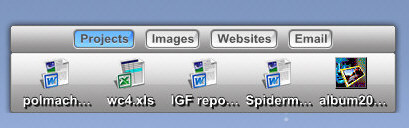
The second type of dock supported by ObjectDock is the tabbed dock. As one would expect, tabbed docks have tabs on them. The tabbed dock is only available in ObjectDock Plus.

The Tabbed docks are incredibly powerful when combined with the ability to have multiple docks on the desktop.

Different docks can be organized in different ways. And tabbed docks can be docked to an edge of the screen to display just the tabbed dock. When the tabs are docked to the edge you can choose to have them show up on top or activate with a hotspot. What can't be shown in a mere screenshot is just how good the usability of ObjectDock is. Drag a dock to the edge and it'll automatically dock. Move it off and it'll undock. It works intuitively and easily.

When used properly, tabbed docks can enable users to organize their desktops in truly remarkable ways.

Because the tabs can be made any size the user wants, the user could have color coded tabs that have no text. Or they could simply have hot spots that activate various docks when the mouse goes there.  The hot spots are intelligent in that the user can set how long the mouse must linger on that hotspot before activating it (this is a major usability issue that ObjectDock Plus has going for it).

Free vs. Plus

Here is a table that describes the differences between the free version and the plus version.

Screenshot Feature ObjectDock Freeware ObjectDock Plus

Standard Dock

Docklet Support

Taskbar Support

Skinning Support

Mouse-Over Zoom effect

Notification Animations

Minimized Programs displayed as thumbnail
Image short-cuts displayed as a thumbnail
Custom Graphics Engine
  GDI+ Graphics Engine
Replace icons with other images
  Can hide Windows Start Bar
  Start menu support

Multiple Docks  

Task grouping  

System Tray Support  

Tabbed Docks  

  Multiple Monitor Support  

Fly-Out Menus  

Tabs docked to screen edges  


Control of Tab Sizes  

Hot-Spot activation  

Multi-Dock Manager  
  Cost

Free

$19.95


User Gallery

ObjectDock Plus with a video game (Warhammer) skin applied.

User uses ObjectDock Plus tabs as drawers. This is accomplished by having single docks that are docked horizontally but are vertically shaped docks. So each dock ends up appearing as a drawer. Also in use is WindowBlinds for the GUI and DesktopX for the enhanced icons.

This subtle use of ObjectDock has the dock on the bottom right and another tabbed dock on the bottom.

This screenshot is using the Alienware WindowBlinds visual style for the GUI.  The dock on the bottom shows off the range of skinning abilities of ObjectDock.

This user is using ObjectDock Plus to organize their photos in fly-out menus.

This user has two docks, one at the bottom and one at the top.


Additional Information

Many of these screenshots use programs that make up Object Desktop, Stardock's suite of desktop enhancements. It is a separate product from ObjectDock Plus. Object Desktop can be found at www.objectdesktop.com.

More ObjectDock content can be found at WinCustomize's ObjectDock library: https://www.wincustomize.com/skins.asp?library=29

ObjectDock Video Demo

The Political Machine v1.02 preview

Published on Tuesday, September 21, 2004 By Brad Wardell In Political Machine News

We're putting the final tweaks on v1.02 of The Political Machine.

Amongst the tweaks and changes come in the endorsement area. Based on player feedback, we've decided to make conservative special interest groups harder to win the support of if you're a Democrat and vice versa if you're a Republican with the liberal special interest groups.

Most of our energy has been trying to make sure the game works on the widest variety of hardware.  The game should run fine on pretty much any hardware out there (and fortunately it does). But there are some notable exceptions including some of the older integrated Intel video adapters. We have not found a solution to this. It should be working on there. DirectX 9 is still relatively new and we use some features in it that have noting to do with horse power but a lot to do with presentation such as true type fonts and sprite manipulation stuff.  Since this engine is going to be used in Galactic Civilizations, we'll definitely be working on it.

The big "bug" fix in this is an endorsement crash bug that occurred on Windows 98. For you techies out there, the cause of this was that our endorsements are stored in an INI file and Windows 98 handles them differently than Windows ME/2000/XP. 

As some of you know, Stardock continues to enhance and support its games for the long haul so we will be releasing more updates as time goes on and incorporate features and fixes based on your experiences.

Have fun!

The Point System Revisited..

Published on Tuesday, September 21, 2004 By Brad Wardell In Blogging

Points Activity Whose score it affects
1 Someone views one of your particular articles Your Site score
0.10 Someone views one of your articles as part of a listing Your Site score
5 Registered user comments on one of your articles Your Site score
1 You comment on an article or skin or forum post or news item Your personal score
1 Anonymous user comments on one of your articles Your Site score
1 to 81 A user gives your article an "Interesting" rating Your Site score
1 to 81 A user recommends your skin Your Site score
2 to 186 A user gives your article an "Insightful" rating Your Site score
1 Someone visits your personal site Your Site score
10 Each unique domain that refers to your site Your Site score
5 Each unique domain that links to one of your articles / skins Your Site score
0.1 Each download by a WinCustomize subscriber of one of your skins Your Site score
1 Every rating you give to a skin Your personal score
1 to 18 Someone gives one of your comments an "insightful" rating Your personal score
-1 to - 18 Someone gives one of your comments a "trolling" rating Your personal score
-100 An admin/moderator gives one of your comments a "trolling rating" Your personal score

Personal Score = Site Score /10 + Personal Points

Top Personal Sites: Based on the points in the past 30 days.

Top Users: Based on points in the past 30 days.

Hall of Fame: Overall points for users and personal sites.

Blog: Balloon-related injuries, Natural Desktop, and Skinning

Published on Tuesday, September 21, 2004 By Brad Wardell In WinCustomize News

I can't believe this. I may have broken my foot playing with a balloon. Yes, another balloon-related injury.  The four year old and I were trying to bat the balloon as high as we could to get it touch the ceiling (we have a very high ceiling in our living room) and well, I succeeded in that but came crashing down into furniture thus fulfilling the nerd-like stereotype.

So here I am at home immobilized as I type this up. It definitely is slowing me down on all the things I have to do. So let me first say, to those people who email me, please be aware I get around 1200 email each day of which 300 or so are non-spam. So as a result, I cannot answer anywhere near all of them and even those I do get to, I tend to be delayed in responding. And needless to say, being stuck on a couch hasn't helped.

Natural Desktop has been a huge hit. And we've been listening to feedback and adding more and more features that we hope to release relatively soon (free of course) to those who have purchased it. My personal request is that it be able to allow more wallpapers to be added and then randomly select between them. 

Being the nerd I am, I have Natural Desktop running full time on one of my machines just for its sound track. I'm very glad about that because it's a beautiful day outside right now but I'm stuck here inside with my broken foot. So I can still "hear" the sounds of outdoors via Natural Desktop playing on the speakers from the other PC. Each person seems to find something different about Natural Desktop.  For me, it's the sound tracks - having natural sounds playing based on the time of day.  For others, it's the wallpapers that change based on time of day and time of year.  And still others they like the animated portal. I have to say, Tiggz did an incredible job on that. I am going to look at the code to figure out how he did the animated weather display.  Most of the weather displays are images that, at best, play a set animation. But in Natural Desktop, each cloud that passes is unique. The rain and clouds and time of day are all seamlessly blended together. 

Which brings me to my other request - to allow people to set what the weather is so that they can control what it is. In 1.0, it just uses your local weather info. But I think it would show off the value of it further if people could see just how much stuff is in there. It's incredibly detailed.  The upcoming version will even show the proper moon phase along with the weather.

There's been some great WindowBlinds skins lately but I want to highlight one in particular today, DanilloOc's NeoShell takes advantage of the new WindowBlinds 4.4 features of being able to have the explorer task panel at the top instead of just the left. It's very cool.

BTW, those of you who make skin suites really should try to use Theme Manager and the suite section here. First, it'll increase your download counts because you can make suites that download each component from WinCustomize. Secondly, it makes it more convenient for users. See Adni's MSII as an example.

And of course, WinCustomize premium subscribers are now able create and use personal pages here. It's the first phase of the WC2K5 roll-out.  If you're not already a subscriber, you can choose the store link and get set up. The WC2K5 roll-out will expand to more users next month as we finalize the personal pages features. Then we'll move on to the libraries, site, and forums.

Computer Gaming World: Editor's Choice Award

Published on Tuesday, September 21, 2004 By Brad Wardell In Political Machine News

The first major PC publication review of The Political Machine has come out - Computer Gaming World's 4.5 star review and an editor's choice award.

We are very excited and pleased about this. As you can imagine, trying to create a political strategy game that has the right balance of realism and fun and put it together into a $20 package that has very high production values still was really a challenge. But one that we enjoyed immensely and hope you have been enjoying as well.

Make sure you check out this month's Computer Gaming World as it also has a head to head match up between well known industry reviewers Tom Chick and Bruce Geryk. It was a close game between the two and we won't say who won here.

Disecting CBS memogate

Published on Monday, September 20, 2004 By Brad Wardell In Current Events

So does CBS have a liberal media bias?

Consider these facts and decide for yourself:

For their story impugning the President's military service CBS relied on what turned out to be forged documents claiming to be personal memos of his commanding officer. During their investigation, they talked to the deceased officer's wife and his son. Both of them said that their story was false.  CBS chose not to include their opinions because they were considered "biased" sources because they were "pro-Bush".

So CBS refused to believe the word of the family of the officer who allegedly wrote these memos because they were "biased". 

Yet the main two sources they relied on for their story is John Kerry's co-chairman, Ben Barnes as one source and the other source has turned out to be one Mr. Burkett, a man who has serious credibility issues in the past and has made all kinds of various unsubstantiated claims against the President. 

So the wife and son of the alleged author of these memos were "too biased" to take their concerns on the story seriously but two Democratic operatives are not too biased to use?

You be the judge.

Another Balloon related injury

Published on Monday, September 20, 2004 By Brad Wardell In Home & Family

It appears I've broken my foot. I just got back from the hospital and have it all wrapped up. I have to go later this week to a specialist to determine precisely what they deal is. Right now, it's just so swollen that it's hard to tell exactly what the deal is.

So how did I injure it? Football or some other sport? Nope.  Working on the house? Nope. 

I broke my foot hitting a balloon. My 4 year old son and I were hitting a little white balloon we had in the house attempting to see how high we could make it go towards the ceiling (we have a 20+ foot ceiling in the living room).  I jumped higher and higher so that I could hit the balloon to make it go higher and higher.  I jumped and jumped until I finally came down onto the television and fell badly.

After the initial pain came the realiziation -- I'm going to have to explain to people that I broke my foot playing with a balloon. An ordinary little balloon.

So for you kids out there, remember, balloons are dangerous. They should only be played with by trained professionals.

WinCustomize Personal Pages Up...

Published on Monday, September 20, 2004 By Brad Wardell In WinCustomize News

If you have an active WinCustomize Premium Subscription (click the store link at the top if you don't) you can now create your own personal page.

Your personal page becomes a sub-domain of WinCustomize.com (i.e. frogboy.wincustomize.com).  Only premium subscribers can see it now. 

Your personal page lets you write blogs, view your gallery, make recommendations, see stats on everything from how many downloads your skins have gotten to your actual ranking overall in all kinds of areas. Plus there are awards for being a leader.

This is a beta, and it's the first phase of our WinCustomize 2K5 roll-out. We'll be making tweaks and fixes over the next week. Have fun!