Brad Wardell's Blog


DesktopX 3.5 Beta Supports Sidebar gadget making!

Published on Monday, June 18, 2007 By Brad Wardell In WinCustomize News

Version 3.5 takes gadgets to the next level

Stardock DesktopX has long led the way in allowing users to build a better desktop. It was the first program for personal computers that enabled end users to easily create mini-applications on their desktop.  DesktopX lets users create objects in just a few simple steps that can be combined together to make widgets or used to build entire desktops. DesktopX Pro was the first program that allowed users to export their creations as stand-alone programs called gadgets.

With the arrival of Windows Vista, gadgets have become much better known. The Windows Sidebar uses a particular format of gadgets (the .gadget file).  Stardock is pleased to announce that DesktopX 3.5 can create native Windows sidebar gadgets.  How easy is it? Check this out:

A quick demo

DesktopX can be used to create the simplest of desktop objects to sophisticated desktops that use VB Script, JavaScript, or C++ quickly and easily put incredibly cool stuff on the desktop. DesktopX has been used to create media players and weather gadgets for MyColors, to create alternative computer interfaces in movies, all the way to making PC game interfaces.  For this demo, we're simply going to create a short-cut gadget.

Step #1: Create the object


From the system tray, users create a new DesktopX object by right-clicking on the DesktopX tray icon


Step #2: Give the object an image


The object (on the left) can have its image changed by clicking on the mouse-away button

Step #3: Assign the short-cut


Users can type in a path or use the built in program finder.

Step #4: Export the object


Right-click on the object and select export.

Step #5: Export as a Sidebar Gadget


Users can export objects as widgets (which require the user to have DesktopX installed but are smaller in size), EXE gadgets (which are stand-alone programs), or as Sidebar gadgets (.gadget files).

Step 6: Give some basic info on the gadget
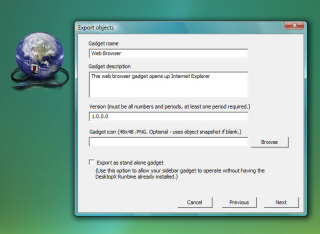

Fill in some basic info about your gadget and then name it
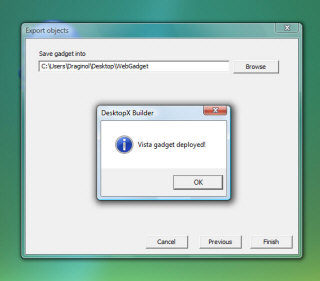
Your new gadget!


Floating on the desktop


On the Sidebar

Also, remember, DesktopX supports all kinds of other cool features built-in like animation (so you could make zooming sidebar gadgets easily), rotation, built-in scripting, plugins, colorizing, mouse states and more:


Animation and other effects are built into DesktopX

And DesktopX has integrated support for JavaScript, ActiveX controls, VB Script, Flash, and more.  Imagine what can be done by combining the power of DesktopX with Microsoft's Sidebar gadgets.

The Beta

DesktopX 3.5 is currently in beta.  It's only available for users who have Object Desktop (www.objectdesktop.com).  Stardock expects the final version of DesktopX 3.5 to be ready before the end of the Summer (2007).

A preview of the NEXT Galactic Civilizations II update!

Published on Wednesday, June 13, 2007 By Brad Wardell In GalCiv II News

Galactic Civilizations II: Dark Avatar 1.6 is available for free download by all Dark Avatar players but we're just getting started in our after-release support! 

We're already well underway with Galactic Civilizations II: Dark Avatar 1.7 (actually 1.61 will be available shortly which will have some graphics engine tweaks/fixes for some users who had problems with 1.6).

So what will 1.7 have in it? The screenshot on the right shows the new maintenance and leasing summary screen (and leases are getting a revamping to make them more attractive to use by both players and computer AI).

Other features include a new local high score list with a new hall of fame screen, Starbase managers, Starbase modules that raise maximum HP, Constructor rally point management, new mega events (based on player suggestions), Anomalies randomly return, a new type of governor based on rally point destination, updated computer AI, updated diplomacy AI, and more!  Stay tuned!

If you don't have Galactic Civilizations II, you can get Galactic Civilizations II: Gold Edition either directly via TotalGaming.net (which supports PayPal and most credit cards) or at your local retailer.  If you have Galactic Civilizations II already you can upgrade to Dark Avatar at the purchase page.

Migration to Vista gets easier with Multiplicity 1.2

Published on Monday, June 11, 2007 By Brad Wardell In WinCustomize News

Stardock has released Multiplicity Pro 1.2. Multiplicity Pro is a program that allows users to use multiple computers together at their desk as if they were a single computer. The program uses a network connection between machines to establish a universal clipboard and allow a single keyboard and mouse to control them all. Each PC continues to have a monitor attached to it and the setup works similarly as multi-monitor system.

For users, the experience is similar to a multi-monitor setup on a single PC except that with Multiplicity, each monitor is connected to its own computer. This allows users to take advantage of the power and resources of an entirely separate computer with the ease and convenience of a multiple monitor setup.

Multiplicity Pro 1.2 adds support for Windows Vista including the ability to copy and paste files and folders between machines.  For users trying to migrate from Windows XP to Windows Vista, these features can drastically ease the transition.

Multiplicity and Multiplicity Pro which adds file copying and support for more than 2 computers are available at https://www.stardock.com/products/multiplicity/. A free trial is available for download.

Galactic Civilizations II: Dark Avatar 1.6 released!

Published on Thursday, June 7, 2007 By Brad Wardell In GalCiv II News

Stardock has released its first major update to Galactic Civilizations II: Dark Avatar. The award winning strategy game has garnered universally positive reviews since its release but Stardock’s update not only addresses minor bugs and play balancing but includes a brand new graphics engine!

"Many of our game developers have been working on our next game, a fantasy strategy game and in the process have made real advances in 3D engine development," said Brad Wardell, Designer of Galactic Civilizations. "We wanted to bring some of those performance advancements into Galactic Civilizations."

As a result, players have reported seeing a 10X graphics performance improvement.

"Now players can play on gigantic maps and be zoomed out quite a ways to display hundreds or thousands of ships and still get fantastic performance," said Wardell.

While significant features are common in Stardock’s free updates for its games, a full-blown engine upgrade sets a new bar. The new version also includes dozens of new features as well based on player feedback.

Registered users can download the update via Stardock Central, the company’s unique download manager that not only allows users to update its games but can install the entire game from scratch without requiring the CD onto multiple home computers.

Galactic Civilizations II: Gold Edition is available at most retail stores in North America and includes both the original Galactic Civilizations II as well as the Dark Avatar expansion pack.

A full listing of what's changed can be found here: https://forums.galciv2.com/?aid=154562. The home page for Galactic Civilizations II is https://www.galciv2.com.

Galactic Civilizations II: Dark Avatar v1.6
Requires:
Galactic Civilizations II or Galactic Civilizations II: Gold Edition

Price:
Free Update to existing customer, new users can purchase at www.galciv2.com or at their local PC game retailer
See it at:
https://www.galciv2.com

Developer:
Stardock Corp. (www.stardock.com).

15090 Beck Rd.
Plymouth MI 48170

Screenshots:

Galactic Civilizations II: Dark Avatar 1.6 Change Log

Published on Thursday, June 7, 2007 By Brad Wardell In GalCiv Journals

It's time for another update for Galactic Civilizations II and this time we've put our energy into not just adding new features, fixing various reported issues, and tweaking game balance. This time we integrated in a new graphics engine for the ship rendering that should result in a performance boost of 10X to 15X depending on your setup and what is happening on the screen.

This update should be available via Stardock Central by around 5PM EST on June 7, 2007.

Here's a complete list of what's been changed:

+ NEW: New Graphics Engine for ships which should result in a 10X to 15X performance improvement for most players

+ NEW: Computer AI updated to be better in diplomacy

+ NEW: AI ship design more optimized

+ NEW: More differentiation between alien races on what technologies they research

+ NEW: The popup for adding money to negotiations on the trade screen will now open with the value needed to make the AI accept the offer (or the total amount in your treasury if they won't accept it).

+ NEW: Graphs and mini-map rewritten using Direct3D instead of GDI

+ NEW: 3 New Custom Maps

+ NEW: Galaxies tend to have more stars and planets

+ NEW: Stacked ships will only show one ship in the tile

  + The ship that is displayed is chosen like so:

     + If a ship is the galaxy’s selected ship it is always shown

     + Otherwise, the toughest selected ship is shown

     + If no ship in the stack is selected, the toughest ship is shown

    + An icon appears next to ships that are in a stack

    + when you move a ship off of a stack, it will show the next ship in that stack

    + This significantly increases performance in my tests.  I had a stack of about 50 ships and no major hit to frame rate.

+ NEW: Added code to save score data for non-metaverse games locally in the My Documents\My Games\GC2DarkAvatar folder

+ NEW: You can now change the social project (if there is stuff in the queue) from the colony list in the civ manager

+ NEW: Some additional dialog (but no new trees) for computer players

+ NEW: Added Starbase module to repair the starbase with Tech Requirement Advanced Hulls.  Will only show up if the starbase is missing HP, and can be 'installed' multiple times.  This module should not count towards the total modules.

+ NEW: Option to use old graphics engine for users of video cards that don't support the DirectX features we're using

+ FIX: Fixed bug where non-optimal defenses were never decreased as the defenses absorbed damage during a battle round

+ FIX: Fixed end of turn crash that happened if you had the Force AI to use Max CPU option ON.
 
+ FIX:  Made Build Menu update after a project is decomissioned. 1 per planet improvements like Orbital Terraformers will now show up in the build list again if you remove them from the queue or destroy an existing one.  1 per civ and 1

per galaxy improvements may not be destroyed and rebuilt - this is by design.
 
+ FIX: Fixed bug where if you changed the settings for a custom opponent's Natural Abilities and/or Financial Resources, the values would not remain the same after leaving the tab.

+ FIX: Fixed error where invalid information was being returned by the activation code in Win98 and Windows ME by adding alternate code if the first instance failed.

+ FIX: Fixed bug where save game was not saving the campaign file name and added code to fix save games currently exhibiting this bug (should fix problem with people continuing their campaigns)

+ FIX: Fixed crash bug where if the random event that creates a new minor race happened mulitple times, the minor races would end up with the same name and then delete each other's ship designs, causing a crash on the end of a turn

+ FIX: Fixed bug where the turn a ship was created was not saved/restored when loading a save game, which could cause a ship design to be deleted too early

+ FIX: Fixed bug with loading height maps for planet surfaces

+ FIX: Fixed bug where ending the game from the planet screen resulted in a crash because the planet screen was not hidden before the end game screen was unhidden

+ FIX: Added strings that were not being saved to scenario save game code

 + FIX: Made it so that your allies won't declare war on you in the mega event Allied War where the good races gang up on you.

+ FIX: Minimap and line graphs now uses Direct3D for drawing, which should show an increase in framerate.

+ FIX: Updated the QUICKSTART command line parameter code to work with DarkAvatar's settings

+ FIX: The minimap scrolling lag on Vista should be resolved, and scrolling in general should be smoother with better frame rates.

+ FIX: On Vista PCs, the debug.err will now be saved in the Documents\My Games\GC2DarkAvatar folder. (This will not work if you run the exe in WInXP compatibility mode.)

+ FIX: Fixed a minor bug with the money popup in the tradewnd if you were in debt.

+ FIX: Fixed bug where the influence and morale bonuses did not show up correctly on the summary screen (from the planet screen) if there was a influence or morale bonus (respectively) on that tile.

+ FIX:  Flushes resource manager’s resources when game exits

+ FIX: Fixed crash in invasion ground units

+ FIX: Fixed crash if memory does not allocate in ResourceGraphic

+ FIX: Fixed crash in ship design code if hardpoint data failed to load

+ FIX: Fixed bug where minimaps were not refreshing immediately when you started a new game

+ FIX: Added code to handle if you or your trading partner are in debt to fix flakiness with the money popup in the TradeWnd. 

+ FIX: Fixed bug in the function that calculates the morale of a colony to fix a longtime bug where your morale could permanently drop to 1%

+ FIX: Made it so that ships on the Governor minimap should show up larger when they are affected by the switch.  Also made starbases not show up on this minimap to reduce clutter.

+ FIX: Fixed typo in XML files that caused land and background textures in Invasion window to be black

+ FIX: Added code for the super hive to adjust the costs of factories in the queue when they take over another colony.

+ FIX: Fixed a lockup on Trade screen when you have a huge amount of money in the treasury and you try to offer money.

+ FIX: Fixed lockup on Governor screen when you click on the Starship rallypoint governor

+ FIX:  Found a solution for the graphical glitches on AMD machines.

+ FIX: Optimized new batch renderer so that ship instances of the same type will share the same vertex and index buffers.  This will save memory over the previous implementation where each instance had its own vert and index buffers.

This should also fix the where ship parts sometimes would not show textures in the designer.

+ FIX: Fixed some alt-tab crashes present in 1.6 beta 5.

+ FIX: Added code to remove AI ship designs from the graphics cache when they are no longer being used

+ FIX: Fixed bug where, in 1 on 1 battles, if both ships kill each other, the stronger surviving ship would have hp restored instead of receiving 1 hp.

+ FIX: Added support for mixed vertex processing which should help some people with older video cards who would normally be running in software vertex processing mode.

+ FIX: Changed the way that vertex and index buffers are created to help framerates for cards running in software or mixed vp mode.

+ FIX: Fixed bug with loading save games that could cause the cheater flag to be tripped

+ FIX: Fixed bug where you could change AI mining bases to send to your planet

+ FIX: Fixed bug where the repair starbase module was showing up as a bonus in the starbase details screen after it was applied

+ FIX: Fixed bug where the repair starbase module was being counted as one of the available modules even when the starbase didn't need repair, which threw off the total count by 1.

+ FIX: Memory leak in ship gfx when you alt-tab out of the game

+ FIX: Fixed the “Missing Mining Base Graphics” bug

+ TWEAK : Turned off some debug strings to try and improve loading time

+ TWEAK: Added dialog to warn you if you start/load a metaverse game with a cheater flag

+ TWEAK: Pirates event less common, somewhat less lethal

+ TWEAK: AI deals with Disease event better

+ TWEAK: Various tweaks to AI behavior

+ TWEAK: Extreme Colonization more expensive

+ TWEAK: Visual updates to some planetary improvements

+ TWEAK: AI more focused on what it builds on planets (long story)

+ TWEAK: AI tweaks to tech tree

+ TWEAK:  In the Ship Designer, when using auto-place to place a component, the component will use the current scale and rotation settings

+ TWEAK: You are no longer permitted to change your capital to another world, and bonuses for the capital city have been increased.

+ TWEAK: The display of stars on the minimaps should now  be more visible on large and gigantic galaxies.

+ TWEAK: Made a slight change to the code that starts the AI threads which may help with the AI seeming to get a free turn at the start of a new game or when loading a save game. 

+ TWEAK: Planet Surface Variety Option now defaults to 50%

+ TWEAK: Converted star box to use vertex buffer for point sprites and optimized it for point sprites, and optimized it for software vp if running in software vp mode

+ TWEAK: Added option for “Enhanced Ship Rendering” - if you are running in software vp mode, turning this off may increase your performance

+ TWEAK: Added option to allow the game to start in mixed vp mode when it would normally start in software vp mode.  Turn this off if you encounter problems in mixed vp mode to start in software vp mode.

Object Desktop: Next Steps

Published on Wednesday, June 6, 2007 By Brad Wardell In WinCustomize Talk

There's so many things we could do next with Object Desktop but we're having a hard time narrowing down what we should focus on.

After all, with only 15% or so of the user base moved to Vista (a LOT slower than anticipated) it doesn't make much sense to pour all new development into Vista specific tech.

But at the same time, we don't want to get into the path of making "legacy" software as well.

One of my personal peeves with Object Desktop is that it's too eye candy focused these days and not enough productivity.

The OS/2 version of Object Desktop was almost purely productivity software:

Here's a link to the OS/2 version of Object Desktop (10 years ago).

megashot.jpg (282126 bytes)

Now, a lot of features that were part of Object Desktop have become part of the OS today.

But still, I think there's a lot of room for growth in other areas.  Before I post my ideas for what I'd like to see in there, we'd love to hear some things you'd like to see us work on.

The Republican Party is broken

Published on Friday, June 1, 2007 By Brad Wardell In Republican

Peggy Noonan, one of my heroes, has an outstanding column in today's Wallstreet Journal about George W. Bush and how he has torn the Republican party asunder.

It has always amazed me to see Bush haters trying to paint Bush as a "typical" Republican or "typical" conservative. He is neither.

His out of control spending, his preference for loyalty over competency, his incompotent handling of Iraq, his left-of center views on federal education, immigration, and even welfare make him not a Republican or a Democrat but some sort of bizarro President.

It's as if "Bob down the street" somehow got elected President. Bob, who knows little on politics, has little interest in it, gathers about him his Sunday afternoon Football buddies to hang with him and set out policy based on their "gut".

Except I suspect Bob wouldn't be stupid enough to call the base of his support unpatriotic as Bush did yesterday.  Only in Bush's world would those who are against lawbreaking considered unpatriotic.

Check out Peggy's column below. It is well worth the read.