Brad Wardell's Blog


ObjectDock gets a face lift in v1.9

Published on Wednesday, April 25, 2007 By Brad Wardell In ObjectDock

ObjectDock is a program that adds a skinnable dock to your Windows desktop.  It is one of the most popular desktop enhancement programs available. 

ObjectDock 1.9 is such a major update over 1.5 that it could have been called ObjectDock 2.0. In fact, there was a lot of internal debate on this with 1.9 being the compromise versioning!

So what's new in it?  Here is a list of changes from v1.5:

What's changed in ObjectDock 1.9 over 1.5: 
 
  • Brand new awesome weather docklet! New docklet uses brand new technology to fly out your 5 day forecast when you click on it or hover over it, and hides it when your mouse goes away.
  • Zoomin/Zoomout smoothness *significantly* enhanced, and is now adjustable! Find the new options in the "Quality & Performance" settings
  • ObjectDock now comes bundled with some really great artwork (icons and backgrounds) from the community. (Permission recieved to use all of the images involved).
  • New artwork has been pre-associated with over 50 different programs! As result, chances are if you add a program, it will show up with a nice high-resolution icon!
  • New minimize effect on Vista! When Live Thumbnails are in use on Vista and your dock is showing a taskbar, windows will now do a nice minimize animation into any zooming dock. I
  • Live minimize effect should be smoother than any other program available! Effort was made to make it work with minimal to no interference to your workflow, and the animation should never jump around / flicker heavily at the end unlike other versions of this effect you may have seen.
  • "Live previews" for files and folders are enabled! While folders will not have their icons update automatically if their contents change, when loaded folders will show as their correct preview. The same with other types of documents that offer a live preview (PDF's, etc)
  • In Vista, all minimized windows will show up as a live mini-thumbnail in the ObjectDock taskbar! Optionally you can have all windows, minimized or not, show up as thumbnails. Note: this feature is only
  • available for zooming docks, it does not support tabbed docks.
  • New background ability! Tile-based backgrounds can now adjust the size/position of the original icon, end result, really cool tiled backgrounds. Check out the included HyperGrass theme for an example of how cool tiled backgrounds can now be!
  • Completely redone the mouse-activation / layering system. See the new "interaction" area in zooming dock's positioning options. The new interaction abilities should make ObjectDock a much more pleasent program to use!
  • Custom icons set for program file shortcuts now automatically sync with custom icons set for windows of a program in taskbars.
  • Entry areas in shortcut dialogs now use AutoComplete
  • Entering in generic terms or filetypes such as "internet", "email", ".doc", etc for a shortcut will now
  • Background code *significantly* improved.
  • New "Troubleshooting" dialog with quick access to disabling features of ObjectDock
  • Increased drawing optimization code's ability to manage images. Should result in quicker than ever drawing and decreased memory usage for zooming docks.
  • Docks can now not only be left/right/center aligned, but anywhere in-between. See the new slider in zooming dock's positioning options

  • Brand new "Show Start Menu" functionality! Will show your existing startmenu/startpanel right next to the cursor when you click it. Add one by right clicking dock and choosing "Add -> New Start Menu Entry"
  • "Add" menus now significantly more useful ; they now give you the option to add a wide variety of different built-in entries
  • New "command entry" abilities! You can now create a dock item to toggle autohide on and off, or toggle hiding/showing the taskbar. Very useful!
  • New option available to turn on "proportionate stretching" for backgrounds
  • New mode available in plus: "keep on top, hiding off-screen for maximized applications", which makes the dock always on top except when a window is maximized, at which point it will automatically temporarily turn on autohide
  • Improved dock's ability to judge what maximum size it should be. Dock will now exactly fill the screen when you set it to be as large as possible, and it will properly maintain this as you add/remove items.
  • Brand new taskbar modes available in Plus! Your taskbar can now be set to show "all windows", "minimized windows only", or "non-minimized windows only"
  • Dramatically improved behavior during right click menus on zooming docks. When you right click and the dock's zooming locks in position, if you click/right-click on another item ObjectDock will now correctly select the item that your cursor was over at the time, not what i would be after the zoom lock is released. Similarly, if you begin dragging an item while locked, the program will behave appropriately instead of its prior very unpredictable behavior.
  • Improved handling / awareness of full-screen applications
  • Completely redone system tray mechanism for Plus, which is more lighweight and does not require any additional resident EXE (that’s right, sdmcp.exe will be a thing of the past ) System tray will not currently work on 64-bit versions of Windows, but they do work with Windows Vista, including the new "Special" tray icons in Vista.
  • Performance and memory usage has been improved. Lots of optimizing for CPU usage.
  • Every single 'glitchy' behavior that we/users could find in previous versions of ObjectDock has been fixed
  • When using extension-only in shortcuts, the item's title will now automatically update to the name of the application, not just its filename.
  • Ability added for ObjectDock to apply included default images for programs that do not have high-resolution icons already included with them. For example, a default Notepad shortcut on XP would use the included custom high-quality icon, but on Vista where a high-quality icon is available for Notepad, ObjectDock will use the actual Notepad icon.
  • Improved system tray, should now work more reliably than ever! Outlook 2007 and Windows Live Messenger should both now work reliably.
  • Fixed up a couple minor resource leaks
  • Improved taskbars / thumbnail behavior.
  • Added option to turn off tabbed docks' ability to automatically dock to the edge as a drawer when dragging. Option available in "misc options".
  • Fixed multimonitor issue with the Start Menu functionality, and added better problem-notification.
  • Fixed issue with flyouts where if they contained 9+ items and zooming is disabled, they could show up partially behind the dock.
  • UI improvments
  • Ability to export backgrounds added to the DockZip packaging format. Try this feature today by right clicking the dock and choosing "Pack images for sharing"
  • Dialog flow / layout improved for zooming docks
  • Colorizing a background now also colorizes the indicators you've selected to use
  • When packing up icons, you can now reliably drag dock items on to the "packager" dialog, and the icon associated with that item will automatically be added to the package you're creating
  • Improved autohide ability in general. Also, added ability for autohide to give activation back to the window that had it if an autohidden dock gets activated temporarily and then hides.
  • improved shortcuts so that the dock longer pauses for a moment when you run something
  • improved delete-item animation so that there is no longer a delay when you delete something from the dock
  • clicking empty space directly above/below a zooming dock that is still part of the background (e.g. a shadow) no longer causes the dock item below it to get selected. similarly, right clicking that area will bring up options for the dock itself, not the item below where you clicked.
  • On Vista, Taskbar should now show / be able to interact with applications ran as administrator when UAC is enabled in vista, even if ObjectDock isn't elevated. (Minimize animations will not work for programs ran as administrator however)
  • Fixed issue where icons for url-shortcuts would not get remembered
  • Can now drag/drop "Internet" and "Email" shortcuts from start panel into dock
  • ObjectDock is better than ever at picking up the best high-quality icon for your file, particularly in Windows Vista.
  • You can now zoom icons up to 256x256.

    Click Here to check out some of the features of ObjectDock as a video.

     
  •  

    In short, a lot has changed.

    Highlighted Changes

    There's so many new things in ObjectDock 1.9 that it's hard to narrow things down to a handful. And even the above list isn't complete!  Here are some of our favorite changes:

    It's Faster!


    Probably one of the first things some users will notice is how much faster ObjectDock 1.9 is.  That's because the underlying engine was largely rewritten to take advantage of advances in OS and video card technology. It's faster while using less memory.

    It's Prettier!


    Another thing users will notice, especially long-time users, is how many cool new backgrounds and icons come with it. The default look has been changed, the default icons changed, and a ton of artwork from the WinCustomize.com community (with permission) has bee included.

    One other note about that screenshot, ObjectDock supports backgrounds on a per item basis!

    It's more useful!

    ObjectDock is popular not just because it's so visually cool and pretty but because it is very useful. Docklets that support searching and the ability to display running tasks as part of your dock are examples of why ObjectDock isn't just a cool program, it's a very useful one.

    ObjectDock 1.9 includes a new weather docklet that on a single click will display the 5-day forecast.


    ObjectDock 1.9 also includes a new Start menu docklet that will bring up the real Start menu (and if it's skinned, then it'll still be skinned!).

    It's more usable!

    ObjectDock has always been strong about having features that make is convenient to use. But ObjectDock 1.9 goes even further!

    ObjectDock 1.9 now includes options for dock placement that is completely free-form! Put the dock anywhere you want on the screen!


    It's easier to use! 


    The user interface has been updated to be easier to use with functionality much more accessible!

    It has more Windows Vista support!

    While users of Windows XP have much to rejoice, users of Windows Vista get live thumbnail previews and minimize and restore effects thanks to the new Windows Vista desktop graphics engine (the DWM) which provides hardware acceleration features!

    It's more fun!


    With thousands of skins and icons for ObjectDock and tons of cool effects and options to choose from, ObjectDock doesn't just look great and work great, it's just fun to use.

    And it's still free!

    The world's most fully featured dock on any platform is still freeware. 

    Stardock also makes ObjectDock PLUS! which adds tabbed docks, system tray support, additional mouse-over effects, multiple dock support, taskbar grouping, and more!

    But ObjectDock itself remains free as it always has even with all these new features.  Try it yourself and find out what millions of others have learned -- it's fun, pretty, and useful!  

    Get it at http://www.objectdock.com

    Jeff Skilling - my evil mirror universe twin

    Published on Tuesday, April 24, 2007 By Brad Wardell In Business

    Watching PBS show on Jeff Skilling, the main guy behind Enron's corruption and describing his beliefs and showing interviews with him.

    Oye is this guy literally my polar opposite. He believes ideas are king. He feels people should be rewarded on ideas alone and execution of those ideas is left for the lesser beings of the world.

    It was that philosphy that was Enron's undoing. Their switch to mark to market accounting is based on booking as profit deals as they are pinned. So if you sign a deal that will generate (in theory) $10 billion over 20 years, they'd book all $10 billion up front.  Here in reality, we call that counting chickens before they're hatched.

    He also apparently said that only money motivates people which I know for a fact to be untrue. There is a lot more to life than materialism. What motivates one person may not motivate others. 

    The PBS show definitely doesn't make Enron's people look very good. If even half of what is in this show is true, we're talking about a bunch of despicable people with Jeff Skilling at that top of the list.

    ObjectDock 1.9 TOMORROW!

    Published on Tuesday, April 24, 2007 By Brad Wardell In WinCustomize News

     Tomorrow the biggest update ever to ObjectDock will be released! ObjectDock is a freeware program that allow users to add a fully skinnable dock to their Windows desktop. It is one of the most popular desktop extension programs of all time.  ObjectDock 1.9 adds a ton of new features and comes with a lot of great new content created by the WinCustomize community.

    We'll be making the announcement of its availability tomorrow! Stay tuned!

    We're so excited!

    Published on Tuesday, April 24, 2007 By Brad Wardell In WinCustomize News

    As some of you know, Stardock went through a lot of changes last year as it transitioned from being a small company to a significantly larger company. The growing pains were pretty apparent as outlined in this article "How Stardock failed the community".

    The problems were identified and have been addressed and I won't go into too many details here (we'll talk more about them in the upcoming Stardock Magazine) but suffice to say users of Object Desktop and ThinkDesk will be very pleased.

    The biggest challenge has been dealing with Windows Vista's release while providing new and interesting things for Windows XP users.  Over the past year or so, the rate in new updates and releases from Stardock has slowed way way down despite us hiring more developers.  There are a number of reasons for this but the biggest has been in having to put in resources to support Windows Vista.  That transition is nearly complete and a shared code-base will let us get back to more consistent updates (though 64-bit support remains a pain that we're dealing with).

    But starting this month (in fact, starting tomorrow) you'll start seeing changes happening in pretty rapid fire that will continue all summer and into Fall. Stay tuned!

    Brad the bee keeper

    Published on Friday, April 20, 2007 By Brad Wardell In Pets & Nature

    As a kid, I was afraid of bees. I mean, hysterically afraid.  To be fair, I probably had good reason, I'd been stung hundreds of times by the time I was 12.  I grew up next to a swamp and was constantly getting stung by bees, hornets, wasps, etc. 

    Admittedly, most of the stings were due to my own idiocy. Okay, nearly all were due to idiocy.  One time, after getting stung when I was 8, I "declared war" on the big wasp nest and attacked it with a stick.  The wasps won.  I was not a very bright boy.  As my 1st grade teacher said to my mom (seriously) "The world needs ditch diggers."

    It wasn't until I was older that I realized that most people didn't get stung by bees a lot. I had just assumed being stung regularly was a normal thing.  I was afraid of bees because of the sound they made and just some psychological impact of seeing them flying around. 

    Being stung, other than stinging (no pun intended) had no side effect.  I didn't even know until high school that some people were allergic to bees. Heck, I didn't even know people were supposed to swell up or get any mark at all.  I'd get stung and just watch the little stinger pumping in my hand, arm, leg, whatever.  I'd eventually pull it out but there wasn't even a red mark.

    I'm still afraid of bees.  I really don't like having an irrational fear of something.  So I've decided to take up bee keeping.  I bought a 3 acre property that has nothing on it presently and am thinking of raising honey bees. I'm only at the beginning phase of educating myself as to what is involved. The next step is buying the gear and then finally getting the actual queen bee to start the hive.

    I also think it is something good for my kids to be exposed to as well.  Funny thing, my oldest son was stung by a bee just today. If my wife hadn't seen it, people would probably not believe him -- not even a mark.

    The Best Skins of 2006

    Published on Friday, April 20, 2007 By Brad Wardell In WinCustomize News

    Last year was another great year of skinning. And we've gone through literally thousands and thousands of skins to pick out the 10 best skins made last year.  Check the article linked below to find out the best skins and skinners we could find.

    Best Skins of 2006

    Published on Thursday, April 19, 2007 By Brad Wardell In OS Customization

    Last year was another great year for skinning. Users from around the world created some incredibly fantastic skins. 

    Culturally, skinning is a great deal different today than it was back in the late 90s.  Back then, a popular skin might get a 1000 downloads. I remember when the first "Aqua" skins came out and the infamous "WinAqua" from Dangeruss managed to get 5 THOUSAND downloads total which was, back 2000 or so, a real milestone. Now, downloads of 50,000 are common and most of the top skins can expect to be reaching towards 100,000 downloads.

    The popularity of skins has altered the way skins are made. Designs tend to be much more mainstream.  While programs such as WindowBlinds and Winamp allow for pretty free-form skin designs, the trend has been to make them conservative and "clean" to appeal to the widest audience.

    In this article, we look at some of the best skins of last year. This article is, by no means, the end all be all list, we do try to include a good selection of the best creations from the past year.

    WindowBlinds

    WindowBlinds is a 3rd party program developed by Stardock (whom I work for) that lets users apply GUI skins (often called visual styles) that change the overall look and feel of the Windows interface (title bars, push buttons, Start bar, etc.).

    To use WindowBlinds skins you will need to download WindowBlinds.

    Last year was a great year for skinning. Not counting the great skins that came out of the GUI Championships, here are ten of the best (there were so many great ones to choose from so apologies to all the other great skinners we didn't include).

    danill0c's 5imple skin was one of the first WindowBlinds skins to really show off what WindowBlinds 5 could do. Both a practical skin and very polished at the same time. The subtle shadow effect is part of the skin (WindowBlinds 5's engine supports alpha blending effects like shadows and glass).  A terrific design all together.

    [Download]


    Vista Ready!
    Kol's Thallos was one of the best skins of last year without a doubt. Clean, smooth, and useful, its subtle shadows and polish made it a favorite for users. Thallos is unique in that Kol created both WindowBlinds and msstyles versions of it and hence won in both categories. The two are virtually identical. The WindowBlinds version adds toolbar icons, and a progress animation.

    [Download]


    Vista Ready!
    Josephs's Live Suite was one of the highlights of last year. Some argued that this is the look they wish they'd updated Windows 2003 Server to look like. A good step between Windows XP and Windows Vista.

    [Download]


    Vista Ready!


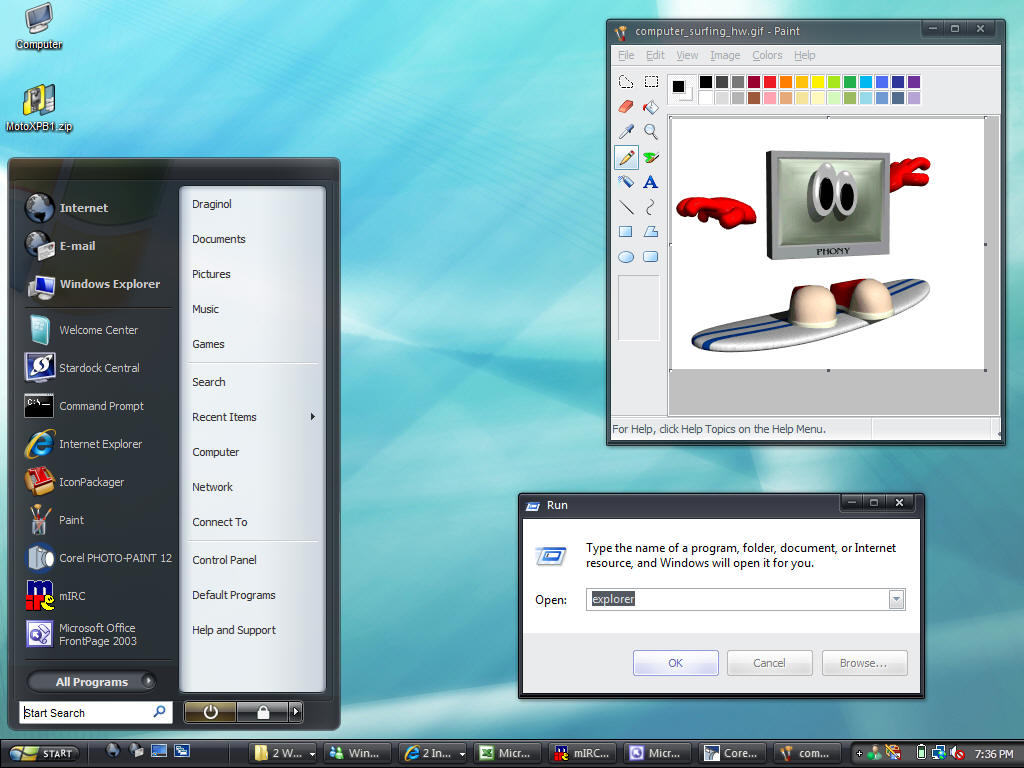
    ChaNinja's MotoXP B1 was one of the most beautiful skins created last year. Both highly stylish and very usable. It comes in multiple styles, supports animation, and is very fast.

    [Download]


    Vista Ready!

    danillo0C was almost certainly the top skinner of 2006. Besides making the top GUI Championship skin Acrylic, he also made Aerial. This skin has it all and is incredibly usable and fully-featured.

    [Download]


    Vista Ready!

    JJ Ying was another skinning super-star last year and one of the best skins made last year was Ecliz Deluxe. The screenshot really doesn't do it justice as it comes in multiple styles including a clear glass version. A truly amazing skin. And as you can see, it works great on Vista as well as XP.

    [Download]


    Vista Ready!

     No best of 2006 list would be complete without tehZERO's Eminence.  With its cloudy stained glas title bars, clean design, it looks great on both Windows XP and Vista.

    [Download]


    Vista Ready!

    For users getting tired of Aero-like glassy skins, Buuf-OS from Gabriel provided great relief. With great toolbar icons (for XP users), great progress dialogs, and lots of other subtle tweaks and enhancements, it's just a beautiful and original skin.

    [Download]


    Vista Ready!

    Adni's VistaPlus was the most downloaded WindowBlinds skin of 2006 with nearly a half-million unique downloads.  It doesn't run on Windows Vista but for Windows XP users looking for a fantastic looking skin on Windows XP that in some respects is a better Vista than Vista, VistaPlus is a great choice.

    [Download]

    MikeB's Old Republic was one of the more original skins that also maintained a high degree of usability and polish. With a subtle shadow and distressed style, it's an awesome choice for users looking for something different.

    [Download]


    Vista Ready!


    Some Popular Skinners


    XP MSStyles

    Last year might have been the twilight of XP msstyles with Windows Vista's arrival this year.  But it was still a great year for .MSSTYLES.  MSStyles is Microsoft's skin format designed for changing Windows XP's look and feel. While not as powerful as WindowBlinds, it has a significant following. Third-parties can make skins and use them provided that the uxtheme.dll is cracked to disable digital signing protection. Below are some of the notable ones we found made from last year.

    To use .msstyles you will either need to crack the digital signing verification in uxtheme by patching it (which you can obtain at Neowin.net and elsewhere) or you can download/install SkinStudio and use it to convert them to WindowBlinds format. There's a quick guide for that here.  In the case where we took our own screenshots, they were taken on Windows Vista via WindowBlinds since XP msstyles won't run on Vista.

    Here are some of the best from 2006!

    Luna Element 5 from Tornado was easily one of the favorites of users everywhere. With a clean UI that blends XP and Vista together seamlessly, Luna Element makes our list of one of the best skins of 2006. LE 5.1 released in January of this year keeps the updates going.

    [Download]
    Kol did double-duty with Thallos. Available both for WindowBlinds and as an msstyles, it was a user favorite.

    [Download]
    No top 10 list on msstyles would be complete without mentioning MohsinNaqi's Tener VS. What makes Tener so special is in the details. The taskbar is extremely well done and the colors are very carefully chosen. Mohsin Naqi is a top skinner with icon packages, wallpapers, WindowBlinds visual styles, and more (you can check out his site here).

    [Download]

    heylove's Area04 (Areao4.2), like many of the top msstyles, made deviantART's daily download (this one on New Year's Eve!).  It is significantly different than most of the msstyles we saw last year. Combined with its original design, clean style, and several different sub-styles, Aera04 makes our list.

    [Download]
    Schluepfer's very first visual style was Klarheit. And if this is what his first effort is, we can't wait to see what he makes for 2007!

    [Download]
    hsn's Mint 2.0 started its life as a Linux Gnome GTK2 theme and brought over to Windows XP. Despite not being "original", it is still one of our favorite skins of 2006 regardless of where its original platform was. For the shadow effect, you'll need a shadow program such as WindowFX.

    [Download]
    Tempura is another Linux GTK theme that was ported but like Mint, the platform is less important than the excellence in the skin itself. Lokheed had a great year and you can see his complete portfolio here. hsn's port of it really shines. You can see how it looked on Linux by going here. Like Mint, you'll need to download a program like WindowFX to get shadows.

    [Download]
    Bant's Reluna Em3lent is a great example of Bant's elegant design philosophy of creating usable, clean, and elegant skins. The skin actually comes in several different flavors that look significantly different from one another. Any individual sub-style would be on its own one of the top skins of the year. Getting them bundled together in this single visual style package makes it just that much sweeter.

    [Download]
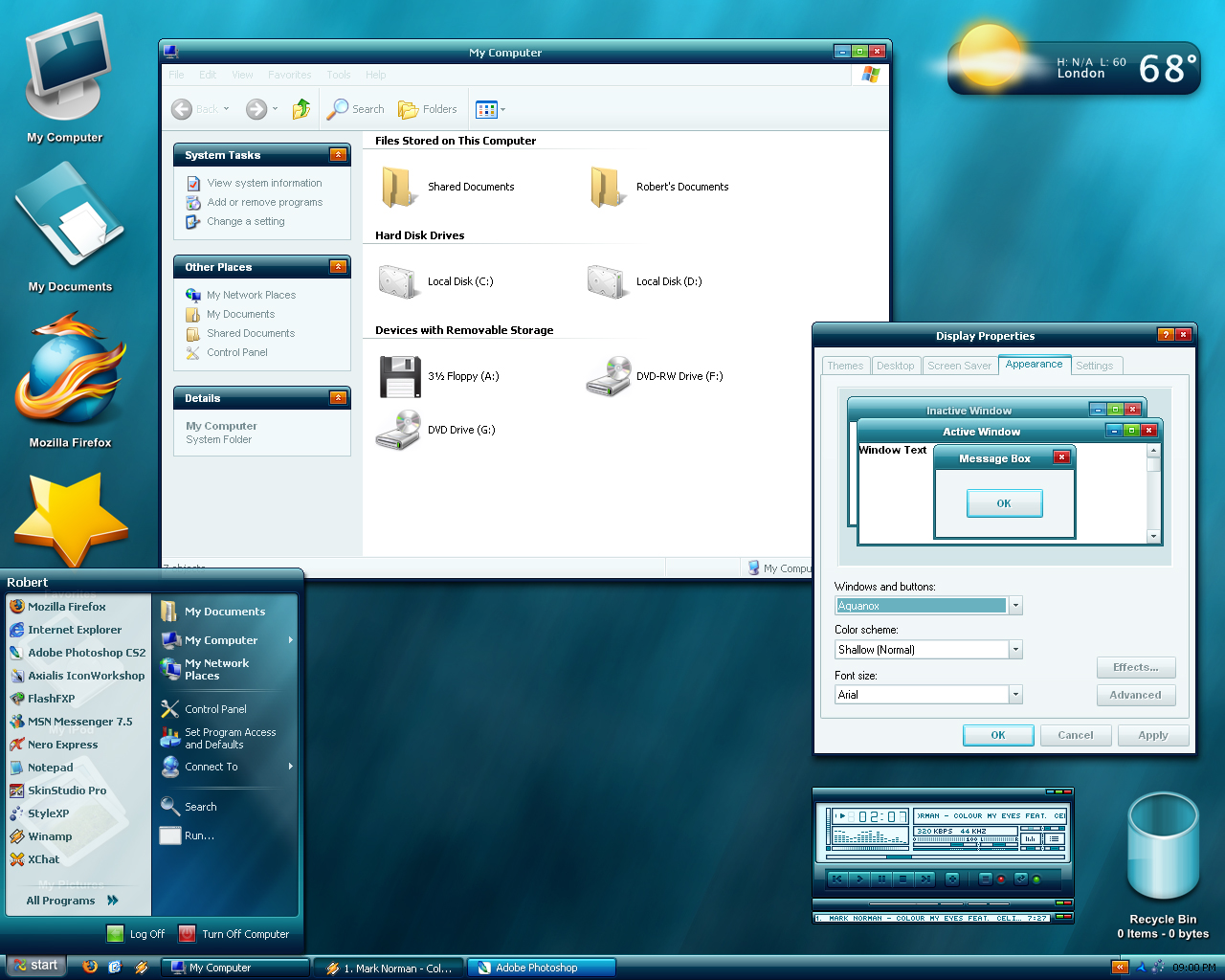
    Cyberchaos's Aquanox VS was one of the most popular msstyles of 2006 with over 100,000 downloads at deviantART. Inspired by some of Kol's other work, this clean, usable and original skin makes our list.

    [Download]
    dobee's NeoGeniX's is one of the most polished and original looking msstyles of last year. It was a favorite of many of us this past year. When combined with the right icon package, a toolbar theme, and the NeoGeniX ObjectDock, users can give Windows a whole new look.

    [Download]


    Winamp Skins

    Winamp was the skinning program that started it all. Originally Winamp skins were very limited in what they could be.  But WinAmp 5 supports both a free-form skinning format as well as the easy but limited skinning format.  Here are some of the highlights from last year.

    To use Winamp as your media player, you will need, of course, Winamp.


    NeuroSKINS Meridian was definitely one of the best looking Winamp skins we saw last year. Taking full advantage of the Winamp 5 skinning engine, it's both highly usable and just looks great.

    [Download]
    883's Drone was possibly the best Winamp skin of 2006 that we saw on WinCustomize.com. 883Design has been perfecting this design for quite awhile but its final arrival was Summer of 2006.

    [Download]
    Tiggz's GT3 skin was ranked on our list as one of the best Winamp skins we saw last year. Part of the GT3 skin series, it is a clean, bold look with a high degree of functonality.

    [Download]
    In a year with a lot of glass skins, GlassAMP from jeree01 one of the best we saw combining the signature glass look with a high degree of usability.

    [Download]
    While not as usable as the cleaner, simpler skins made by others, Skinister's self-named skin has a high degree of creativity and originality putting it on our list.

    [Download]
    faris's Cell skin was another favorite for many users. With over 50 different color styles and many different ways of using, Cell was easily one of the top skins of 2006.

    [Download]
    Inter-Pol.info AMP continued the trend of glass-styled skins. But unlike many skins, this one was able to carry it out without it looking like a Vista clone. An exceptional skin.

    [Download]
    Maybe we were a little biased but the Heavy Equipment community project (which delivered skins for dozens of programs) gets bonus points for letting users have their entire UI have a consistent look (screenshot of complete suite here). But regardless, it's still a great skin. Winamp skin from Elvee.

    [Download]
     MrV2K's Pebble skin has a great, polished design. Its usability to the user depends on the user of course but we found this to be one of the better Winamp skins we found this past year. 

    [Download]
    Snowman's 5imple Winamp skin takes a different route than most. It makes Winamp into an almost iTunes-ish media player with a very simple and clean skin based on the popular WindowBlinds skin.

    [Download]


    Conclusions

    That's it for this year. There are so many other skinnable programs out there that I wish there was time to cover them all. If you have your own list of favorite skins, feel free to comment here and I'll try to check in and update the bottom of this article with some other noteworthy lists or produce a follow-up with with favorite skins of other programs or ones you think we missed.

    Related Articles

    Changing icons on Windows Vista
    New Vista Icons
    Make XP look like Vista