Databanks updated!
Published on Monday, March 6, 2006 By Brad Wardell In GalCiv II News
We've updated the Databanks section today with some new information and new links. Check it out!
In a perfect world, we could release an update every single day. But from a marketing point of view, that would be a disaster. You need pauses between releases in order to justify announcements and the like. If you're doing a daily update, a site like Blues News or Gamespot is not going to mention it, they couldn't.
I've mentioned this previously but when I play the game, I have it in the debugger. Previously, I only had my own insticts to go off on when it came to tweaking things. Now I've got tens of thousands of other people to rely on which really helps.
For instance, tonight I tweaked these things:
+ Tried to put more effort into keeping the AI from putting its rally points on its own planets which can disrupt its strategy
+ AI pickier about what it trades with each other, this should satisfy most people who feel the AI isn’t careful about what it trades with each other and the player
+ Performance tweak so that the AI isn’t evaluating putting a..ahem..starbase into a fleet. (it wasn’t doing it, but it evaluated doing so each turn)
+ Drengin and Terran AI personalities more focused on what they research.
+ Drengin tend to research more militaristic techs
+ Toned down minor races a bit. They no longer get quite as much money to start with.
+ Number of minor races is now randomized but still somewhat based on galaxy size. Generally there will be fewer of them.
+ Put a cap on planetary influence to remove cheese potential.
+ AI better at finding enemy targets.
+ AI better at protecting key home sectors
One of the things I want changed but isn't in my area is the ship upgrading. I want ship upgrades to automatically remove the space-using components and just leave the extras. I'm going to see if that can be put in tomorrow. The current upgrading thing is simply too complicated and complicated = bad on many levels (makes it hard to use, increases the odds of someone doing something no one else has done which means doing something that was never tested and so on). And besides, let's be real, we upgrade because we want our cool ship design to stay and we just want to toss on different weapons and engines and such based on the latest tech.
But like I said, we can't realistically do daily updates on Stardock Central and such.
So here's a compromise, for people who are really techie, you can download the latest internal build here: www.galciv2.com/latestbuild
Don't post comments on these builds to the forums or the support people will be really pained. But you can comment on this journal. Mind you, I code the AI mainly so some UI feature or something is out of my area.
As the site continues to grow in traffic we always end up with performance issues trying to handle it all.
So we've bought some new servers which should be going up within the next 4 weeks. They're MONSTERS. Holy cow. SMP Dual Core with both redundant RAID and RAID for performance (a lot of hard drives there).
We also increased our bandwidth by an additional 100 megabits but it'll be a bit before we are fully exploiting this new bandwidth level.
So stay tuned, changes are acoming..
 The GameSpy review of Galactic Civilizations II has been put up.
The final line of the review "Master of Orion is dead. Long live Galactic Civilizations II! "
The review talks a great deal about the computer AI. Veteran strategy gamer Allen Rausch talks about how brutal the computer AI can be in the game:
Then, just as I was about to conquer his homeworld, the Iconian leader sent me a message telling me that, while he knew he couldn't defeat me, he was going to use his last action to spit in my eye -- he was going to surrender to the humans. Suddenly all his planets and ships belonged to the human leader who had doubled the size of his empire in a single turn. My next message was from the human leader who told me to say my prayers because I wasn't long for this world. The humans! They had been everybody's buddy! They had built up a great trade network and were the most peace-loving race in the galaxy. They had also given technology to the Iconians and encouraged them to go to war with me, all to pull me out of position and swoop in for the kill. I found this out because the computer AI sent me a message taunting me for my stupidity in falling for it! The greatest thing about Galactic Civilizations II is that something like that happens every game. I may not have enjoyed being flimflammed by the computer, but that's the kind of immersive gameplay every strategy game player dreams of.
For new players, we do want to assure you that you can set the game difficulty down and the computer players do play very easy so that you can learn the ropes without being wiped out. It's all about how challenging you make the game. Check out the whole review, it's a very informative read.
Some users have suggested that we prune/moderate the GalCiv II forum. The reason for this is because what inevitably happens is that as a software product gets out there, you end up with a lot of people in absolute numbers who have a problem, ignore pinned topics, and just make an obnoxiously titled posts such as "This game sux! bugz! Rushed to release!!11" or something to that effect.
If you have a 2% problem rate and you have 50,000 people running the game, that means you've got a 1000 people with problems. And some number of them are going to make posts. It only takes a half dozen to a dozen posts to change the perception of a forum. So I do recognize the temptation to eliminate duplicate posts or venting posts. But I also feel that people should have the right to go out and vent. They paid $40 for the game, they should be able to vent if they have a problem.
Of course, I reserve the right to vent back at the guy who posts a diatribe about how the game is a "bugfest" only to find out that they're running a video card with 3 year old drivers and literally ignored the warning dialog that popped up. Or to remind the person who's screaming how his machine can't run it that he posted no info on his machine.
That said, I don't want to give the impression that the game is perfect. It's not. Every software product will have some problem, somewhere. It's purely a matter of percentages. Even consoles have problems. Go to any forum for the recent launch of any software (console or PC) and watch.
We don't like getting yelled at by customers who run into some problem any more than you like running into problems. And we especially get no joy out of people making forum posts that ignore the stickies proclaiming the game is buggy.
Let me put it like this, if the game crashes, we consider that unacceptable. After months and months of testing, we made sure it was rock solid before sending out. So far, we've only encountered two crash bugs since release that were due to bugs in our code, the rest have been old drivers, bad drivers, etc. (and people wonder why developers like consoles).
So below is a list of things we've compiled that cause people problems and how to work around them.
Whenever you have some problem, you should look at your debug.err which is created in the game's directory. This will tell you a lot about your system. And if a person does experience some problem with the game, they should go to the pinned topic in the forums that is appropriate to them and post their debug.err info there. That's where tech support watches the most
I'm going to put this vaguely in the order of what causes a problem.
#1 Game crashes immediately.
Happens to approximately 2.5% of users.
Most common cause: Running your desktop at below 1024x768 or running your desktop in 16-bit color. This resolves 99% of users.
#2 Game crashes randomly while playing!
Happens to approximately 2.5% of users.
Most common cause: People with older video drivers. We weren't kidding, you MUST HAVE A RECENT (past year) set of video drivers. If you don't, the game will crash randomly. The readme says this. The stickies say this. We're not kidding around here. You must update your video drivers. Ignoring all that and running into the forum and saying "How could they ship this piece of #$@#!" is not going to update your video driver. You must update the video driver.
Next most common cause: People who have eliminated their page file or have a very small page file. That's your virtual memory. Check the debug.err and near the top it will say how much virtual memory you have allocated. If it's less than a gig (heck, nowadays you should have at least 2 gigs for virtual memory) then there's your problem.
Next most common cause: Overheating. The game's 3D engine has no polygon count, no texture limit. It's designed so that even 2 years from now, you can with mods plug in advanced textures. Some modders have already put in ships from popular sci-fi movies that have over a million polygons and it works. But it comes at a cost: Your video cards are fully utilized. And that can translate to heat. This mostly affects people who have built their own machines and thrown in a powerful video card. Version 1.0X (and later) support GPU throttling which should solve this.
Ex: If the player is running the nvidia 81.95 drivers, update them to 81.98 or better.
Next most common cause: People with AMD64 Dual Core who haven't updated their chipset drivers. GO here, get your drivers, play game, have fun.
#3 Game crashes when I save a ship design.
THIS one is our bug. Cause: If the player selects a planet from the GNN dialog, clicks on the star port, clicks on the shipyard, builds ship, it will die in 1.0. Basically the Z-order of the windows gets confused. Obviously, nobody in the beta/gamma/RCs ever tried to build a ship this indirectly (we just clicked on the shipyard icon). It was fixed essentially immediately. You'll need to download the update or not go to the shipyard via all those dialogs.
#4 Game crashes when I invade a planet once in a great while when playing as a custom race.
THIS is also our bug. It only occurs when you play as non-human and only once in a very great while. Fixed in 1.0X. Though at this point, we're talking cases that can be counted on one hand.
OTHER TIPS:
Read the stickies! Post your debug.err. Or at the very least tell us what kind of computer you have (though debug.err will tell us all about your computer).
If the game crashes on the player, they should be able to assume that there's a reason for it and that there's probably a solution for it.
We don't like getting yelled at by customers who run into some problem any more than you like running into problems. And we especially get no joy out of people making forum posts that ignore the stickies proclaiming the game is buggy. Let me put it like this, if the game crashes on you, we consider that unacceptable. But you can be certain that the game shipped with plenty of testing to make sure it doesn't crash. We've only encountered two crash bugs since release that were due to bugs in our code, the rest have been old drivers, bad drivers, etc. (and people wonder why developers like consoles).
So below is a list of things we've compiled that cause people problems and how to work around them.
Whenever you have some problem, you should look at your debug.err which is created in the game's directory. This will tell you a lot about your system. I'm going to put this vaguely in the order of what causes a problem.
#1 Game crashes immediately.
Happens to approximately 2.5% of users.
Most common cause: Running your desktop at below 1024x768 or running your desktop in 16-bit color. This resolves 99% of users.
#2 Game crashes randomly while playing!
Happens to approximately 2.5% of users.
Most common cause: People with older video drivers. We weren't kidding, you MUST HAVE A RECENT (past year) set of video drivers. If you don't, the game will crash randomly. The readme says this. The stickies say this. We're not kidding around here. You must update your video drivers. Ignoring all that and running into the forum and saying "How could they ship this piece of #$@#!" is not going to update your video driver. You must update the video driver.
Ex: If you're running the nvidia 81.95 drivers, update them to 81.98 or better.
You also absolutely must be running at 1024x768 or higher. That means both X and Y must be equal to or greater than those two numbers.
Next most common cause: People who have eliminated their page file or have a very small page file. That's your virtual memory. Check the debug.err and near the top it will say how much virtual memory you have allocated. If it's less than a gig (heck, nowadays you should have at least 2 gigs for virtual memory) then there's your problem.
Next most common cause: Overheating. The game's 3D engine has no polygon count, no texture limit. It's designed so that even 2 years from now, you can with mods plug in advanced textures. Some modders have already put in ships from popular sci-fi movies that have over a million polygons and it works. But it comes at a cost: Your video cards are fully utilized. And that can translate to heat. This mostly affects people who have built their own machines and thrown in a powerful video card. Version 1.0X (and later) support GPU throttling which should solve this.
Next most common cause: People with AMD64 Dual Core who haven't updated their chipset drivers. GO here, get your drivers, play game, have fun.
#3 Game crashes when I save a ship design.
THIS one is our bug. Cause: If the player selects a planet from the GNN dialog, clicks on the star port, clicks on the shipyard, builds ship, it will die in 1.0. Basically the Z-order of the windows gets confused. Obviously, nobody in the beta/gamma/RCs ever tried to build a ship this indirectly (we just clicked on the shipyard icon). It was fixed essentially immediately. You'll need to download the update or not go to the shipyard via all those dialogs.
#4 Game crashes when I invade a planet once in a great while when playing as a custom race.
THIS is also our bug. It only occurs when you play as non-human and only once in a very great while. Fixed in 1.0X. Though at this point, we're talking cases that can be counted on one hand.
#5 You lose your mouse pointer
People with nVidia Geforce 6X series cards (for the most part) have reported this. We have yet to get it in our internal lab and it doesn't seem to be that wide spread but it's a real show stopper. The solution is to use the hardware mouse cursor which is in the video options area of the game.
OTHER TIPS:
Read the stickies! Post your debug.err. Or at the very least tell us what kind of computer you have (though debug.err will tell us all about your computer).
For people with 1.0X that are experience random CTDs, we think we know the cause.
We've now had two cases where we've worked with someone on this and in both cases it turned out they either had a very small page file (low virtual memory) or had turned off a page file entire.
During the autosave, a virtual copy of the game is created which temporarily increases how much memory the game uses. For most people, that's meaningless. But for people with little or not virtual memory, the result is a crash.
Check your virtual memory settings. You can do that by right-clicking on my computer, go to properties, click on the advanced tab, click on the performance settings, ciick on advanced, click on the change button in virtual memory. Make sure your virtual memory is set to at least 2 Gigs. The game won't use all that of course or anywhere near but we have found that those who run into this almost always have either no page file or very low memory.
Have you made some cool ships? Show others what you've managed to make!
Here's a robot shp that Synthetic Orange pointed me to:

Show off your designs here!
BTW, if you're having trouble hosting your pictures, the Library here allows for screenshots to be uploaded.
This guide is designed to give brand new players a quick introduction into how they can get going in the game without being crushed.
Journal Entry: Starting up the game…
Alright, I’ve got the box home. Now, if I can just get the top off, why do they make these things so that it’s nearly impossible to get the top cover of the box off without wrecking the box itself? You know, the little plastic thingy at the top. I don't have a knife, so I'm using my fingernail here to get the thing off. That's it, flame forum post on the way!
Okay, let’s fast forward a little…
First, let's start a new game.

I'd recommend going with a small galaxy at first. Use all the defaults whatever they are because they've been set up for new players.

For your first game, play as the humans, since, hopefully you're somewhat familiar with that species.

Now, for the abilities, I'd recommend putting your points into economics, morale, and research. This way, it's easier to get money, your people are happier, and you get stuff faster.

Now for picking your opponents, pick just a few and put their intelligence very low for your first games. That way they won't really do much other than drool and make snarky remarks.
With the humans, they’re good at diplomacy naturally. This is good because it’ll help keep me out of war a little easier. My first few games I don’t want to just get crushed. I think I’ll also play on a small galaxy so not to get overwhelmed right away.
So now I’ve started the game.
The first screen I get is one asking me to pick a technology to research. There’s 6 to choose from. Since I’ve kind of decided to be diplomatic, I’ll choose Universal Translator. It says it’ll take 7 weeks (turns) to research that. Okay, fine.

If you hold down the left mouse button on the main map and drag your mouse around, you can move the screen around. Very handy for getting around.
Now I’m brought up to Earth. Gosh, there’s only 5 billion people on Earth in this universe. Okay, I’m looking at this map of Earth with a big grid on it.:
I click on the yellow tile and it says I need soil enhancement to use it. Fine. So yellow must mean that the tile is useful but only in the future. That implies the green tiles are ready to go. So I click on one of them.

Now I see 5 different things I could build here. Factories, farms, a lab, an entertainment network, and a market center. Those correspond with the things at top. Factories give me more shields and hammers. The lab will give me more beakers. The entertainment network will improve my approval (which is at 90% already so no need for that right now). The farm will increase my foot by 5 mt/wk which means my population will be able to grow. But I don’t need a farm right now, Earth is doing fine with 15 mt/wk and I only have 5 billion population so I can go to 15 billion based on what I have.
So I click on Basic Factory and then press the Build button and it adds it to the build queue. I then click on Basic lab and do the same thing. Then I try double-clicking on a basic factory and I see that it adds it to the queue (ooh, faster, good!).
Now I click on some of the tiles that have something on them. The first thing I click on is a star port. It says it lets me build ships. Great. The other one is my civilization capital. It says it produces 24 manufacturing points. So I’m off to a good start.
Here's how things work on planets:
I typically start by building a couple of factories. A basic factory can product 8 manufacturing points if it's fully funded. That is, if your spend-rate is 100% and all of that spending is put toward either military or social production (or a combination). Each of those 8 points costs 1bc to produce. You can get bonus production through your abilities which you are not charged for. You can also build starbase factories which enhance your production rate but you are charged for that additional production.

Players typically start out with 5000 bc. My suggestion is to use that money to quick build things. For instance, select a factory, press the buy button and you will be given a number of purchase options. I tend to pick only the first two unless I'm desperate since I don't like paying interest. This way, you can really get your civilization going early on.
I notice in the top right the starport says its idle. So I click on the Build Ship button.
This is what I see:
Pretty empty. I’m not doing anything. Well, since the goal of the game is to expand my goodness out into the universe, I need to build a colony ship. So I do. The little number in () means how many weeks it’s going to take. It says 17 which isn’t good. Good thing I’m building those factories. Scout only takes 8 weeks in this example.

I click end up selecting the colony ship and hitting "back to planet".
I see up at the top little button thingies right by the number that shows how much production is going on in each category. I click on the one by military and the military box lights up and now instead of only having 6 shields it has 10. But social and research both lost some of their symbols. This is how I can focus production on a planet. But I only gained a few shields but lost six production points total from the other two categories so this isn’t the best way to do it at this point. I will see what I can do with my economy.
Now I’m on the main screen and I see earth’s solar system.

Looking at earth here I see a “10” by it. That’s what class it is. So I know that a class 10 planet must be pretty decent. Higher numbers are better and lower numbers are worse. The 10 means how many tiles I can use on the planet by default.
Jupiter, Saturn and Mercury are class 0. That means they simply can’t be used by us. Mars is class 4. Not exactly a vacation destination but it’s useable.
I also have two ships. One is a colony ship ready to go. The other is called the Terran Alliance flagship. It says it’s of class “Survey Ship”. That means it can explore anomalies. That’s a fancy way of saying space junk collector.
When I click on my ships, I see that the mini map in the corner has various levels of lit up space. That represents how far from Earth that ship can go. If I want to be able to travel further, I need to either improve my life support systems through research, build a starbase somewhere which extends my range or colonize a planet that will add range around that planet.
On the mini-map to the right are some little buttons. One of them looks like 3 intersecting circles. If I click on that the map lights up:
That represents the influence borders of different civilizations. It also gives away their position. In Galactic Civilizations II, I know where the aliens live. So if I want to expand, I should probably go where they don’t live. So looking around, I see some stars that are outside that influence area. I send my colony ships there.
At this point there’s nothing more I can do on the map. So let’s take a look at that bottom bar. Remember how my planet is going to take a bunch of weeks to build that colony ship? That’s a lot of turns. So let’s go to the domestic policy screen.
Here I have my Tax Rate and my Industrial Capacity sliders. My taxes are at 33%. If I make that higher, I get more money but my people get unhappy which slows down their rate of growth which hurts me in the long run and would hurt me if I weren’t a dictatorship (i.e. later on I’ll research other forms of government).
The industrial capacity slider, by contrast, is only at 50%. That means my factories and labs are only working at half-speed. Since I’m currently making 11bc per week, I decide to increase my industrial capacity rate to use all of it (100%).
So now my factories are working a full power. Those beakers and shields and hammers cost 1BC each to turn from their raw component into something that’s useable so my net income drops. But now when I look at Earth, it’s only going to take 8 weeks to build that ship. Good, but not good enough.
So let’s move the military rate to the right and change my relative priority more to military. Now it’s only going to take 4 weeks to build the colony ship. Better.
Your tax rate and your industrial capacity slider have nothing in common. They are unrelated. Your spending % determines what % of your industrial/research capacity you are going to use. Every shield, hammer, and beaker you product on your planet costs 1BC to produce. So you do need to have taxes to fund that. However, it doesn't matter whether you are spending more than you make because they aren't related to one another.
It takes 1bc to create 1 point of research or 1 point of industrial production. That's it. We only have the two sliders on this screen out of convenience.
So I've been building colony ships, building things on Earth, and colonizing the galaxy. I've started meeting some of the aliens.
I've also started running into these:

Basically, these are moral dilemmas. They were inspired years ago when I was in high school and I kept hearing about how horrible the United States had been to the native population. I remember, as I sat in a class room that was almost certainly once inhabited by the natives who had settled here some 3,000 or so years ago the hypocrisy of the whole thing. Were they suggesting giving it back? No. It's easy to condemn after the fact. So in the game, you run into those situations too. You land on a planet and it's already inhabited. Whatcha going to do? Do the kind thing and take huge penalties to production? Or make them slaves? Or something in-between? Your choice will affect your ethical alignment.
Good civilizations tend to team up together.
Neutral civilizations tend to have nobody that really likes them but no one really hating them either
Evil civilizations get advantages on a planet by planet basis but are at risk of getting ganged up on.

The research tree is big. Very big. If you use the left-mouse button (hold it down) on the tree and drag it, you can move the tech tree around.
At this point, I’ve colonized most of the planets I’m going to colonize so I’m going to switch over to researching faster. So I pull up the domestic policy manager and move the military production slider down and increase the research slider.
But let's look at a few important technologies:
Trade. You need trade to build freighters. When you build a freighter, you can send it to an alien world and it will create a trade route which gives you money. The number of trade routes you have is dependent on your trade route ability. Typically, trade will give you roughly 3 trade routes. You can research Advanced trade and beyond to get more trade routes.
Planetary Invasion. You need this technology in order to invade planets.
Weapons. You don't get to just blow things up right away. You have to research weapons technologies first to do that.
Alliances. You need to research alliances. The other player must have the technology as well. Then, if you have "close" relations or better, you can ally.
You can pretty much build a starbase anywhere. However, in 1.0X and earlier, you have to have them be at least 3 tiles apart on the map (this is going to eventually be changed to X number per sector -- probably 4 which is what the AI is stuck with).
There are 4 types of starbases:
Military Starbases. These can pump up the attack and defense of your ships within their zone of control.
Economic starbases. These can pump up your trade route money for freighters that pass through their zone of control as well as pump up the production on planets in their zone of control.
Influence starbases. These pump up your background influence in their zone of control.
Resource starbases. These can only be built on a galactic resource. With additional constructors, you can keep increasing the benefit you get from them.

As you build up starbases by sending more constructors to them, the graphics change and they get increasingly powerful. Don't forget to equip them with weapons and defenses so that they can defend themselves from attack.
If you're playing on a large galaxy, rally points are very important because otherwise, it can be a pain in the butt to manage your civilization.

To create a rally point, just press the rally point button and then place the rally point anywhere on the map.

Then you can name it however you want. If you click your ship and press the T button it will allow you to send it to one of your rally points (or if you click on the command button on the ship and choose "Go To" on that screen).
You can also tell your planets to automatically send ships to a rally point:


If you click the little button that looks like it has 2 line graphs on it you are taken to the Civilization Manager. One of the most useful ways to automate things is with governors. The governors allow you to give orders globally and have them carried out. So for instance, you could have all your ships that are going to rally point X to change to rally point Y (or stop going to one at all). You can tell all your planets that are building ship A to build ship B. It's a great way to keep from getting bogged down.

On the foreign policy dialog you can initiate discussions with other players. Just select the one you want and press the Speak to button.
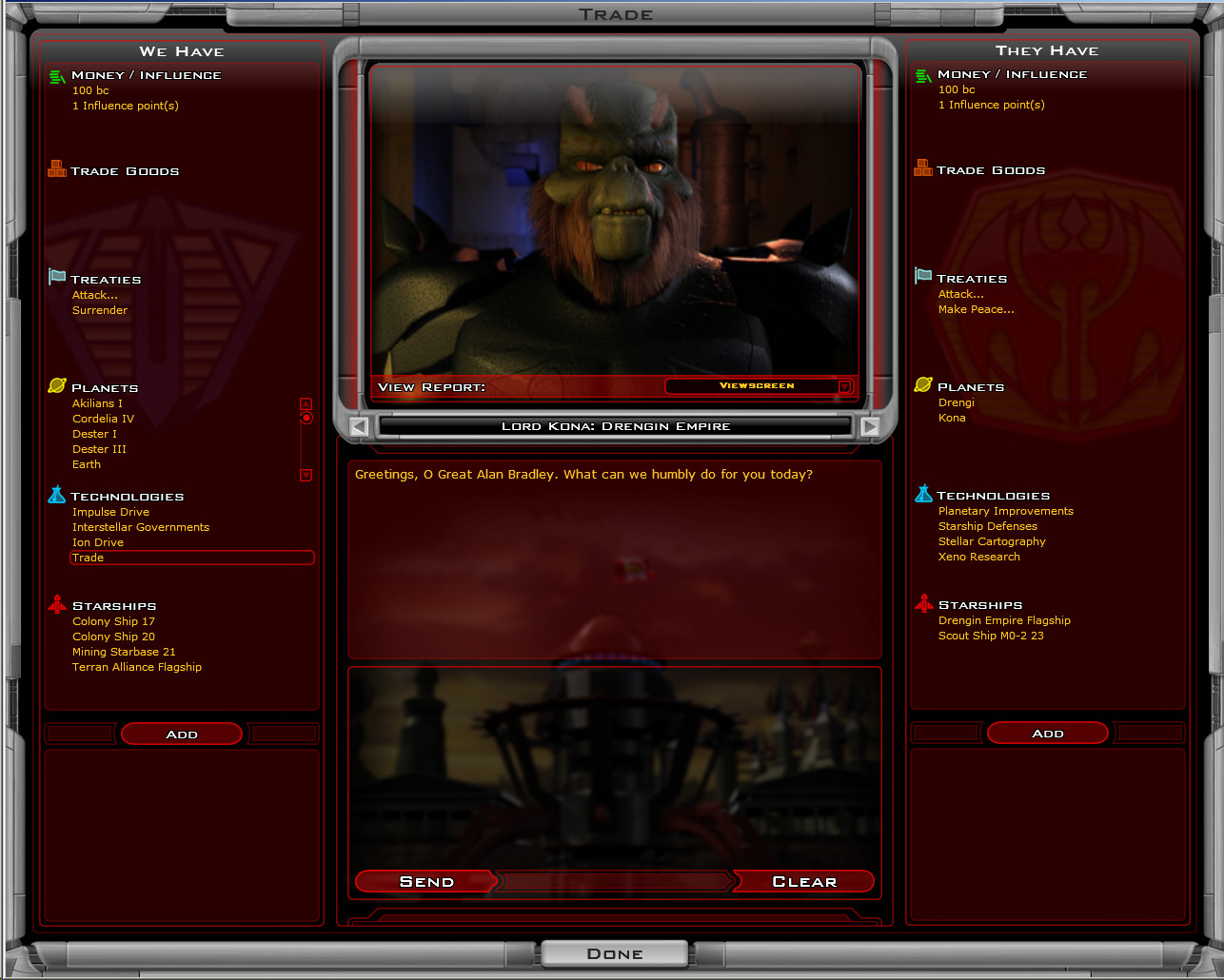
The column on the LEFT is what you have. The Column on the right is what they have. You can trade anything for anything if you name the right price. Because of this flexibility, there is no "What will you give me for X?" type functionality that other strategy games usually have since there's an infinite number of possibilities. Instead, we color-code the offer text. If it's red, they won't take it. If it's green, they will. The dialog updates as you add items.
There are a lot of different strategies that you can take from here...
You can take the standard "conquer them all" approach and just build up your military and try to conquer them. See your user manual on how combat works.
You can become the ultimate behind the current power broker and become incredibly rich and win by paying different civilizations to war each other into oblivion and buy up their planets and ships as you need them until you win through overwhelming dominance.
You could become the ultimate influencer. Built up your influence on your planets, make sure you get the influence resources, and then build influencer starbases which expand the borders of your influence until everyone defects to your side.
You could go for the master politician route in which you get everyone to like you through a variety of means and then ally with them.
You could take the roll of conqueror in which there are many different strategies for that. For example, you could focus on building fleets of small ships or just a few capital ships. You could go with relatively cheap ships supported by powerful starbases. You could poor money into research to make sure you have incredibly powerful ships. Or you could poor money into manufacturing and make sure you have lots of mediocre ships. There are many different paths to military conquest available.
You could also become a technological titan and research “Technology Victory”. It’s expensive but if you can fortify your corner of the galaxy you might just be able to hold them off long enough.
The general idea is to make sure you can play the game over and over and over again without running out of ways to play.
Also make sure you visit Galactic Civilizations II’s website (www.galciv2.com) to obtain downloads. The game’s computer AI is designed to be heavily enhanced over time based on player strategies. The computer players should feel like real human beings in most respects (except minus the disconnects and abuse).
Most of all – have fun!