Brad Wardell's Blog


Nerds & Star Trek

Published on Friday, March 26, 2004 By Brad Wardell In Humor

I don't really like Star Trek. I mean, it's okay. But I don't go out of my way to watch it. Never have. But you wouldn't know that from walking into my house. I have an entire bookshelf full of Star Trek books (that I've never read) and tucked away are various Star Trek ornaments, toys, holograms, and other Star Trek junk.

So if I don't like Star Trek, how come I have all this Star Trek stuff? Simple: People give them to me as gifts.

Here's how it works - I'm a nerdy guy. I mean, my job is on computers. And during the late 80s and early 90s, only "nerds" used computers. You know what I mean probably. I would get questions like "So you're some sort of 'computer genius'?" Right.. Just like other people are Microwave oven geniuses or Driving a car geniuses. We know how to use appliances and other things.

Nerds, for various reasons, are assumed to like Star Trek. And therefore, at Christmas, unasked for, I would get some sort of Star Trek item. Maybe a book. Maybe a toy. Maybe a VHS tape. Maybe a sound track.  And so I'd put this away and some guest would come over, spot the Star Trek book on the shelf and whisper to their spouse "Aha! I knew it! I knew he liked Star Trek. Being into computers and all! And Christmas is right around the corner!"

And so the process self-perpetuates. People see the Star Trek stuff, they put it together with my "computery ways" and viola, out pops out a Star Trek-related gift. Star Trek calendars. Star Trek trivia. Spock ears. You name it.

Which begs the question -- maybe Star Trek isn't as big a phenomenon as people thought. Maybe the whole Star Trek mania thing is manufactured by stereotypes to begin with. The ratings for Star Trek shows were never that great. The movies have never done great business. But people assume there's a huge following for all things Star Trek.

After all, look at all those nerdy guys with all the Star Trek stuff...

WinCustomize integration into Stardock Central

Published on Friday, March 26, 2004 By Brad Wardell In WinCustomize News

What pays for this site? Two things: 1) Sales of software from this site and 2) WinCustomize subscriptions.

And if you have a WinCustomize subscription, you can use Stardock Central to browse through the themes and wallpapers on this site at lightning speed. Each library can be viewed in multiple ways depending on user preference (see screenshot for the thumbnail view).

If you don't already have a subscription to WinCustomize.com, it's only $19.95 and that's for TWO years (less than $1 per month). This site costs hundreds of thousands of dollars per year to run and ads and other things don't even come close to paying the bills. Only the continued support of users subscribing to the site make WinCustomize possible.

Samurize 1.31 released

Published on Friday, March 26, 2004 By Brad Wardell In WinCustomize News

Samurize is a freeware program that allows users to load up VB Scripts to display all kinds of interesting information on their Windows desktop. Version 1.3/1.31 adds some new refinements.

In February, Samurize was nearly a victim of its own popularity as its bandwidth requirements went beyond what the host could provide. So in March, Stardock itself began hosting Samurize.com for the Samurize team.

Download version 1.31 at www.samurize.com.

WindowBlinds skinning

Published on Friday, March 26, 2004 By Brad Wardell In WindowBlinds

A History

Highlights:

  • Once upon a time...

  • A skinning history

  • Myths & Facts about WindowBlinds

Once upon a time...

Stardock used to be the world's leading independent developer of IBM's OS/2 software for the horizontal market. Chief amongst those products was Object Desktop for OS/2. If you bought a machine pre-loaded with OS/2, there was a good chance you had Object Desktop on it. Object Desktop filled in the gaps in the OS. It added features and new functionality to OS/2 as well as made it look nicer. One of the features in Object Desktop allowed users to add new looks to the OS. The term "Skinning" hadn't been coined yet.

When Stardock began working on Object Desktop for Windows in mid 1997, having a feature that would change the look and feel of Windows was considered a very high priority.But changing the look and feel on Windows would be a real challenge. The decisions made at the time would have a long lasting affect on what would become WindowBlinds. 

The curse of DOS

In year 1998, Windows 95 and soon Windows 98 would rule the Windows world. Which was a real problem for WindowBlinds because Windows 95 and Windows 98 (And later Windows ME) are restricted to having only 128K (that's Kilobytes) of GDI memory. And every button, every control, every checkbox, ever "skinned" things came right out of that GDI pool. And in Windows, if you ran low on those resources, programs would crash, the system could hang, and the system would slow down. There was no other way around it though.

When WindowBlinds 1.0 came out in 1999, it was instantly very popular. But at the same time, it gained a bad reputation with some people because it slowed down their computers and in some cases made them unstable. WindowBlinds never used very much memory, but it didn't have to. No matter how much RAM someone had installed, 128K was the pool of memory that mattered.


Windows 2000 arrives

When users began to move to Windows 2000, Stardock began being able to separate Windows 2000 from the DOS based versions of Windows (Win95/98/ME). Users who ran Windows 2000 suddenly, almost by magic, discovered that WindowBlinds wasn't slowing down their computers much or making their systems unstable. Still though, even in WindowBlinds version 3, Stardock has to make some compromises in order for it to work still on Windows 95/98Draginol since that is where the bulk of the market was. But Windows 2000's release started moving skinning (in all its forms, not just WindowBlinds) out of the "hacker" arena and make it more mainstream since desktop enhancement software was finally able to run better.

The Windows XP era

Windows XP changed everything. It was the day skinners had long awaited. The mainstream version of Windows that was no longer DOS based. No practical GDI resource limits, the end of daily crashes and other system flakeyness. Where WindowBlinds was previously a fun hobbiest program before, now it became something any user could use on a day to day basis. Windows XP also made things easier by including its own "Skinning" engine that is remarkably similar in implementation to WindowBlinds. Instead of wblind.dll, Microsoft included uxtheme.dll. Instead of wbload.exe, Microsoft put the theme manager in a process called svchost.exe. But otherwise, the two were very similar in how they functioned.

The mainstreaming of skinning on Windows XP created a new term for skins that change the Windows GUI -- visual styles. Visual styles come in two formats - WindowBlinds format and .msstyles format.

So when Stardock went back to the drawing board to do version 4, they decided to focus on Windows XP. In fact, at first, WindowBlinds 4 was only available on Windows XP. It was able to take advantage of theme APIs provided in Windows XP along with hardware acceleration provided by the drivers in the ATI Radeon and nVidia Geforce cards to speed up performance to the point where WindowBlinds was actually faster than using Microsoft's bundled themes. Also, by focusing on Windows XP Stardock could take advantage of the compatibility APIs Microsoft provided and then extend that to be able to skin programs that were not explicitly "theme aware". So with WindowBlinds 4, the command prompt becomes skinnable, for example

Longhorn in the long term

The most obvious reason why WindowBlinds has remained so popular is not just all the features it provides, but the fact that you can run it on any version of Windows. Stardock expects that to remain the same with Longhorn (the code-name to Microsoft's next OS scheduled to come out in 2006/2007). Longhorn will have a new compositing engine (similar to Quartz on MacOS X). This will allow for vastly more sophisticated visual styles and should eliminate the last differences in performance between "classic" Windows and one with a visual style.


A Skinning History

The first WindowBlinds skins tended to be fairly simple.


Soon though, users began to make more complex visual styles for WindowBlinds. Note in this 1998 version that the Start bar isn't skinned yet and neither are most of the controls.

This is an early sampling (early 1999) of some of the most popular skins of the time.

Shoggot's Scathe in summer 1999 featured a title bar that rotated when active (the blade rotated) and whose blade grew as the window grew.

Screenshot of skins running on WindowBlinds 1.0. WindowBlinds let users assign different skins (visual styles) to different applications.

A collage of some of the most popular skins of 2000

WindowBlinds running in late 2000

WindowBlinds in early 2001 -- 9 months before Windows XP was released.


Windows XP-style visual styles start becoming poular. This is Windows XP Charcoal by Alexandrie.

This is a collection of some of the more popular skins of 2002.

MetalX, the visual style that won the most awards at the GUI Olympics 2002. Designed by Grayhaze.

Early 2002 example of coloring in action

Nintendo licenses WindowBlinds to release additional visual styles for their customers

Microsoft licenses WindowBlinds to add new visual styles for their Xbox customers.


WindowBlinds gains the ability to change progress animations


WindowBlinds gains the ability (with the help of SkinStudio) to import in .msstyles which immediately benefit from WindowBlinds features such as coloring on the fly.


Myths & Facts about WindowBlinds

Because WindowBlinds has been out now for half a decade and it has changed so dramatically over the years, there are a lot of misconceptions about how WindowBlinds works.

MYTH: WindowBlinds is a memory hog.

FACT:  No. WindowBlinds not only uses very little memory but it actually uses LESS memory than the bundled themes do. That's because WindowBlinds visual styles are designed to use less memory since its skin format was designed during the days when users had fewer resources.

The Wbload.exe process in the Windows task list.


MYTH: WindowBlinds will slow down your computer.

FACT: To a certain extent, anything you load onto your machine will slow it down by some amount. The question is, will a given program slow down your computer noticeably. In WindowBlinds' case, it shouldn't slow down your computer. Thanks to hardware acceleration and using extra video RAM on most new cards, WindowBlinds should be noticeably faster than using the bundled themes in Windows XP.

MYTH: WindowBlinds isn't as compatible or will crash my programs

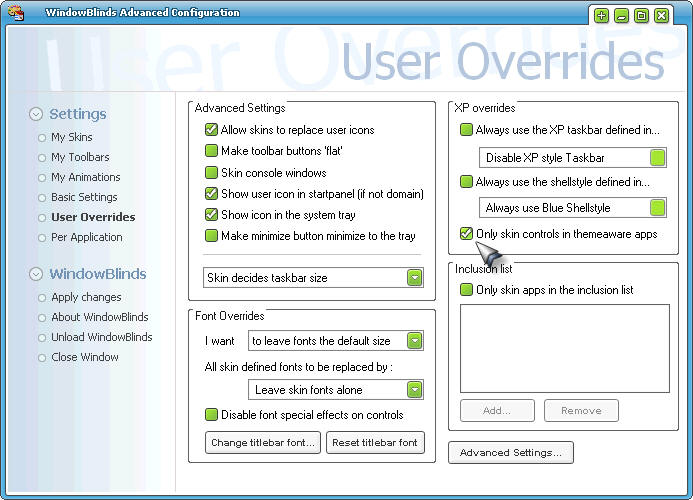
FACT: WindowBlinds, because it's a commercial product, has to provide additional value over the included themes in Windows XP. One of the ways it does this is by defaulting to skinning non-theme aware programs. Of course, some programs just don't like being skinned. Those apps can be added to the exclusion list. Most existing software is excluded by Microsoft's theme engine. But you can do the same thing with WindowBlinds if you are concerned about compatibility over consistency:

You can tell WindowBlinds to only skin theme aware programs and have identical compatibility to Windows XP's bundled themes.


MYTH: All the WindowBlinds visual styles are big and ugly.

FACT: There are thousands of WindowBlinds visual styles on the net. And it can also import in .msstyles files if you have SkinStudio installed. Because WindowBlinds is very flexible, skinners tend to make skins that they want to make with little limitation. So that creates more variety. But sites such as WinCustomize.com do have ways of filtering visual styles so you can find the ones you want.

For example, if you want to see the Admin picks of WindowBlinds visual styles, you can go here. That doesn't mean you'll like what they picked but they are skins that other people have liked.

The History of WindowBlinds

Published on Friday, March 26, 2004 By Brad Wardell In WinCustomize News

WindowBlinds was the first full GUI skinning program for Windows. It began development in 1997. And by 2001, thousands of skins/visual styles had been made for it and even influenced the development of Windows XP which includes a quasi-WindowBlindsLite type feature in it to change from classic to "Windows XP style".

This article goes over the history of WindowBlinds complete with screenshots of its evolution. Check it out!

Net cowards

Published on Thursday, March 25, 2004 By Brad Wardell In Usenet Discussions

Before there were blogs there was Usenet and before Usenet there were BBSes. And from the very start, there have always been hyper-aggressive people who take out their own personal frustrations on the world at large.

There aren't many of them, but there doesn't have to be. Just the few that are out there are enough to bring grief to other people. Being on-line as much as I am, using my real name, has made me a target of griefers over the years. When I ran BBSes 15 years ago, I occasionally had to deal with them. Sometimes they'd go after me. Sometimes they'd just sit around like a trap door spider waiting to suck the fun out of the lives of those who were unfortunate enough to encounter them.

My friend Pat, T-man (who is the genius in charge of this site's back end), has had similar experiences. One time, a griefer went too far and T-man went to his house and yanked him out the door and made it clear that there'd be real world consequences for that.

We were a lot younger then and obviously one cannot simply go and find these griefers and punch them in the nose. But boy, it's tempting sometimes. On usenet I've had people accuse me of everything from being gay to being a convicted child molester. Griefers get it down to a science knowing which buttons to push. They always seem to have an inordinate amount of time.

At various net gatherings, I've met these griefers. Of course, they weren't "griefing" me (or they wouldn't have come). But of the dozen or so griefers I've met in real life, it's always the same story: They're cowards. And I mean pathetic cowards.

Griefers aren't just detractors. They are people who intentionally go out of their way to try to upset other people. They actually do things, on purpose, just to make someone else unhappy. It is as if they are trying to absorb the happiness of others through delivering grief like some sort of parasite trying to cure their own miserable lives.

In my experience, griefers fit a very particular psychological profile:

First, they are nearly always male. I don't think I've ever met a female griefer in all my years (there's plenty of female net personalities I've encountered I didn't like but none of them intentionally went out of their way to bring pain to others for seemingly no reason).

Secondly, they're nearly always single. Which I guess isn't very surprising.

Third, they come in two major groups. The first group are the teens/young adults who practice petty evil. The kind of people who would kill a small animal for no particular reason. Petty evil. They are fairly common. An under-developed sense of empathy. They're usually physically weak. It's as if they are trying to get back at the world for all the wedgies they get at school. Momma's boys.

The other group though, at the risk of bieng politically incorrect, tend to be 45 to 55 year old white single men living on disability. Yea, I know, pretty specific. Not always are they on disability. The key ingredient are bitter men with an extensive amount of free time on their hands. They are usually quite sad. Almost Golumnesqe in their pitifulness. I usually encountered this kind at User Group meetings when I'd be demonstrating something. They wouldn't say a word to me. But I'd later see them on-line just making the lives of others miserable.

Whereas younger griefers tend to hang out on forums and in on-line games, the latter tend to show up on Usenet or spend their time terrorizing some hapless technical support person. The younger ones are brief and not subtle at all. The older ones write amazingly lengthy, vile, and kook-like diatribes.

The length and detail are how you can distinguish the young griefers from the older ones. It's all about quantity for the young griefer. Older ones focus on quality. Singling out a target and making it their mission in life to try to bring "someone down a notch or two". Writing book-like diatribes about things that have nothing to do with them. That are about unimportant things. Things that cause onlookers to wonder "I wonder what they might have made of themselves if they put their hateful energy into something constructive?" 

Regardless of the age, griefers are cowards. I mean that in the literal sense. You meet them in person and they are quiet, introverted, passive. Easily bullied and dominated by those around them. But secretly, quietly, they build their resentment of those around them into a little black ball of hate and spew it out onto the Internet. If they're going to be miserable, why shouldn't others? Maybe if they can make someone else miserable, it will make themselves not feel so pathetic in comparison.

Those of us who run net communities come to look for the type and put in safe-guards as early as we can. Since griefers are cowards, they quickly flee if they believe their power base is gone. That is why the older ones tend to live in the sanctuary of Usenet and the younger ones simply move from game to game, from fan site to fan site, from on-line community to on-line community. There are always ample targets for them to take out their pain on.

When you write an article, try to imagine that you are talking to that person there. Since I use my real name and can be "found", I have long made it my policy to imagine myself saying this in a crowded pub. If I'm not willing to say it to someone's face, I won't say it. It's advice that I highly recommend to others.

Still...even if I understand them, it is hard not to be tempted to retaliate against one's cowardly on-line tormenter. Because they would never say the vile things they write in person, in public.

Myths & Facts about WindowBlinds

Published on Thursday, March 25, 2004 By Brad Wardell In WinCustomize Talk

Myths & Facts about WindowBlinds

Because WindowBlinds has been out now for half a decade and it has changed so dramatically over the years, there are a lot of misconceptions about how WindowBlinds works.

MYTH: WindowBlinds is a memory hog.

FACT:  No. WindowBlinds not only uses very little memory but it actually uses LESS memory than the bundled themes do. That's because WindowBlinds visual styles are designed to use less memory since its skin format was designed during the days when users had fewer resources.

The Wbload.exe process in the Windows task list.


MYTH: WindowBlinds will slow down your computer.

FACT: To a certain extent, anything you load onto your machine will slow it down by some amount. The question is, will a given program slow down your computer noticeably. In WindowBlinds' case, it shouldn't slow down your computer. Thanks to hardware acceleration and using extra video RAM on most new cards, WindowBlinds should be noticeably faster than using the bundled themes in Windows XP.

MYTH: WindowBlinds isn't as compatible or will crash my programs

FACT: WindowBlinds, because it's a commercial product, has to provide additional value over the included themes in Windows XP. One of the ways it does this is by defaulting to skinning non-theme aware programs. Of course, some programs just don't like being skinned. Those apps can be added to the exclusion list. Most existing software is excluded by Microsoft's theme engine. But you can do the same thing with WindowBlinds if you are concerned about compatibility over consistency:

You can tell WindowBlinds to only skin theme aware programs and have identical compatibility to Windows XP's bundled themes.


MYTH: All the WindowBlinds visual styles are big and ugly.

FACT: There are thousands of WindowBlinds visual styles on the net. And it can also import in .msstyles files if you have SkinStudio installed. Because WindowBlinds is very flexible, skinners tend to make skins that they want to make with little limitation. So that creates more variety. But sites such as WinCustomize.com do have ways of filtering visual styles so you can find the ones you want.

For example, if you want to see the Admin picks of WindowBlinds visual styles, you can go here. That doesn't mean you'll like what they picked but they are skins that other people have liked.

Editiorial: Are skinners abandoning originality in exchange for popularity?

Published on Thursday, March 25, 2004 By Brad Wardell In WinCustomize News

I was doing an article today on the history of WindowBlinds skinning. And I firmly believe that the vocal "minimalistic skinsa re king" crowd have really done real harm to skinning. I say that because skin authors seem to have become so afraid of making anything that isn't "minimalistic" because not only will they not be appreciated for being creative and original, they're likely to get flamed by the "Minimastic" brigade.

Let me show you some skins from 1999 so you can see what I mean in terms of originality.


This is old but when was the last time you saw a skin that tried to look like something other than "Look, it's another generic GUI"? Or at least done reasonably well?

This is from 2000! Sure there's OS skins in here too but look at that Allend Bond skin. Or Dangeruss's skin.

This is from Shoggot. His title bar blade actually rotated (animated) when it was the active window and the blade stretched as you increased the size of the window. I can't even remember the last time someone made a good animated title bar. And it's so easy. It's just frames of animation. Some little glowing effect or SOMETHING other than the usual gradients that everyone seems fixated on.

I believe that the reason for the lack of creativity these days is because of the obsession with downloads combined with fatigue from being flamed by the critics who will look at a skin that took 2 weeks to make and shrug it off "I won't use that crap" simply because it's not Windows Luna (but red) or some skin that looks like a slightly more minimalistic version of Luna.

Here's one from DAK from Russia released FOUR years ago.

When was the last time you saw a skin that used animation this clever? This Matrix skin by Mercury was made 4 years ago.


These two skins from Dangeruss, which are going on 5 years in age, show what skinning is all about. Creative and yet outstanding quality. These are the kinds of skins WindowBlinds was made for artistic freedom to create cool and interesting looking things. Little touches like semi-transparent scrollbars (how often do you see that these days?) and captions on the title bar buttons.

Many skin authors seem to be skinning more for popularity rather than for themselves. Back before skinning was so popular, popularity wasn't an issue - there just weren't enough peopel using this stuff.  But now, skinning is not just popular, but with popularity comes..well criticism. The skins you see here took real work to make. But who wants to spend weeks on a skin only to have some anonymous user slam it because they think it's "gaudy".

I wish I had the talent to create good artwork like you see here because I would create "gaudy" skins (if these are "gaudy"). I would rather create a skin that is new and different than yet another "It's very much like Luna but the title bar is slightly smaller and it has a gradient..."  (not that I'm not guilty of that myself since those kinds of skins take less time and will get more downloads.

The skins you see here are available on WinCustomize.com in the WindowBlinds section. Just look at Dangeruss, Mercury, D.A.K. and Allen Bond if you, as a skin author, want to see how these skins were made or if you, as a skin user, want to try them out (of course, since they were made before XP, not all of xP will be skinned with them).

"There's so much JUNK! How do I find good stuff???"

Published on Thursday, March 25, 2004 By Brad Wardell In WinCustomize News

We often hear someone say "There's too much junk in the library!" We have a rating system on skins but what if you want to find the cream of the crop? Well, you would still need to look through the library to see what the best skins are.

..But another way would be to look at the skins that the admins picked as their favorites...

You can now, in a given library, sort by featured. This lets you look at just things the admins have played around with and thought were good enough to feature. They are, effectively, the admins picks.