Brad Wardell's Blog


WinCustomize Subscription Drive: Day 5

Published on Wednesday, October 5, 2005 By Brad Wardell In WinCustomize News

As we near the end of Day 5 of the WinCustomize subscription drive it looks like we'll be at just over 200 by the end of the day.  This means we'll be a little off-par for the month to make our 2000 new/renewed subscriber goal.

Earlier, we talked about the incredible WinCustomize direct-browser and the system tray applet that users get when they subscribe. These programs provide the ultimate way to access the gigs of content, posts, etc. that are on WinCustomize.

Another cool feature that will be coming up in the coming months will be exclusive WinCustomize subscriber skins.  We'll be releasing skins, themes, icons, wallpapers, etc. that will be only available to subscribers for 60 days.  Skin authors with Master access or higher will initially be able to release skins in this fashion as well.  Top skins based on subscriber downloads will be what is used to determine uploads so that skinners who choose to make use of that feature won't be punished.  Eventually, we hope to enable skinners to be subscriber-affiliates, that is, users who subscribe from their particular skin will get a 20% royalty on that skin once a base # of subscriptions are collected.

Stay tuned!

ATI fires back with the X1000 series

Published on Wednesday, October 5, 2005 By Brad Wardell In WinCustomize News

ATI has finally has an answer to nVidia's 7800 in the form of the Radeon X1000 series.  Whether the new family of graphics cards can match nVidia's latest offerings remains to be seen.

The top of the line card, the X1800 has over 320 million transistors in it, 16 pixel shaders and other features that simply look crazy-incredible.  In either case, it'll certainly be more than enough for today's games.  One can hope that ATI remains committed to their generally good driver quality -- something nVidia has been lacking on recently despite having more horse power on their cards.


Links:
View: Source and Specs

Cogent and Level 3 battle it out

Published on Wednesday, October 5, 2005 By Brad Wardell In WinCustomize News

Cogent and Level 3, two of the world's largest ISPs are having a dispute.  As a result, users of Level 3 may not be able to reach sites that make use of Cogent and users of Cogent may not be able to reach websites that use Level 3.  Stardock, Betanews, WinCustomize, Neowin.net, deviantART, and many other sites use Cogent.  So if someone isn't able to connect to Stardock or any of its sites, this may be a reason.

But it speaks to a larger issue -- could the Internet eventually be broken up with us all at the whim of large corporations?


Links:
View: Cogent's Side of the story

WindowBlinds 5 BETA released

Published on Tuesday, October 4, 2005 By Brad Wardell In WinCustomize News

Stardock has released the first BETA of WindowBlinds 5.  WindowBlinds is a program that can completely alter the look and feel of the Windows GUI.  It does so by applying visual styles (skins) to your title bars, push buttons, Start bar, borders, etc.

The most anticipated new feature of WindowBlinds 5 is its ability to deliver glass effects to Windows XP user.  Technically speaking, WindowBlinds can do full alpha blended user interfaces now, that means that skins can have a variable level of transparency.  Numerous new features have been added to allow skinners to do reflective effects, shadows, smooth edges and more to their WindowBlinds skins.

WindowBlinds 5 also eliminates any dedicated processes to it.  When running WindowBlinds 5, no additional processes are needed anymore, it runs as part of the system.  WindowBlinds 5 BETA currently requires Windows XP (32-bit edition).  A 64-bit edition will be available with beta 2.  It should run on any reasonably modern video card. 

WindowBlinds 5 is currently only available on Object Desktop.  To get Object Desktop visit: www.objectdesktop.com.

Preview Guide

Beta 1 Readme

Autodesk now owns Maya and 3D Studio

Published on Tuesday, October 4, 2005 By Brad Wardell In WinCustomize News

Autodesk, the makers of 3D Studio Max has acquired Alias, the makers of Maya for $182 million in cash.  For those of you who thought that 3D Studio Max was made by Discreet, well, Autodesk now owns Discreet so in effect, the 3D modeling software market is under control by Autodesk.

Most 3D modeling that you see in movies, TV, and games is done using either Maya or 3D Studio Max.  This concentration of market power by a single company in such a key market has many designers and artists quite nervous.

"What about the cost of both products?" said Scott Tykoski, a 3D graphics designer at Stardock. "These are expensive products today when there's competition, what about in the future? Are we going to be paying $12,000 base cost for these programs in a year?"

According to Autodesk, the product release schedule for both products will continue into the foreseeable future without modification.  The two companies will continue to exist and market and sell both Maya and 3D Studio Max for the near future.

What the actual effect on development of both products now that competition between the two is gone remains to be seen.  This story is still developing..

WindowBlinds 5 Beta 1 Released

Published on Tuesday, October 4, 2005 By Brad Wardell In Object Desktop

WindowBlinds 5 beta 1 (4.90) has been released on Object Desktop (it's only available if you have Object Desktop presently).

UPDATE: 4.9A now up -- support for older nVidia cards added!

Release Notes:
------------

This build is the first beta for the upcoming WindowBlinds 5. There are going to be some rough edges as it gets out in wider distribution, so please be as detailed as possible with any feedback.

Requirements:
Windows XP.  Does not support Windows 2000 or Windows XP 64-bit (64-bit version will come later though).

The Big One - Per-pixel borders on XP

-Per-pixel (alpha-blended) titlebars and borders. It's been an internal struggle over the last year or more as to whether we would be able to implement these on Windows XP with reasonable performance. We have, _if_ you have a relatively modern video card and good drivers for it.

What does that mean? Your video card needs to have hardware support for alphablending and a driver with SHADEBLENDCAPS support implemented and functional. ATI Radeon's 9000+ or later should be fine, NVIDIA GeForce 6000+ or later should be fine, and even chips that you wouldn't expect like the integrated Intel 82852/82855 GM/GME run fine with it.

Some boards are not going to work with this release, though we hope to be able to work with the driver vendors to find a workaround. GeForce 4600/5200 and related seem to be a common trigger for that (like they are losing the alpha channel for the images). The top/bottom borders with per-pixel skins seem oversaturated, but the left/right borders are working (and you can click "through" the top border).

Yes, you can put shadows on your borders and make them part of the skin. See the Arrow sample that is included. The shadows are part of the skin.

Other new features:

By Per-Pixel, we mean elements that have full alpha blending support (anti-alias themselves to whatever graphical elements are around it).

  • -No wbload.exe process. The binary is still there for installing skins.
  • -Per-pixel menus
  • -Per-pixel taskbar
  • -Per-pixel progress bar overlay
  • -Per-pixel "Please wait" dialog
  • -New wbconfig previews
  • -New skincast features (not in this build)
  • -Lots of optimizations under the hood.

When reporting problems, please check the Troubleshooting section of WBConfig. Select the text with the left-mouse button and press Ctrl-C to copy the text. Please include that when reporting any visual-bugs along with a screenshot (cropped if appropriate for size).

There is an updated SkinStudio beta available to Object Desktop customers with support for creating per-pixel skins. You must still include the non-pp images for systems that don't support the new frames, so the skins should still work with WB 4.x.

Note: To change skins you have to load WBConfig now.  There's no system tray icon yet.  You can change skins from display properties (msstyles now show up side by side with WindowBlinds skins btw) or you can put a short-cut to WindowBlinds config somewhere handy like on the Quick Launch or use Keyboard LaunchPad to assign a hot-key to bring it up.

Enjoy!

Support: https://forums.stardock.com/?forumid=167

What motivates you to start a business?

Published on Tuesday, October 4, 2005 By Brad Wardell In Business

This December will be the 6th year that Stardock has been a Windows ISV.  In December 1999, Object Desktop for Windows was released. And by this December, WindowBlinds 5 will hopefully be ready for release (though no promises, nothing ships until it's ready). 

Back in 1999, there were only a handful of us in a tiny office in Livonia.  Now, there's over three-dozen of us in multiple locations.  I think the key to having a successful company in the long-term is to develop your skills in spotting talented people.  If there's one thing I can take pride in with regards to the company, it's that we've been able to attract some great talent.

We've got guys who've come to us from Sony, Disney, Maxis, and other very large companies who want a small company environment where their full talents can be unleashed. The stuff they make is simply incredible.  We've also been able to bring on some star-entry-level talent as well. Kids, just out of college who are incredibly self-motivated and highly skilled are working on a variety of future projects. To use a sports analogy, it's like we got several good first round draft-choices.

The biggest challenges we face going forward are those of scale.  We still don't have a director of business development.  Our direct-sales force is still understaffed and under-performing.  Those are areas I'm trying to find top-notch people for but it's difficult to get just the right individual for each of those positions -- especially in the midwest.

People looking from the outside see a company, a corporation.  On the inside, we're just a bunch of guys trying to balance having a successful business with having an enjoyable environment.  Even with our steady growth in revenue, we could be making more -- a lot more if we wanted to be a different kind of company.  But wealth generation is not my primary motivation. It is, really, a side-effect of what we do.  We want to make really cool stuff and have a good time while we make it. And we are fortunate enough that other people want the cool stuff we make.

Running a company is often very rewarding and sometimes very frustrating. But it's always interesting.  I don't necessarily recommend it for most people. I think it all depends on what the goal is.  My goal in having a company was to have some level of control over my life.  I think if making lots of money was the goal, things would not have turned out as well.  I think that it's because we've focused on doing things that are cool to work on that we have been able to attract such wonderful, talented people who in turn are able to create things that do happen to make a lot of money. 

WindowBlinds 5 Preview Guide

Published on Monday, October 3, 2005 By Brad Wardell In WindowBlinds

Version 5

Preview Guide

Our story so far..

WindowBlinds is a program that can completely customize the Windows user interface (title bars, star bar, push buttons, scrollbars, etc.).

Since its initial release in 1999, 4 versions of WindowBlinds have been released.  When Stardock began working on WindowBlinds, no one else had ever attempted to do something like it.  Getting it to work on the various versions of Windows was a real challenge and in early versions, performance was sacrificed to attempt to gain some level of stability on those older operating systems.

In 2001, Microsoft implemented a new look into Windows XP and used a GUI architecture that worked similarly to how WindowBlinds worked.  Stardock was able to make use of that architecture with WindowBlinds 4. At the same time, video card vendors were starting to optimize their drivers for Windows XP.  As a result, by WindowBlinds 4.5, the program not only could make Windows look terrific, it could make Windows run faster.  By caching drawing via the card's video memory, WindowBlinds could substantially increase the rate in which window resizing and repainting occurred. 

Users continued to request new features. Two features were at the top of the list: First, alpha blended title bars and borders.  That is, title bars and borders that could blend in to whatever was behind them to eliminate jaggies and allow skins to be semi-transparent like a piece of glass.  Secondly, user requested the elimination of wbload.exe, the process required to manage the WindowBlinds skins. 

After two-years of effort, Stardock is about ready to deliver WindowBlinds 5 which can produce glass/alpha blended effects on Windows XP with virtually no slow-down (on a modern video card) and now makes use of some built in system APIs to manage WindowBlinds visual styles which allows for the elimination of wbload.exe.  WindowBlinds 5 is effectively a native part of Windows XP.

Glass Effects

 
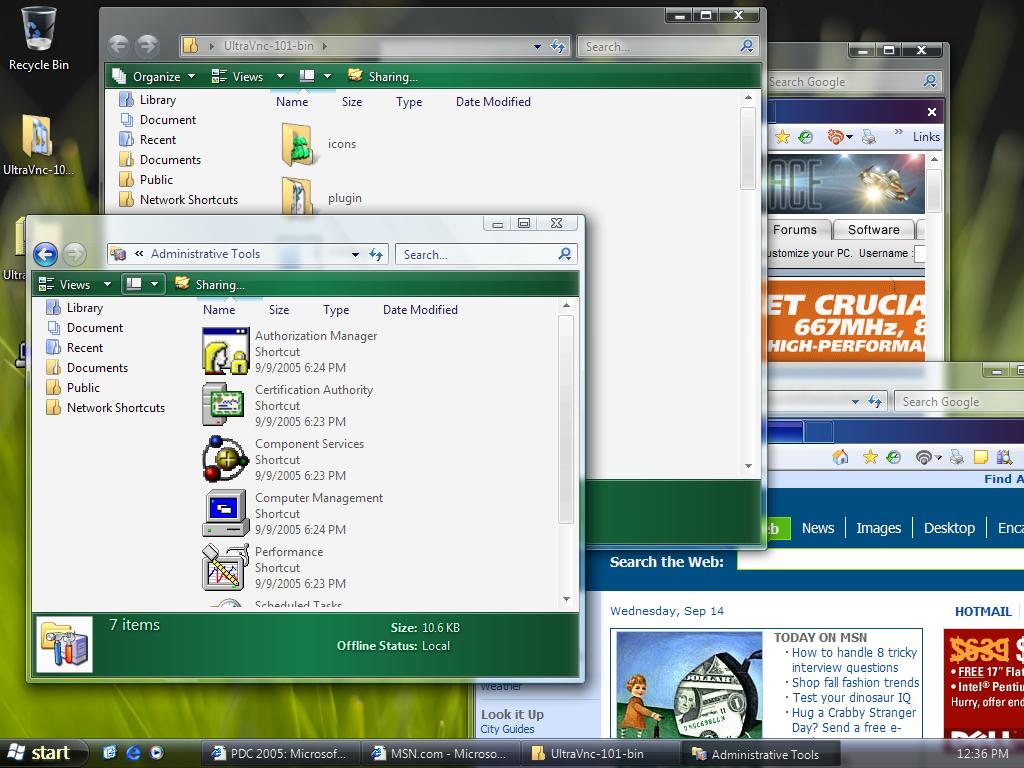
Left: Windows Vista, Right: Windows XP with WindowBlinds 5 Beta.

When user first began seeing screenshots of Microsoft's cool new Windows Vista with its cool glassy effects, many wondered if the same thing could be done on Windows.  Most technical people (including many at Stardock) believed that having glass effects on Windows XP was essentially impossible to do with any kind of decent performance.  On Windows Vista, the entire desktop is composited as a single 3D surface (like you'd see in a modern PC game).  That means on Windows Vista, effects get the full benefit of your modern 3D graphics card.  On Windows XP, that isn't the case.  What makes WindowBlinds 5 so special is that Stardock managed to find a way to bring glass effects to Windows XP yet still have a high level of graphics performance (i.e. moving and resizing windows).  A video card with 64 MB of video memory from ATI or nVidia should be more than enough to get good performance.

More than Glass

While making Windows XP look like Windows Vista is nice, it's not the reason why the alpha blending effects were developed.  Skinning, as an artform, really relies on giving artist as much freedom as possible.  Today, alpha channels (different levels of visibility) are a basic part of virtually any graphical element. So to force tile bars and borders to be either totally visible or totally transparent was very limiting.  For one thing, it means that there's jaggies on the edges of skins.

Consider Windows XP's UI:

See the jaggies?


Look very closely at the edges and you see that they try to blend in.  It's a subtle effect but overall allows the operating system to look more smooth, more polished. Combine glass effects and anti-aliasing and you can get some really neat stuff:

Screenshots

This is Stardock's Aura Skin.  If Stardock were making an operating system, this is the design it would go for.  It comes with WindowBlinds 5.


This is StealthOS.  It too comes with WindowBlinds 5.


This is 5imple - Alpha edition.  As you can see, WindowBlinds 5 can still change colors of your GUI, even on glass.

Getting WindowBlinds 5

WindowBlinds 5 is in beta and will only be available on Object Desktop until it nears release.  User who purchase WindowBlinds 4.x from September 1, 2005 on will receive WindowBlinds 5 for free when it is released.  Other owners of WindowBlinds 4 will be able to upgrade to WindowBlinds 5 at a reduced cost.

To get Object Desktop, which is Stardock's premiere suite of Windows enhancement software, go to www.objectdesktop.com

WinCustomize Subscription Drive: Day 3

Published on Monday, October 3, 2005 By Brad Wardell In WinCustomize News

As we near the end of day 3, WinCustomize.com has 128 new/renewed subscribers.  To get to our 2000 goal we have to average 64 per day.  By subscribing to WinCustomize.com you not help keep WinCustomize.com up and running but you also get unlimited downloads, two premium suites plus a new one that that is being worked on, no advertisements on the site, a personal page, a personal photo album with 20 megabytes of disk space, a personal blog with your own partial domain name and more.  You also get the WinCustomize browser.

The WinCustomize browser is a unique program that taps directly into WinCustomize.com's database.  Not only does it quickly retrieve the most popular skins, the latest downloads, and our full directory of skins, themes, wallpapers, etc.  It is also able to directly apply that content.  Whether it be a wallpaper, a Windows Media Player skin, an icon package, or even a WindowBlinds skin, you can select a given skin, press a button and it'll instantly download and apply it for you (as long as you have the corresponding program installed and if not, it'll prompt you and download the program for you!). The Browser also integrates seamlessly into the WinCustomize forums.  It's the fastest, easiest way to access the forums on WinCustomize. 

And if that wasn't enough, there's also the WinCustomize system tray notifier.  Simply load it up and it sits in your system tray notifying you when new content has come on-line (user settable).  The newest skins, the hottest themes, and latest news are always just a click away.

These are just some of the things user get for $19.95. It's an incredible variety of software, content, and site services.  In a world where many sites and services are charging $15 to $25 per month, WinCustomize provides a great deal of bang for the buck.

Office 12 gets Native PDF support

Published on Monday, October 3, 2005 By Brad Wardell In WinCustomize News

Steven Sinofsky (Senior Vice President, Microsoft Office) has announced that Microsoft is planning to build in native support for the PDF format in Office "12".

The PDF support will be built into Word, Excel, PowerPoint, Access, Publisher, OneNote, Visio, and InfoPath. There is no word on whether customers will be able to use support in Outlook. The new functionality will work in combination with the new Open XML formats in Word, Excel, and PowerPoint. Microsoft wants to ensure that sharing documents across multiple platforms and long term archiving are easily available. Customers now have several options, with the existing support for HTML and RTF, and now the new support for Open XML formats and PDF.

Brian Jones (Program Manager, Microsoft Office) commented on his blog that "this really all comes down to the basic theme of content sharing. We realize that this is a really important scenario, and that's why we're making the move to default XML formats that are fully documented. Now we've moved to the files being in open, redistributable, and archivable formats; and we can focus more of our innovations around ways to act on those formats. This is true on the client and the server."

Office 12 is currently undergoing internal testing and is expected to be released in beta form in November.