Brad Wardell's Blog


The local AI Primer

Published on Monday, September 14, 2026 By Brad Wardell In Artificial Intelligence

I've taken the deep dive into local AI so you don't have to.

My feed is filled with local AI stuff. There's a lot of "boy who cried wolf" feeling around it because I hear claims and then only later you find out they were running on $100k of hardware. For that I could subscribe to Claude Max, Codex Pro and Grok Super Heavy Build for decades.

What I really wanted to know is what hardware can do what. What were the real limitations and what they could really do. And so I dug in. And now, you can benefit from that journey. And yes, I use em-dashes — a lot. They're mine. AI can't claim them.

Part 1: The AI Models

AI Parameters: 2B, 3B, 9B, 27B for fun and profit

When you see a model called "Llama 8B" or "Gemma 27B," the number is its parameter count, the number of learned weights inside the neural network, in billions. Parameters are, roughly, the model's capacity to know things and reason about them.

Rough breakdown by size:

  • ~1B and under: Autocomplete with hallucinations of grandeur. Fine for classification, summarizing a paragraph, simple formatting tasks.
  • 2B–4B: Genuinely conversational. Can follow instructions, answer general questions, and with careful prompting, do simple tool use. This is the sweet spot for phones and NPUs.
  • 7B–9B: The workhorse class. Decent general knowledge, can follow multi-step instructions, handles light agentic work (call a tool, read the result, respond).
  • 13B–30B: Where local models start feeling like "real" AI. Better judgment, fewer hallucinations, can recover from their own mistakes mid-task.
  • 70B+: Approaching frontier-model territory, but you need serious hardware. Think a Mac Studio with 128GB of unified memory or a multi-GPU rig, not a laptop.

Parameter count also affects speed, not just smarts. Every single token the model generates requires reading essentially all of the parameters from memory. A 27B model isn't just smarter than a 3B model, it's also about 9x more work per word. Keep that in mind; it becomes a big deal when we start thinking about what you can do in real-time vs. what you should schedule out.

Quantization

Models are trained in 16-bit precision. An 8B model at 16 bits per parameter is 16GB just for the weights.

Think of it like graphics formats. 16-bit precision is like a bitmap. No one, anymore, sends a .BMP in email.

Quantization is lossy compression for neural networks: store each weight in 8, 5, or 4 bits instead of 16. So it's like taking that BMP and turning it into a JPEG. At 8-bit quantization it's essentially the same as the original uncompressed version. At 4-bit it's lost some but probably not enough to matter other than in benchmarks. Below that and it starts to get pretty bad. 4-bit is generally the sweet spot.

The alphabet soup: Q4_0, Q4_K_M, Q8_0, IQ4_NL

Quantization also has many ways of doing it. Just like there's a ton of graphic formats there's a ton of ways of quantizing these models, each with their own trade-offs.

In my experience, I tend to focus on MLX (for Mac hardware), the ones that NVIDIA likes, and the ones that NPUs from Qualcomm and others will like.

A sampling:

  • Q8_0: 8-bit. Nearly lossless, twice the size of 4-bit. Worth it only for small models where the size doesn't hurt (a 0.6B model at Q8 is under 1GB, so why not).
  • Q4_K_M: the modern 4-bit "K-quant." Smarter allocation of bits (important layers get more precision). Usually the best quality per gigabyte, and the default recommendation on CPUs and GPUs.
  • Q4_0: the original, simplest 4-bit format. Slightly worse quality than Q4_K_M, but its plain block layout is what specialized hardware paths are built for. On ARM CPUs and NPUs, Q4_0 is often dramatically faster than Q4_K_M because the fast kernels only speak Q4_0.
  • IQ4_NL: a newer 4-bit format using a non-linear codebook. Great quality, but hardware support is spottier.

The format has to match the hardware. In our own testing, the same 4B model ran at 37 tokens/second as Q4_K_M on CPU but collapsed to 14 when routed to the NPU, because the NPU path couldn't handle K-quants and fell back to a slow path. Same model, same computer, same "4-bit," 2.5x difference. This is the single most common way people accidentally sandbag their local AI setup. This is why it's still a headache and programs like Clairvoyance are exploding in popularity — they just take care of this nonsense.

Part 2: Hardware constraints

TOPS, NPUs, GPUs: the speed of thinking

Chip vendors advertise TOPS, trillions of operations per second. A Copilot+ certified laptop's NPU claims 40–80 TOPS; an RTX 4090 delivers over 600. You'd think a 45-TOPS NPU runs AI at some meaningful fraction of a 4090's speed.

It does not.

There are two very different phases when a model responds to you:

  1. Prefill: reading your prompt. This can be done in parallel so GPUs and NPUs do great here.
  2. Decode: writing the answer. Tokens come out one at a time, and each one requires streaming the entire model through memory again. TOPS are nearly irrelevant; memory bandwidth is everything.

So a laptop NPU can read and understand a full article of text in half-a-second. But actually commenting on it is limited by the memory bandwidth which might take a minute.

RAM: system RAM, GPU VRAM, and unified memory

The model has to live somewhere, whole, in fast memory:

  • Discrete GPU (VRAM): Fastest option by far, but VRAM is scarce. A 12GB card fits a 9B comfortably or a 27B not at all. Spilling layers to system RAM works but every spilled layer runs at system-RAM speed.
  • System RAM (CPU): Plentiful and cheap (32GB fits anything you'd sanely run) but slow, see below.
  • Unified memory (Apple Silicon, Snapdragon X, AMD Strix Halo): CPU, GPU, and NPU share one pool. The great trick of a 128GB Mac is that all 128GB of it is available to the model at decent bandwidth, even though that bandwidth isn't remarkable on its own.

Sizing rule of thumb: model file size + 20–30% for the working context. A 5GB Q4 model wants roughly 7GB free.

Memory bandwidth: the often-ignored bottleneck

Memory bandwidth predicts local AI decode speed better than any other spec:

Hardware Memory bandwidth
Typical laptop DDR5 ~60–90 GB/s
Copilot+ certified laptop (LPDDR5X, shared) ~120–152 GB/s
Apple M5 ~153 GB/s
Snapdragon X2 Elite Extreme (LPDDR5X, shared) ~228 GB/s
Nvidia DGX Spark (LPDDR5X, unified) ~273 GB/s
Apple M5 Max ~614 GB/s
Radeon RX 9070 XT (GDDR6) ~645 GB/s
RTX 4090 (GDDR6X) ~1,008 GB/s
RTX 5090 (GDDR7) ~1,792 GB/s
RTX PRO 6000 Blackwell (GDDR7) ~1,792 GB/s
These speeds make the difference between whether you should be doing a task in real time or be scheduling it.  

One of the first things I realized is that my laptop of choice can run a 27B model just fine. It's just slow at doing it. But most of the work I need to do with AI is not real-time. The very first feature that I used in Clairvoyance was the scheduling. I have so many dashboards, crash reports, sentiment reports, sales data coming in that I just have it run overnight for me to look at in the morning. I used to have that on Claude and that stuff was costing me $100 a month in tokens. But a 27B model can do it exactly as well and at no cost as long as I schedule it.

Diversion: Geek out on Hardware

  • The RTX 5090 is the current consumer king. Nearly 1.8 TB/s means a 5GB model decodes at hundreds of tokens/second, and its 32GB of VRAM fits a 4-bit 27B with room to spare. If your goal is "fast local AI, money is no object," this is the answer. As of this writing, an RTX 5090 currently retails for a little over $4.6 trillion dollars.
  • The RTX PRO 6000 Blackwell is the 5090's workstation sibling: same ~1.8 TB/s bus, but 96GB of VRAM, enough to hold a 4-bit 70B (or an 8-bit 70B, barely) on a single card at full speed. It solves the problem two 4090s can't (see below), big model and big bandwidth in one memory pool, for roughly the price of a decent used car. The use case for us would be you'd park one of these on the rack and have several users on it running a 27B model in real time.
  • The Nvidia DGX Spark is slower than you'd expect. It's marketed as an AI supercomputer for your desk, and for capacity it delivers. 128GB of unified memory fits models no consumer GPU can touch. But its 273 GB/s bandwidth is less than half an M5 Max, a quarter of a 4090. It runs big models acceptably; it does not run any model fast. You're buying capacity, not speed. There's a reason these are in stock at Microcenter. I'd just buy a Snapdragon X2 Elite Extreme or Mac M5 Max instead.
  • AMD's Radeon RX 9070 XT at ~645 GB/s out-decodes every laptop and more than doubles the Spark at a fraction of the price. It's one of the best value plays in local AI, provided the model fits in its 16GB. A 4-bit 9B flies, a 4-bit 27B just squeaks in. The main issue here is the amount of RAM they put on it. Envision me shaking my fist at my friends at AMD. 16GB max? Why? Why did you do this?
  • Two 4090s do not make a 2,000 GB/s machine. The usual way to split a model across two cards is by layers, half the network on each, and a token still passes through the layers in sequence, so each card sits idle half the time. What you actually buy with the second card is capacity: 48GB of VRAM, enough for a 4-bit 70B, at roughly single-4090 speed. (Tensor-parallel setups can claw back some speed, but that's server-software territory, not a checkbox.) Two mid-tier cards to "add up" bandwidth is a common and expensive misunderstanding. But 1000 GB/sec is no joke. 48GB of RAM handles that 27B model just fine.

Extra Detail Stuff

The back-of-envelope math: decode speed ≈ bandwidth ÷ model size. A 5GB model on a 152 GB/s bus tops out around 30 tokens/second no matter how many TOPS you have, because generating each token means reading all 5GB. Our measurements land right on this line: 9B models at 4-bit decode at 21–23 tokens/second on a Copilot+ certified laptop whether we use the CPU, the NPU, or both.

This is also why we learned, the hard way, with a stopwatch, that routing big models to an NPU is pointless or worse. The NPU shares the same memory bus as the CPU, so it can't decode any faster, and its dedicated fast memory is tiny, so anything beyond roughly 3B parameters doesn't fit where the NPU is actually fast. Our working rule is now simply: models over ~3B run on the CPU; the NPU is for small models and for prefill. Small model on NPU: brilliant (a 3B doing a full task in 5.8 seconds). 9B on NPU: same speed as CPU at best, sometimes slower.

Smaller models are proportionally faster, not just a little faster. Half the parameters, twice the tokens per second, on the same machine. Which brings us to what you should actually run.

Part 3: Real world usage

The right model for the right task

"Which model should I use?" is the wrong question until you've answered "for what?" Capabilities don't scale evenly with size. They arrive in tiers:

  • Chat and Q&A: Works surprisingly far down. Look for a 3B model. That's your sweet spot for this. As soon as you go to 4B you max out the Copilot+ spec for memory bandwidth. TURN OFF thinking if the model supports it. You lose all the benefit of speed and a 3B model will never think itself into being smart.
  • Tool use (the model calls functions: search, open a file, run a query): 9B. This is the "Edit this email" level.
  • Agentic work (multi-step: search, read the result, decide, act again): Right now I would say 27B is the sweet spot. But a 13B model can do a lot of this and run real-time on an M5 Max level machine.
  • Judgment (which of these is better? is this claim supported? did I make a mistake?): The last thing to emerge. In our sweeps, the 27B was the only model that went 3-for-3 on every configuration with clean or self-correcting tool use. It noticed its own errors and fixed them. That is a capability, and it doesn't compress. But this is only on newer 27B models.

Side Note: Thinking is not always a good idea

Reasoning models, the ones that deliberate in a visible scratchpad before answering, look like the obvious way to buy quality without buying parameters. At the small end it backfires, and our own benchmark testing showed it was pretty terrible.

We ran our favorite 3B model (VibeThinker-3B) through the same find-and-display task as everything else here. With thinking nominally disabled, its reasoning training still leaked into the output: 2,000–3,000 generated tokens per run, against roughly 70 for a conventional model on the identical task. At 43 tokens/second, that's about a minute of deliberation before the useful answer starts. End to end it took 85–104 seconds, and it was unreliable. One run never called the tool at all. A conventional 9B, three times the parameters, finished the same task in a sixth of the time.

Then we gave it a prompt template that actually suppresses the deliberation. Same model, same hardware, same task: ~56 generated tokens, 5.8 seconds end-to-end including a cold model load, and three successes out of three across CPU, hybrid, and NPU. It went from the worst configuration we had measured to the best one in the sweep. Thinking != Smarter.

Below roughly 4B, turn thinking off. If a task genuinely needs deliberation, those tokens are better spent on a bigger model answering plainly. The 27B above did its self-correcting with thinking switched off. One distinction worth keeping straight: a model distilled from a reasoning model is not the same animal. The 4B distill in the same sweep emitted 155 tokens per task rather than 3,000, and was one of the fastest reliable configurations we measured.

Time to first token

The first speed you feel is the pause before anything appears. It's the sum of model load (if not already resident, loading 5GB off an SSD takes seconds) plus prefill of your prompt. This is where NPUs and GPUs matter. Now you know why that first "Hello" takes so long. It's basically booting the model.

Prefill speed

Measured in tokens/second of input processing, and the spread is huge: we've measured the same 3B model prefilling at 576 tok/s on CPU and 1,908 tok/s on the NPU. For chat, with short prompts, you barely notice. For anything agentic, where every turn re-feeds the growing conversation plus tool results, prefill speed compounds and quickly dominates. This is the legitimate use of that big TOPS number.

Tokens per second (decode)

The number everyone quotes, and the one that governs how it feels once text is flowing. Real measurements from a Copilot+ certified laptop, all 4-bit unless noted:

Model Decode speed Feels like
0.6B (Q8) ~110 tok/s Instant
3B 43–57 tok/s Faster than you read
4B ~37 tok/s Fast
9B 21–23 tok/s Comfortable reading pace
27B ~8 tok/s Watching someone type

Note how cleanly it tracks model size. That's just the memory bandwidth ceiling from Part 2 showing up in practice.

Real-world examples: 3B for chat, 9B for light tool use, 27B for real work

Putting it all together, from our own benchmark sweeps (same task, find a document and display it, run across 35 hardware/model combinations):

  • 3B on NPU: completed the entire task in 5.8 seconds end-to-end, including starting the server and loading the model cold. Warm, the same turn takes 2.4 seconds. Reliable across every run. This is the "it just feels instant" tier, and it's what a modern AI laptop should be doing for quick tasks.
  • 9B on CPU: ~18–24 seconds for the same task. Noticeably more thoughtful answers, comfortable with tools, still fast enough that you don't context-switch away.
  • 27B on CPU: ~41 seconds. Slow enough that you go do something else, but it was the only model that never failed, and the only one that caught and corrected its own mistakes. For work where being wrong costs more than waiting, this is the one.

So use the fast tier for things you're sitting there waiting on, and the slow one for things you hand off. Chat with the 3B, give the 27B a job and come back later.

And "real work" is not a euphemism anymore. The 27B in that benchmark is Qwen3.8-27B, released in mid-August 2026 under Apache 2.0, and its published numbers are the kind that would have been science fiction for a local model a year ago: 61.7% on SWE-Bench Pro and 70.7% on CoWorkBench, the latter edging out the 68.2% Alibaba reports for Claude Opus 4.6 Max, a frontier model. The pattern across independent write-ups is consistent: the 27B leads on agentic software-engineering benchmarks, while the frontier model keeps its lead on pure-knowledge tests (GPQA Diamond, Humanity's Last Exam) and raw terminal coding. Two caveats before you cancel anything: those are vendor-reported scores at full precision, and the 4-bit quant you'll actually run gives some of it back. But directionally, the gap between "toy" and "frontier" has collapsed to a benchmark-by-benchmark argument, for a model that fits on a gaming GPU.

But how many tokens per second do we actually need?

Useful anchors:

  • People read at roughly 5 tokens/second (~250 words/minute). Anything above ~10 tok/s outruns your reading for chat.
  • For agentic work the bar is higher, because most generated tokens are tool calls and reasoning you never read. You're waiting on the outcome. There, 20+ tok/s is where waiting stops being painful, and below ~10 it's genuinely tedious.
What does Claude Code do, as a reference?

For calibration against the frontier: Claude Code, Anthropic's agentic coding tool, running on datacenter hardware, typically streams output in the ballpark of 50–100 tokens/second, varying with model and load. Now look back at the table: a 3B model on a laptop NPU decodes at 43–57 tok/s. A local model on a battery-powered machine matches the typing speed of a frontier system.

It does not fully match the judgment, though as the Qwen3.8-27B numbers above show, even that gap is now contested territory rather than a chasm. The frontier model still wins on breadth of knowledge and the hardest reasoning; the local model's advantage is that the tokens are free, private, and available on an airplane. The trick to being happy with local AI is the same as staffing anything: match the size of the mind to the size of the task. And what you can run on your own hardware keeps getting bigger faster than I expected it to.

Conclusion

Hopefully this has helped you get a handle on what local AI can and can't do. If you can run it locally, I recommend doing so. Easiest way, by far, is to download Clairvoyance. Once you get comfortable with that, you can branch out. I recommend Ollama and LM Studio.

Now, let's take a step back from the benchmarks for a moment and look at the trajectory. A year ago, running a useful model locally meant enthusiast hardware and a tolerance for pain. Today, a certified laptop you can buy at Best Buy answers in under six seconds, a gaming GPU runs a model that would have been considered frontier a few months ago.
It doesn't take a genius to figure out where things are going. Because make no mistake: There are diminishing returns on the benefit of AI for most people. Just as you don't need an airplane to drive to the store, you don't need a ChatGPT Fable 7 to put together the nightly inventory reports or software crash telemetry. Most use cases of Power BI can be handled now by these Local AI models if you pair them with something like Clairvoyance.

The challenge is going to be integrating these capabilities into an individual or enterprise's workflow stack.

Elemental: Dev Journal #32 - Late Game Optimization

Published on Thursday, August 20, 2026 By Brad Wardell In Elemental Dev Journals

Elemental: Dev Journal - Late Game Optimization

We are in the exciting world of late game optimization. Got a saved game that was on turn 800. Anyone getting to that point in any 4X strategy game has found themselves in the "there be dragons" area of gameplay. In Elemental's case, of course, there are actual dragons.

image-1787159413505.png

The first thing we wanted to look at was optimizing the loading of saved games. An 881 turn game has a lot to load so finding ways to cut down the time makes getting back into the game a lot more pleasant and makes having to undo a mistake a lot less painful.

I know a lot of players don't like the idea of being able to just go back to an autosave, but I will admit, if I've got 800 turns into a game and I accidentally lose my entire army, I'm probably going to want to load from a saved game.

Designing units

One of the game's defining features is the fact that you can design your own units.

image-1787160003782.png

At first, your units are fairly mundane but as the game progresses, you get access to more and more magical elements to really make these characters yours.

This is an area I think we will probably want to highlight (most new players don't even realize that they can create their own units) as well as expand on with more customization options.

Next Up

We've been quietly releasing small updates to address bugs and other issues that have come up. If you're a regular player, hopefully you've noticed things getting a lot more consistent in gameplay.

If there's something you guys would like to see in the very near future let us know in the comments.

Moving from chatting with AI to directing it

Published on Friday, August 7, 2026 By Brad Wardell In Personal Computing
Chatting with AI to get feedback that you then paste somewhere else was a stopgap right up there with "prompt engineering".
The end-game, which is almost here, is that users will direct their AI to produce something and it will do it. The complexity of that something will grow in time but we are long past pasting blocks of code.
This increasingly obvious observation has no value unless it can translate into something real people can actually use. And it turns out, if you want AI to "produce something" it needs the tools to do it. A lot of tools. A massive, crazy amount of tools that it can use do to all the things.
The good news, Clairvoyance is a thing. It has "all the things" in it already. Before OpenClaw or Hermes were a thing, Clairvoyance was already doing everything they could do and more at Stardock allowing us to do a crazy amount of production.
Today we released version 0.83 of it. Let me outline *some* of what it already does. And, by the way, it's free.
Clairvoyance Today
  • A staff of persistent AI agents that retain memories of the workspaces they work in. I.e. They already build "second brains" and have since day one.
  • Multi-model agent orchestration. An AI agent producer can, on its own, "hire" a Claude Code Opus 5 UI designer and a GPT 5.6 Terra engineer. You can tell it to do this too but it will do it on its own at its own discretion.
  • Universal resuming of AI agent sessions across Claude, Codex, Cursor, Copilot, Grok and more. Run out of tokens on one? Resume with another. Oh and the session descriptions are summarized.
  • Built-in local AI model handling through a friendly GUI. This includes a powerful local AI optimized harness and full tool-chain to let local AI actually do work and not be a chat bot demo.
  • Rich visual Direct Terminal. You can run in a classic terminal if you want. You an have a dozen terminals running together. And if you paste an image in it will automatically store it somewhere for you. And the terminal does allow you to orchestrate agents. But the gorgeous Direct Terminal can create interactive HTML blocks in chat. Imagine the best, more feature rich web based chat bot you've ever used and then you can imagine something that isn't even nearly as good as Direct Terminal. There is nothing remotely close. It can even tell you your Claude Code cache hit %.
  • Context compression and optimization to reduce token use and increase agent intelligence. In order to do Direct Terminal we have to have total control of the context. This allows us jettison tool call noise output before it gets to the cloud.
  • File Protection. We can block agents from wiping out directories. Not through "hooks" but at the app level.
  • Multi-agent communication (@ other agents). You can have a Fable 5 or other expensive agent just hanging around and do most of your work with say a GPT Luna agent and when something tough comes up, just say "Ask to look at this." and they will put together a hand off.
  • AI Task Scheduler. This was one of our first features. Set schedules for agents to be spawned to do something. We use this to create Steam and Discord sentiment reports for us (i.e. who's mad today?) as well as for gathering crash reports and sending them to humans (or other agents) to look at.
  • HomeDesk with dozens of AI-enabled micro-apps (artifacts). Probably one of the most obvious features and yet still exclusive to Clairvoyance. A vast library of AI enabled widgets that live in their own space. You an also ask agents to create ones for you (so not just weather and stock tickers but things specific to your needs).
  • Local-first storage of files, exhibits, reports and other output, with the option to sync to the cloud. We don't want our stuff hosted by AI companies. When you link your stuff to an AI provider, you are just handing the the keys to your workflow and data to, at best, train on. If you think companies sharing your email address was bad, get ready for companies sharing your proprietary workflows. So nip that in the bud and keep your stuff local or on your own rack.
  • Full-featured Todo and Sprint system that lets AI (and humans) plan out large projects and build them. Not just some Kanban board, a fully featured Todo/Task/Sprint system that the AI agents know how to use, comment on, and organize. No more having a big plan wasted because something went wrong half-way through. The sprint progress provides all the documentation and progress information.
  • Highly polished, feature-rich Markdown editor with Obsidian compatibility, including .md, .base and .canvas file support. We love Obsidian. And its local-first philosophy will pay dividends to its users. We natively support all the file formats and users can point their workspaces as their Obsidian vaults.
  • Complete Canvas system with over a dozen templates, including mind maps, flow charts, system architecture, org charts and more. Imagine your favorite flow charting or mind mapping app. Now imagine if your AI agents could just seamlessly work with it. As in, do everything in it that you can do.
  • Built-in presentation generation and storage. If you've ever lost half-a-day making a Powerpoint presentation, you will love Exhibits. Tell your staff what you want, what data to know about and it'll make an Exhibit that will be polished and amazing and ready to be shared.
  • Seamless sharing of any file, anywhere. No special directory. No hoops. Right click on a file, choose share, how you want to share it and you get a link. That C++ file in some project file you need someone to look at? No problem, right-click share it.
  • Remote control of desktop agents from anywhere via a powerful but easy to use web interface. The morning doom scroll can be replaced with checking on what your agents have prepared for you and giving them instructions from your phone or iPad.
  • Powerful code editor with an integrated language server, AI completions and a code observatory, built to support AI agent collaboration from the ground up. Not a fork of VS Code. Why have a code editor at all? The AI agents use them and anything they can do, we want you to be able to see what they're up to. Even our "subagents" live in their own windows so you can see what they're doing. The code editor is powerful, fully featured, lightning fast and there to make sure you can keep an eye on what the AI is doing.
  • Company-wide domains with built-in mailboxes so agents can communicate with other agents at the company. Your agents can message other people in your company with news and information and they can be responded to by that person's agents with only the non-trivial things surfacing.
  • Integrated credentials vault that lets users direct agents to use MCPs and REST APIs with minimal effort. No one enjoys having to type in some command line to get some MCP to work. But people do know how to add their credentials. No .env variables with your data in plain text.
  • Direct Control feature that lets AI agents build, run and playtest local applications and iterate on them. You haven't lived until you look over and discover your AI agents playing Star Control. "They're testing".
  • Rich database system with dozens of data viewers including Kanban, tables, budget manager, contact management and much more. AI is great at creating data. But without ways to filter and view it in useful ways, it's just noise. We fix that.
  • Deep token budget analysis that shows users where every token was spent in a given session. Are you wasting tokens? Where is it going? How much are these MCPs using?
  • Seamless onboarding for the installation of Claude Code, Copilot, Codex and more from a friendly GUI. Sure, you might know Winget or NPM but most people getting set up just want to press a button and have it. We do that.
  • Integrated Clairvoyance AI harness that lets users work with multiple AI providers (Opus, GPT, etc.) with no setup. Don't have Claude Code or Codex or don't use them enough to justify a subscription? No problem, Clairvoyance provides GPT 5.6, Opus, etc. with its own harness so you can get started doing real stuff right away.
And it's still in BETA! We have some really amazing things coming up. As Clairvoyance gets better we are able to improve it faster.
These features are a prerequisite, and I'd argue only a fraction of the necessary ones, for us to fully move from chatting with AI agents to directing AI agents. What do you think?
You can download Clairvoyance here:

Clairvoyance 0.83

Published on Thursday, August 6, 2026 By Brad Wardell In Artificial Intelligence

Greetings!

Version 0.83 of our new desktop manage for orchestrating AI agents to do work on your machine for you is now available.  Here are some screenshots highlight the work.

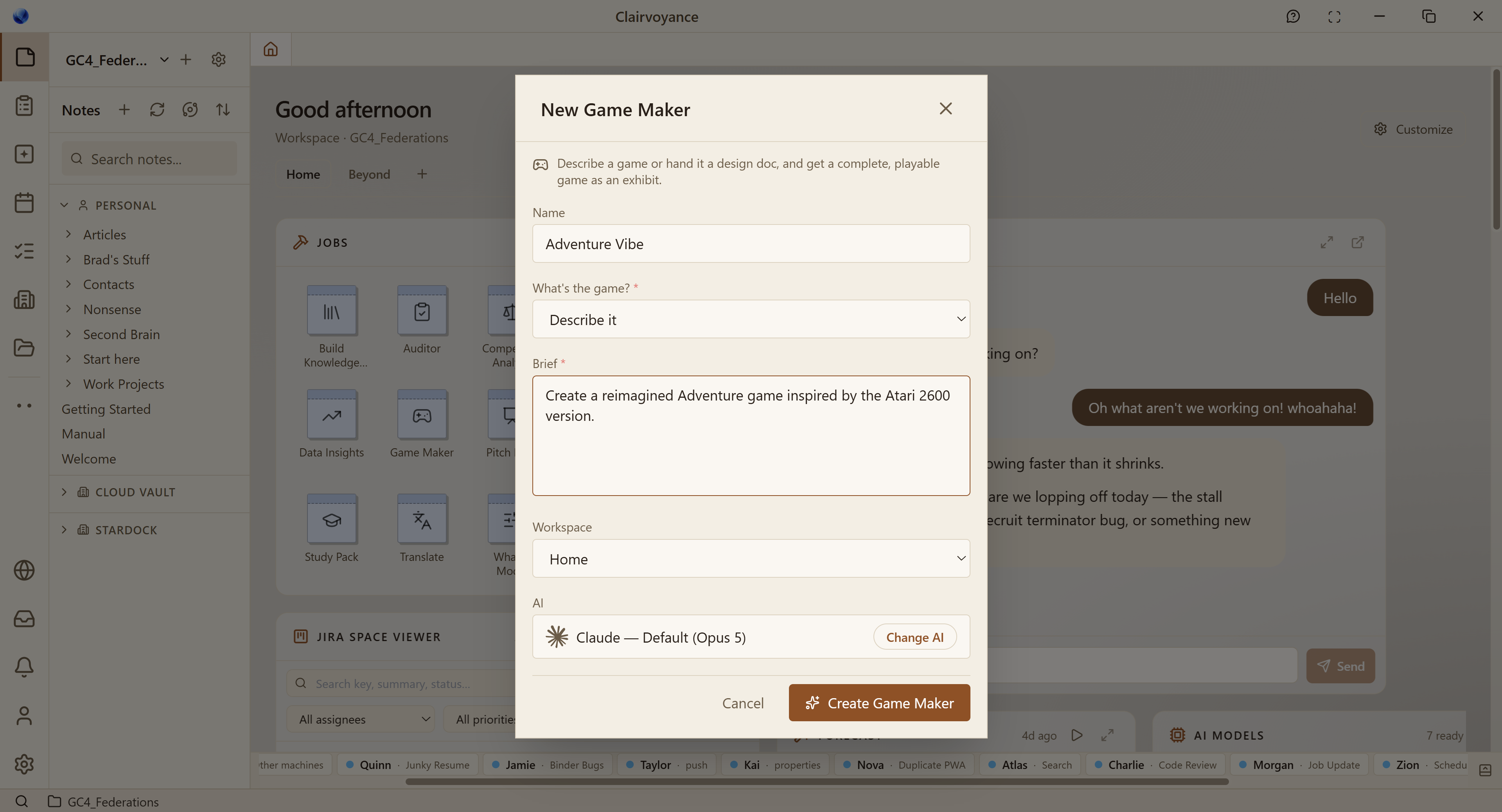
First fun little thing:  The common AI jobs artifact now includes a Game Maker.  Just describe what you want, and it will go make it.


Next up is the main (and admittedly less sexy) attraction: Data management.  

Some of you may be old enough to remember when IBM, Microsoft, and Apple were chasing the holy grail of "Information at your fingertips".  IBM and Apple had Taligent, Microsoft had Cairo (WinFS).  

The idea was to componentize things so that you could work on your data in a much more intelligent way rather than loading gigantic, bloated apps.  As you probably can guess, by the huge apps you are stuck using today, this failed.

The reason componentized apps (OpenDoc, COM, OLE, etc.) failed was because the first step was that data had to have a rich "metadata" wrapper around it.  Data had to know what could be done with it.  And shockingly, it was expected that humans would do most of this classifying by hand.   Unshockingly, they did not.

Now, fast-forward to 2026 where Windows search is still terrible. You have to remember whether the piece of data you need is in a Teams message, Sharepoint, OneDrive, Documents, some "appdata" thing, Dropbox, Google Drive, Slack, Discord, etc.    

The problem isn't that that the data is spread out.  The problem is that there is no nothing keeping track of this.  That is where Clairvoyance comes in.

Now, on the surface, Clairvoyance might just look like a worldclass AI agent orchestrator that bundles a great mark-down editor, mindmap app and code editor.  And it does do that.  But those features are prerequisites for the main event:  Total Information Awareness.

Clairvoyance doesn't run in the cloud. It's on your machine at your command.  And it can use AI to catalog all your files and it doesn't care where they are located.  That is the goal anyway.

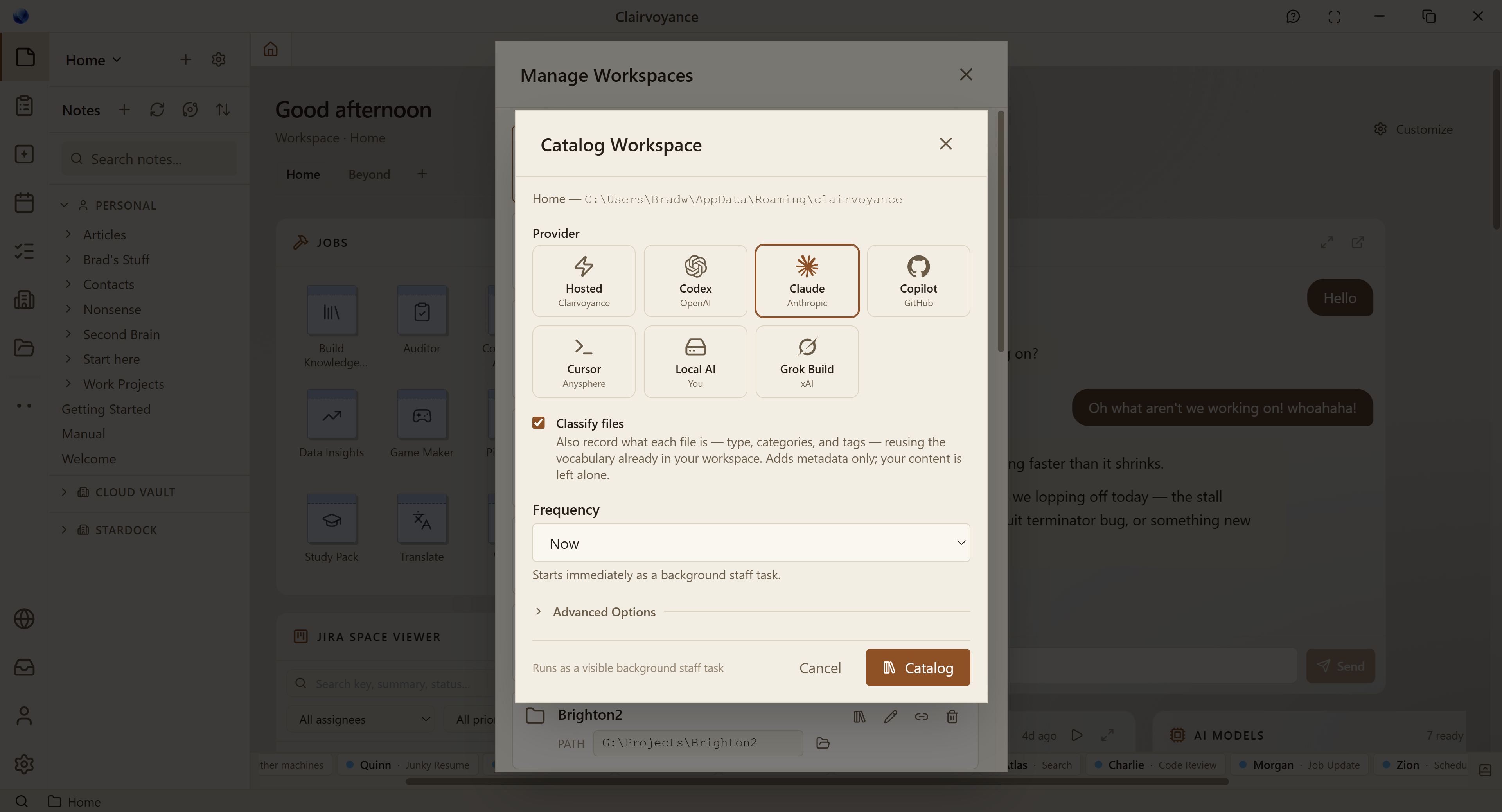
The first step is getting that Metadata set up.   Users create workspaces and order an agent to catalog it.

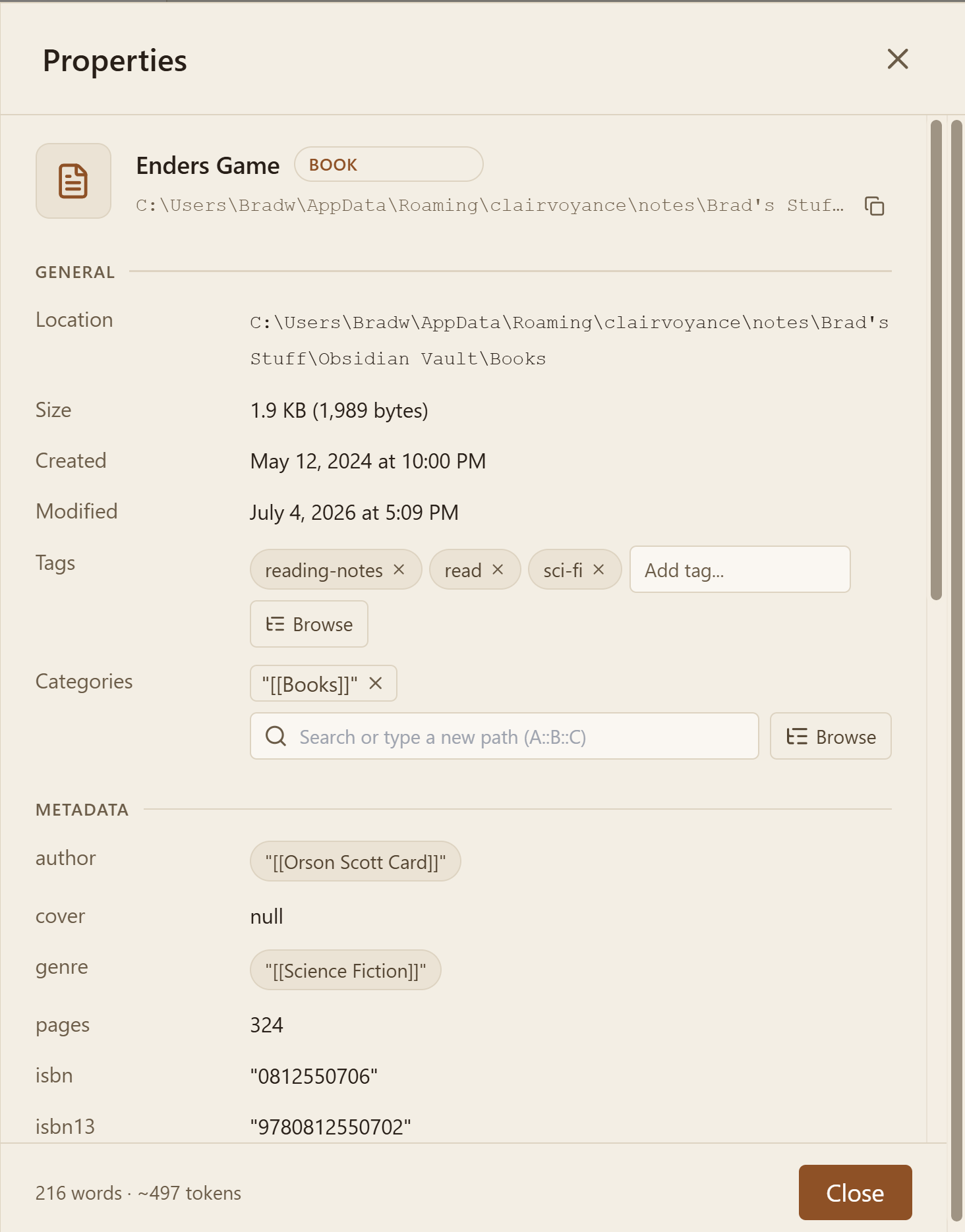
So AI will go through your files and add the metadata.  Here's an example.  Now, the metadata isn't really for our benefit.  It's for search and AI to be able to know the relationships for.

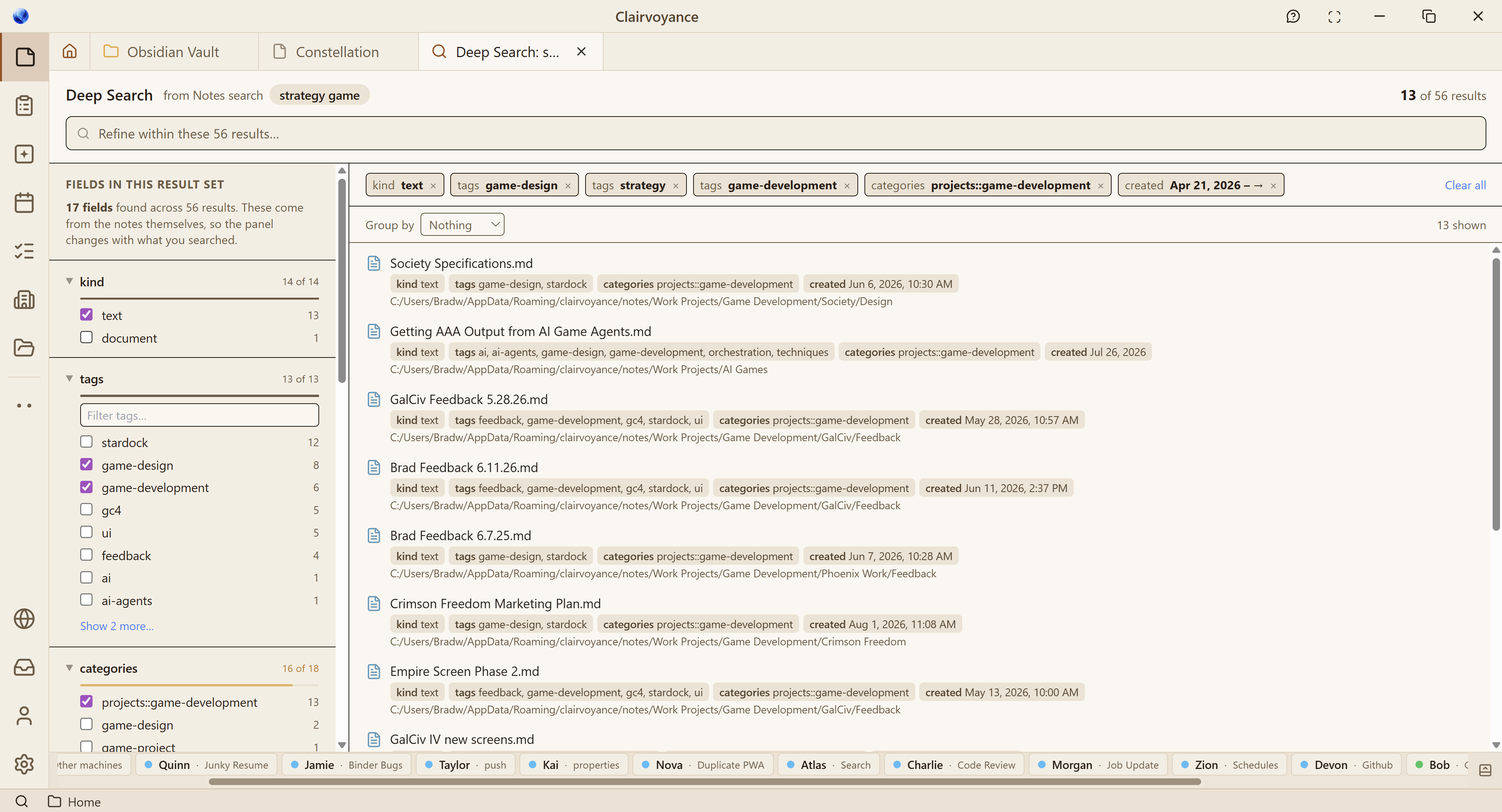
Version 0.83 of Clairvoyance also adds "Deep Search" which lets people find this stuff.

At Stardock, most of our data is spread between Google Docs, Dropbox, OneDrive and Sharepoint.

So the goal here is to have agents classify all this stuff and then instantly find it.  And I mean instant (because metadata is basically nothing compared to searching a file). 

The tricky part has been and continues to be getting all the different types of files classified.  For instance, Adobe Premiere has one way of doing it and Excel has a different way.  

The benefits are speed, less memory usage, and great at finding your stuff. 

It's a lot of unglamorous work, especially making sure that the local AIs are able to do this seamlessly for users (because most of you are probably a: Sick of hearing AI hype and b: uninterested in having to know what "parameters" and "quantize" and other terms mean).


Clairvoyance Gallery

Published on Sunday, July 26, 2026 By Brad Wardell In WinCustomize News

Greetings!

Over the coming months you are going to see a gradual evolution to WinCustomize as we begin to feature more and more creations that were AI assisted.

We now have an application called Clairvoyance that makes it easy for users to create all kinds of amazing things.   We have made a gallery that is gradually being rolled out to the public: Exhibit Gallery  Everything you could do with DesktopX by hand can now be made by its successor, Clairvoyance.  

Games. Widgets. Wallpapers. Cool visualizations. You name it.  Here are a few of mine:

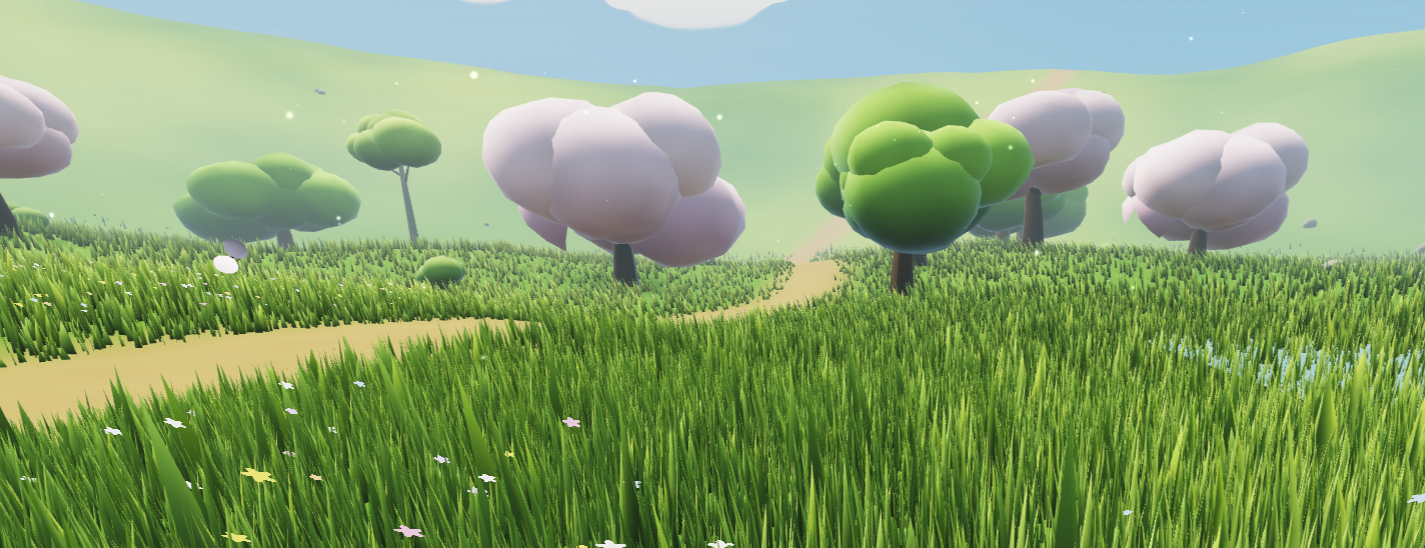
Meadow of the Wind

Just a little open world meadow you can walk around in.

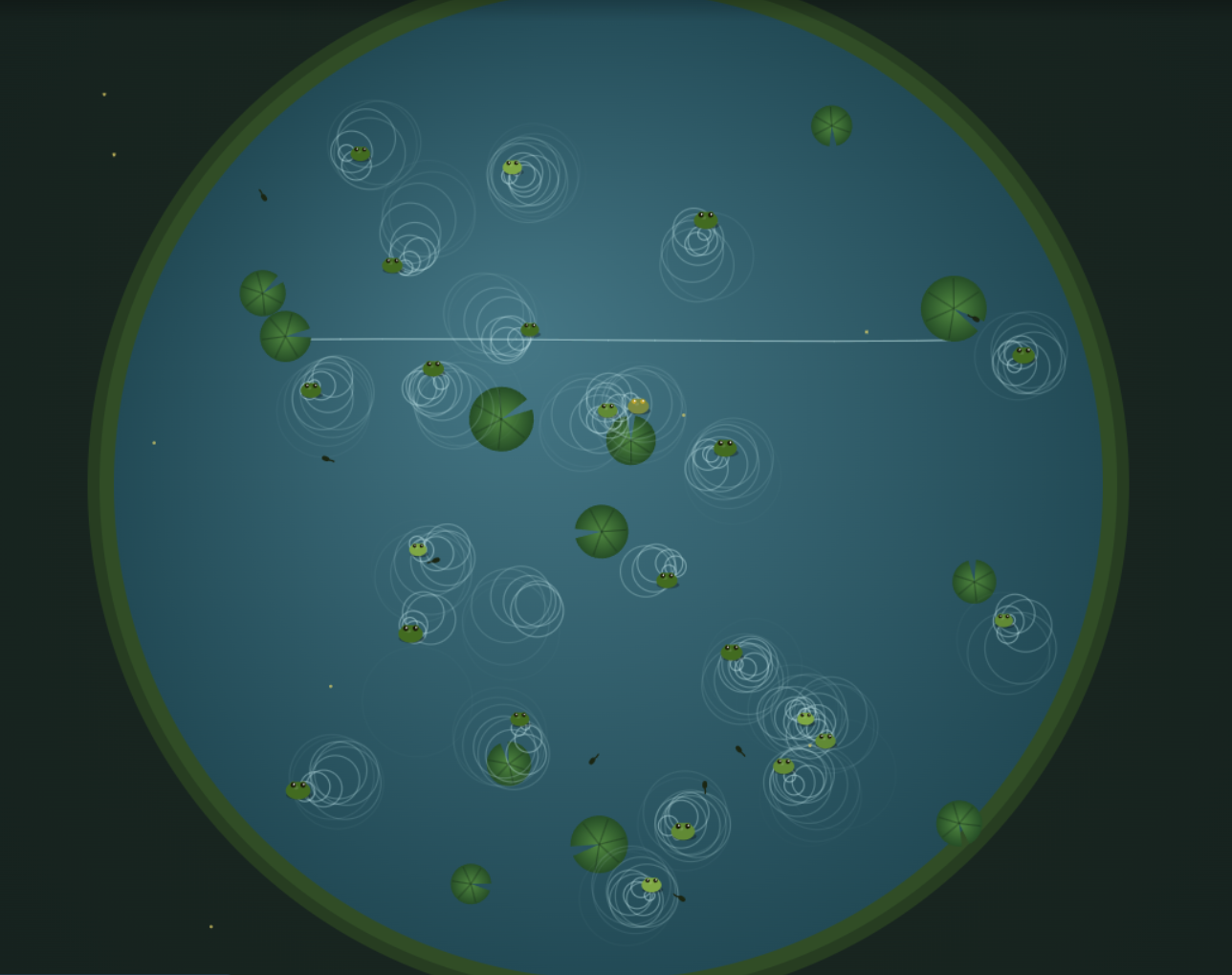
A frog simulator:

Frog Simulator

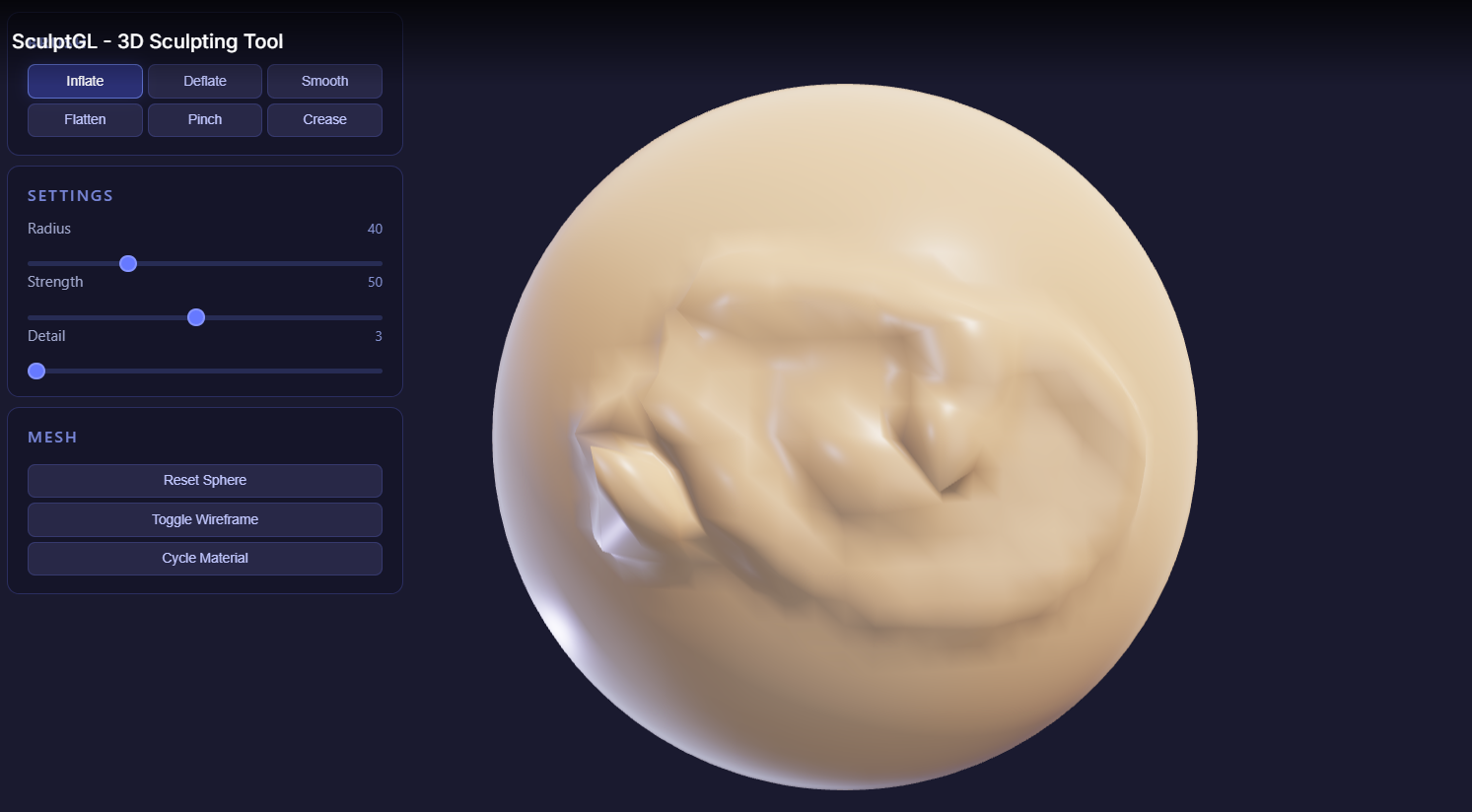
Little Sculptor

So come check it out.  We'll be merging Clairvoyance stuff into WinCustomize asap.

Elemental: Dev Journal #31: Growing Pains

Published on Thursday, July 9, 2026 By Brad Wardell In Elemental Dev Journals

Elemental: Dev Journal - Growing Pains

June was pretty rough for this game. At some point, we don't know when, there was what we think was an OS update that slightly changed the way the game's audio system integrates with the OS, which resulted in what seemed to be (but weren't) random crashes.

So what happened?

In the game there are WAV files and MP3 files, and previously, for the last 15 years anyway, if a file name had a typo or something the game would just silently fail and go to the next one. So a given sound effect or track of music would try to play, and if the file wasn't there or the file name was not the right case, it would either not play or just skip to the next track.

But then in June this stopped being the case, and the game would either plain crash or the music would do something funky (like go into a loop) and then crash.

This issue mostly happened if you were playing as one of the Empires. That's why there was some consternation in the forums and Discord, where someone would complain about random crashes and others would say "well, it's rock solid for me." In truth, they were both right. If you were playing as the Kingdom, it probably worked. If you were playing as one of the Empires, you probably got crashes at seemingly random intervals.

To address this, we've been updating the game in two ways. First, we hardened the calls so they no longer rely on the underlying sound libraries to fail gracefully, for example when a file is named "WarDrums.mp3" on disk but referenced as "Wardrums.mp3" in XML. Second, we fixed a lot of the missing tracks, so if you play the game, especially as an Empire, you will probably hear a lot of sounds and tracks that are "new" but were always there.

Needless to say, it didn't help the game's review scores, and it's just another blip in the game's technical history of being a very big-scope game made by a lot of very young (back in 2008 anyway) developers.

Making it up to players

So besides fixing the problem, we also moved up the release of some of the additional Sorcerer King quests. In version 1.3 you will see a lot of new quests.

image-1783615706568.png

We also moved up the release date of v1.3 from August into July. We expect to have a preview build up by the end of this week.

Version 1.3 has a loot balance pass across the board that we think players will like a lot. It also adds a new tactical battle tooltip that shows what effects, abilities, and tactical items a given unit has on them, so players can make better decisions about who to target. This feature has me excited because now I want to give bandits and other enemies interesting items to make use of (at least a health potion or the occasional scroll, for instance).

image-1783615746897.png

So there you have it. Once v1.3 is out, we'll be moving on to v1.4. Let us know in the comments what you'd like to see next.

Dev Journal 29: Treasures of the Magi

Published on Thursday, May 21, 2026 By Brad Wardell In Elemental Dev Journals

Treasures of the Magi is the first DLC for Elemental: Reforged. It adds a host of new items, armor, weapons, potions, and other gear, along with a handful of new lairs, quests, and monsters.

Two of my favorite additions are the Mage Wands and the Shapeshifting Potions. But players will almost immediately notice the new items and lairs that help bring fresh life to the game, especially for those who previously played Fallen Enchantress.

While the general improvements coming with version 1.1 will probably get the most attention thanks to the major performance boost, along with broad improvements to balance, stability, AI, and overall polish, we think Treasures of the Magi will be something most players will really enjoy.

The Background

We’ve discussed the history of Elemental before, but as a quick recap: the Elemental games - War of Magic, Fallen Enchantress, and Sorcerer King, which Reforged remasters - take place during the Third Age of Elemental, shortly after the Cataclysm. The world is beginning to recover, but civilization is still only barely returning. That’s why the land is filled with thugs, bandits, and other dangers; nature abhors a vacuum.

But the First Age of Elemental took place during the Age of the Magi. Before the Shards, magic permeated the world, and some people were especially gifted in wielding it. The most powerful of these became known as the Magi, and they crafted many incredible artifacts that were lost during the Cataclysm.

When the Titans came, the Magi hid their Treasuress and placed them under the protection of their constructs: golems. Golems were something we always wanted to explore more deeply in the original games because they were such an important part of the setting’s backstory. Their role was somewhat akin to familiars in other fantasy worlds. They were a major part of Magi society and power.

As a result, this expansion introduces many new golems, most of them guarding some of the game’s more powerful Treasuress.

By the time of the Fallen Enchantress, upheaval across the world has caused some of the vaults lost during the Cataclysm to become accessible once again.

And now you get to benefit from that. If you dare.

In action

Here’s a case where I have a potion of Ogre form.

image-20260519-161625.pngimage-20260519-161653.png

Not so tough now, eh?

Here is a case where you discover a Treasures guarded by golems. This will not end well.

image-20260519-162327.png

Over the course of the game, you will find a lot of new loot. We put in the effort to make sure this loot wasn’t simply like what already exists but with a different stat. We wanted to make sure these items delivered interesting choices.

My particular bugaboo was that I felt like there weren’t enough interesting early game swords. It always felt weird that I would get super excited about getting a “training sword” because that was basically the only sword I was going to get that was better than the one I started with until I got late in the game.

image-20260519-164514.png

We’re pretty excited about Treasures of the Magi. We hope you like it as much as we liked making and “Testing” it. Let us know what you think.

Dev Journal #28: A Preview of v1.1

Published on Thursday, May 14, 2026 By Brad Wardell In Elemental Dev Journals

Dev Journal #28: A Preview of v1.1

When we shipped 1.0.3, the team sat down and made a list of the things that were nagging us. Not big design questions. Not roadmap items. Just the stuff that, after a long play session, you start to feel. A few systems were slower than they had any right to be. Some encounters didn't reward you the way they should. The item pool felt thin in some places and oversaturated in others. A handful of bugs had been on the "we'll get to it" list for too long.

v1.1 is the result of getting to it.

This isn't a feature release. It's the kind of update that makes the version of the game you already own feel better to play. Here is what is in it.

Now, before I start, I have a minor rant about AI I want to get off my chest. I write these by hand. I enjoy writing them. But every app I use now, every editor, etc. offers to edit it and as soon as I let it, in come the em-dashes and the stupid, pithy, punchy writing style. It’s what’s ruining YouTube. My kingdom for something that is better than a spell checker but won’t turn my writing into AI slop. Ok, rant over. Let’s keep going.


More Items, Better Items

One of the things that has bothered me for a while is that loot in Elemental was a little predictable. By the end of a few games, you knew most of what you were going to find. That is a problem in a game built around exploration and reward.

The good news is that we did not need to invent new art to fix it. Stardock has been making fantasy games for over twenty years, and the art vault is enormous. Swords, axes, staves, helms, cloaks, rings, amulets, trinkets, oddities. A lot of it is genuinely great work that just never made it into Reforged because the original Elemental shipped with a smaller item set.

In v1.1 we have uplifted a substantial chunk of that vault into the game. New weapons. New armor. New accessories. New crafting outputs. The variety is not just visual either -- most of these come with their own effects, and we tried to give each one a reason to exist rather than being a stat bump over the last thing you found.

A few things I want to call out:

  • More tiers in the middle. A common complaint was that you would find a starter sword, then a great sword, with not much in between. We have filled in the middle of the curve so progression feels more continuous.

  • More flavor at the high end. Late-game items lean harder into doing something interesting rather than just adding numbers. Following our internal rule that items should do one thing -- sometimes two -- and do it well. See those em-dashes? I did that. Sorry. Moving on.

  • More reasons to open every ruin. The pool of possible rewards is wider, so the ruin you ignored last game might be the one with the thing you actually wanted this game.

image-20260513-205448.png

Fewer Items You Already Have Too Many Of

The other half of that conversation: variety only matters if the existing pool is not crowding it out.

If you played a few games of 1.0.3, you noticed it. Tilda Herbs everywhere. Splintered Staves on what felt like every other monster. Guiding Spears stacking up from goodie huts. Those drops were not bugs exactly…the likelihood values were just too high, on too many sources, all at once.

So we did the audit. For v1.1:

  • Tilda Herbs drop rate is roughly halved. 36 monster treasure entries got rebalanced. The average likelihood went from 42 down to 21. They still drop. They just no longer take over your inventory.

  • Splintered Staff drop rate is roughly halved. 21 monster treasure entries rebalanced, average likelihood 40 down to 20. The +15 Dodge accessory remains a great early-game find, but you should not be equipping four of them on the same team anymore.

  • Goodie hut spear oversaturation is on the list for a follow-up: the root cause sits in the goodie hut rolling code rather than in the drop tables themselves, and we want to fix it properly rather than paper over it.

We also did a pass on item descriptions. Some inherited from FE:LH had unfilled template tokens or missing words. The Hunter's Short Sword, for example, has been sitting there reading "The was discontinued when much worse things than bears began killing the warriors" is now fixed.

Performance

The other thing the team has been heads-down on is performance. Elemental is a game where, by turn 200, a lot is going on. Dozens of cities, hundreds of units, an AI thinking about all of it, a tactical battle system sitting in the wings, and a world simulating itself underneath you.

We went through the parts of that pipeline that were costing us the most and tightened them up. Where you’ll notice this stuff the most is when you zoom out and see the cloth map. The cloth map was doing a lot of calculations.

The short version: turns are faster, battles load quicker, and the late game does not grind the way it used to on modest hardware. It wasn’t GPU, it was pure CPU stuff.

Bug Fixing, Big and Small

Some of these you noticed. Some you did not.

The big ones:

  • Horse and warg counts now work. The top bar was showing you a stable; the unit-training screen said you had zero. Both were right. The data was desynced. Fixed.

  • Units no longer render one tile offset from where they actually are. You can retire the "click the unit in the panel, then right-click to snap it back" workaround.

  • Map seeds are honored on the new-game screen. Type a seed, get that seed.

  • Two tactical autoresolve crashes in the post-battle elimination path, both with surgical fixes.

  • Bishop's Ring works. Two empty stub definitions at the bottom of CoreSpells.xml and CoreUnitStats.xml were silently overwriting the real spell and stat. Last-write-wins is a brutal rule when the last write is empty. The ring now charges on melee hits and releases the charges as healing.

The small ones: dozens. Tooltip fixes. UI alignment. Spells that did not match their descriptions. AI decisions that did not make sense in specific edge cases. Audio cues firing at the wrong moment. Cropped portraits on four golem variants because they were sharing a Stone Golem Hero camera framed for a much taller model. v1.1 closes a lot of tickets that have been sitting too long.

Balance

Balance is the part of any strategy game that is never finished. We made passes on a few areas where things were either wrong or misleading.

Spells:

  • Regeneration was telling players it fully heals the target each season. It does not, and it never did at this value. It grants +4 Health Regeneration per season. Some of you reported it as broken. You were right that the description was broken, even if the spell was working as designed. New description matches reality. We may revisit the value itself. For now, we are at least no longer lying about it.

  • Elixir of Essence now works for non-sovereign champions. Previously it was sovereign-only, and when used through the found-item popup it fired twice and granted double essence. Both fixed. The same fix caught a separate bug where new army members started with HP higher than max for one turn.

  • Enchantments and city radiance now agree between UI and rules. Cities with fractional radiance below 1.0 (some campaign cities like Kilford generate 0.3) used to let you sneak exactly one enchantment in even though the UI showed no slots.

  • Bishop's Ring – See above. Charges on melee defense, releases as healing.

Combat and Items:

  • Loot rebalance pass. Tilda Herbs and Splintered Staff drop rates halved across the board.

  • Core Armor tweak. A small but felt adjustment to base armor values.

  • Treasury Vault finally shows its actual percentage benefit instead of "+0%" in tooltips. It had been silently missing its ResourceMultiplier modifier.

Economy:

  • Festival now provides 40% more food, up from 10%. The improvement was always supposed to be a meaningful growth bump for a celebrating city. At 10% it was flavor.

  • The improvement modifier double-count bug is fixed. City Food, Gold, Mana, Production, and Storage totals are no longer counting tooltip values twice. If your economy numbers look different in v1.1, that is why. The new numbers are the correct ones.

The goal was not to overhaul anything. It was to look at what players were actually doing, which spells nobody was casting, which improvements were quietly broken, and either fix the bug, fix the description, or fix the value.


When

v1.1 will roll out as a free update for everyone who owns Reforged, and it arrives NEXT WEEK!


As always, thank you for the feedback. Most of what is in this update came from things players brought up on the forums, in Discord, in reviews, in bug reports. We are paying attention. Not in the stalking you on your computer sort of way. I mean, not yet. Soon. But not yet. But we are trying our best to make sure we are adding the things you (and we) want to see to keep making the game better and better.

Stay tuned!

So what's next for WinCustomize?

Published on Tuesday, May 12, 2026 By Brad Wardell In WinCustomize Talk

For the first time in many years, Stardock has invested in a massive upgrade to its server hardware.   It's, by far, the most expensive and expansive hardware upgrade we've done.


Part of it was necessitated by last year's near destruction of not just this site but all of Stardock's tech infrastructure.

About a year ago, we had an issue in our datacenter that caused many of our critical VMs to become corrupted and required us to reconstruct nearly everything from scratch. 

Now, we had backups but it was one of those things that hadn't been fully tested because you are talking something like 36 terrabytes of data.  

It took us awhile to recover and we didn't fully recover.  There was loss and the recovery wiped out our IT budget for the year.

Now, we are in 2026 and we are looking at where things are going with WinCustomize.  The first thing we're doing is migrating it all to the new hardware. This will happen in bits and pieces but you should notice a general speedup.

But the real change is going to be the complete rewrite of this site.  It's going to look different and we are going to be changing the site's mission a bit.  It's still about customization but the world is getting very interesting with people able to create a lot of interesting stuff.

I've already built a kind of test site for this.  You can see it here. https://www.clairvoyanceai.com/gallery/browse?type=exhibit 

That's just for showing off cool stuff people have made. It's not terribly applicable here since WInCustomize has always been about sharing things that others can use to customize their Windows experience in some neat way.

But I do think we can look forward to people being able to make DesktopX type things a lot easier and share them.  We just need to make a new product for it (a new DesktopX basically but one that is built with today's security -- we were so native 20 years ago).  

I'd like to get your opinions on what kinds of new things you'd like to see added here.  We are pretty far away from the days of people making Winamp skins and icon packages. People don't do that anymore.    I had thought, at one time, that maybe iPhone/Android stuff might be interesting but I never even change the wallpaper on my iPhone.

But I can imagine all kinds of interesting things that I might want to improve my desktop in 2026 provided it can be done without fear of malware or something getting injected.   

Dev Journal #116: The Tech Tree in the Room

Published on Thursday, May 7, 2026 By Brad Wardell In GalCiv IV Dev Journals

Tech trees are one of those parts of a strategy game that look obvious from the outside and turn out, every single time, to be one of the hardest things to get right. Game designers have been struggling with how to present technology research to the player since the early 90s, and three decades in, nobody has really solved it. There are good answers, there are interesting answers, and there are answers that work for one game and fall apart in another. There is no settled answer.

As part of the work going into GalCiv IV 4.0, we have been revisiting our tech tree. The question we are sitting with is whether to redo it from scratch or to focus on making the one we have more effective. Both are real options. Both have real costs. We are not done deciding.

Pretty | Easy to Use | Provide Good Gameplay.

Pick 2.

But that doesn’t stop us from trying to have our cake and eat it too. And of course, that means a lot of failure. So much fail.

image-20260429-151948.png

Why this is hard in the first place

A tech tree is doing more work than it looks like it is doing. It is not just a list of unlocks. It is the spine of the strategic identity of the game. The decisions you make in the first thirty turns of research are not "what gets unlocked next," they are "what kind of game am I playing." If your tree fails at that, no amount of balance work fixes it. If it succeeds at it, players will forgive a startling amount of imbalance.

That is the bar. Two players in the same game, same map, same starting civ. Do they end up feeling like they played different games? If yes, the tree is doing its job. If no, what you have is a checklist with nice art on it.

Then on top of that, the tree has to be legible. It has to be plannable, at least somewhat. It has to survive 500 turns of play without becoming a chore. It has to be teachable to a new player and rewarding to a veteran. It has to scale to hundreds of nodes without turning into wallpaper.

These goals fight each other. Always.

How the genre has tried

Our genre has tried a bunch. Let’s take a tour.

The Civ lattice. Directed graph, eras as horizontal bands. The thing everyone pictures when they hear "tech tree." Strong theater, you really do feel like you have crossed into the Industrial Era. The weakness is that the optimal path crystallizes within months of release, and by Civ V the community had spreadsheeted out the dominant openings to the point that the lattice was largely a memorization exercise.

Master of Orion's tier-and-drop. Each tier offered a few techs and you picked one; the rest were gone for that game. The first 4X I can think of that was honest about the fact that the exclusion is the choice. Two MoO games were not the same game. The cost was that a new player could lock themselves out of something critical without realizing it.

Classic GalCiv parallel tracks. Our own heritage, in various forms, since GalCiv II. Military, economy, diplomacy, social, all advancing in parallel with cross-track prerequisites. It solves the "tech tree is one rail" problem and lets a player visibly be a military civ or a research civ. The honest weakness is that the tracks tend to drift toward feeling like four small linear trees that happen to share a screen.

SMAC's blind research. You set a category bias and the game picked your next tech. The most radical answer in the genre to "the optimal path becomes orthodoxy," because there is no path you control. Beloved by a hardcore niche, hated by everyone who wants agency. I respect it more than any other system on this list and I would not copy it.

Stellaris's card draw. Three weighted options every time you finish a tech, drawn from a pool. The slot machine answer. The dominant build cannot exist if the build is not replicable. The cost is planning. You cannot say "in twenty turns I will have X" because the deck might not deal it. Some players love this. Some bounce off it in the first hour.

Beyond Earth's web. No clear forward, no era bands, total radial freedom. The designers were trying to make every game feel different by removing the spine. The community decided it removed the legibility too, and the game's reception suffered. The cautionary tale on the shelf above my desk.

Endless Space 2's era quadrants. Four wedges per era, era-gated. A clean compromise between the Civ lattice and parallel tracks. Pretty, legible, and the era gate occasionally forces you to research something you did not want, which is good for the game even when it is annoying for the player.

Every one of these is somebody's favorite. Every one of these is somebody's most hated system. That tells you something about how unsolved the problem is.

Our own scrap heap

The reason I am writing this post is that we have been building prototypes. A lot of prototypes. Most of them did not work. Showing the ones that did not work is more useful than pretending we walked straight to the right answer.

The image at the top of this post is one of them. Here is the rest of the museum.

image-20260429-151933.png

I am going to include a link to an interactive version of each of these. What looks pretty in a screenshot tends to fail in actual use.

  • The Constellation. The picture above. A central node with category-colored hexes branching out across a starfield. Looked like the wallpaper for a sci-fi novel. Stopped being readable somewhere around thirty techs, and we have a lot more techs than thirty. https://www.clairvoyanceai.com/view/share/OLWNMjbf9bpL

  • The Radial. Circular layout, techs arranged around the rim. Easier to scan than the constellation. Harder to see how techs related to each other.

  • The Web. Free-form graph, nodes wired by relationship rather than tier. The most expressive of the prototypes and the most chaotic to look at. Felt like the Beyond Earth lesson coming back around. https://www.clairvoyanceai.com/view/share/KQvwmm1DmS8X

  • The 3D Circuit. A stylized circuit board in three dimensions. I personally pushed for this one longer than I should have. It looked great in stills and was a nightmare to use. https://www.clairvoyanceai.com/view/share/e0N6XCPZ7Inf

  • The Organized Table. Rows and columns, no graph at all. The boring one. The one we had the hardest time arguing against on legibility grounds, because it was always the easiest to read. The argument against it is the argument against any pure list view: it is legible the way a spreadsheet is legible, which is not the kind of legible we want. https://www.clairvoyanceai.com/view/share/HK20lSPF7eZT

  • The Hex Grid. A flat hex map of techs as tiles, with adjacency standing in for prerequisite. Felt promising for about a week. https://www.clairvoyanceai.com/view/share/aPRde_wgjEsP

There were others that did not survive long enough to make this list. The six above are the ones we sat with for at least a couple of weeks each.

The lesson, after a long stretch of this, is one I should have learned faster. The visualization is downstream of the structural decision. If the underlying structure is a directed graph with several hundred nodes, no amount of art direction makes it feel small. The most expressive layout for forty techs becomes unreadable at eighty and unusable at one twenty. You can hide complexity behind zoom and filtering, but hiding complexity is not the same thing as designing for it.

The reason GalCiv has tended toward parallel tracks for twenty-plus years is not that we lacked imagination. It is that parallel tracks scale. The reason every Civilization ships with the lattice is the same reason. The reason Beyond Earth's web is the cautionary tale is that they tried to escape this and the math caught up to them.

Redo, or refine

Which brings us back to the question we are sitting with for 4.0. Do we replace the existing tech tree, or do we focus on making the one we have do its job better?

The argument for replacing it is the constellation, the radial, the web, the circuit, the table, the hex. We built six prototypes for a reason. The current tree has the four-little-linear-trees problem I mentioned earlier, and dressing that up does not make it go away.

The argument for refining it is the lesson from the scrap heap. Every fancy visualization fell down at scale. The current tree, whatever its faults, scales to the size of game we ship. The risk of throwing it out and replacing it with something prettier is that we end up with our own Beyond Earth web.

Right now I lean toward refine, with one specific structural change I have been chewing on that might do most of the work without us starting over. I am not going to commit to that here, because we are still arguing about it. If we land on something I am sure of, that will be its own dev journal.

My top complaint is that I can’t have a tech have multiple prerequisites. It’s just virtually impossible to do that and make it work in a decent UI of any size.

In the meantime, I wanted to put the failed attempts on the table. Some of them are pretty even when they did not work, and the road to the right answer goes through showing the wrong ones honestly.

If you can think of a tech tree in any game that has over 200 techs (or skills or whatever) that you liked, please leave it in the comments below.

-Brad

739 pages 1 2 3 4 5 6 7 8 9 10 Next