Brad Wardell's Blog


Fallen Enchantress v2.51

Published on Tuesday, October 29, 2019 By Brad Wardell In Elemental Dev Journals

Fallen Enchantress: Legendary Heroes is getting an update.

Changes include:

  • Unit movement engine optimizations
  • AI update to be more greedy about getting goodie huts
  • Early game technology costs reduced
  • Default unit movement increased from 2 to 3 tiles.
  • Sovereign default combat speed increased from 22 to 32
  • Sovereign default HP increased from 20 to 28.
  • Several bug fixes to late game instability

Release date: Now!

Screenshots (at 5K)

image

image

image

image

image

GalCiv Dev Journal: Thinking about starting conditions

Published on Saturday, October 26, 2019 By Brad Wardell In GalCiv III Dev Journals

The first impression of gameplay in a 4X strategy game tends to be what the opening choices are.  And this is something we have tried our best to optimize in GalCiv III.

In version 3.96, we are giving players the shipyard again by default (which we used to have back in 1.0).   The presence of the starting shipyard has everything to do with having meaningful starting decisions.

For example, here is v3.96 without the shipyard as an option now:

image

We added a new build-once project called Industrial Center (retribution) that is the equivalent of the Computer Core except for manufacturing.  Combine that with trade resources and (in Retribution) artifacts and you have some interesting options.

Then you go over to the shipyard and you have a 4 obvious choices:

image

Note that we no longer have any weapons at the start of the game (retribution). Your ships are unarmed.  So this allows us to clean up the first impression a little bit so that weaponizing ships makes an obvious difference to your shipyard choices.

Also, having the shipyard combined with the recent increase in starting funds means players can move out a bit faster than they could before.   This gives a little more room, especially for new players, to not get economically over their heads.

These changes, along with the visual update to the planets (you can see the visual update in the first screenshot) will be in v3.96.

Making Microsoft's Surface Pro work as a better tablet

Published on Tuesday, October 22, 2019 By Brad Wardell In Personal Computing

I love my Surface Pro.  It doesn't always love me.  This Summer, a firmware update caused the keyboard cover connector to not work anymore which forced me to use the Surface truly as a tablet.  It wasn't...a good experience.

While I wasn't a fan of Windows 8, it was a pretty decent touch OS.  Windows 10...not so much.  A big part of the reason Windows 10 isn't good for touch is that it doesn't use the screen edges well.

Windows 10, by default, has these touch-based shortcuts:

  1. Swipe from left: You get a very cluttered desktop / app manager (3 x 3)
  2. Swipe from bottom: nothing (no standard use in apps)
  3. Swipe from top: Nothing (will close apps if they're running)
  4. Swipe from right:  Notification Center

That's pretty weak.

Compare that with an iPad:

  1. Swipe from left: Brings up your gadgets / reserved for apps
  2. Swipe from bottom:  Return to home screen OR bring up a nice 3X2 list
  3. Swipe from top:  Notification Center
  4. Swipe from top right:  Quick settings
  5. Swipe from right: (reserved for apps)

The Surface Pro, like all touch devices, has an interesting, not well known feature: The touch sensitive area is bigger than the display area.  You could assign areas outside the display area to have functionality.

...Enter...TouchTasks...

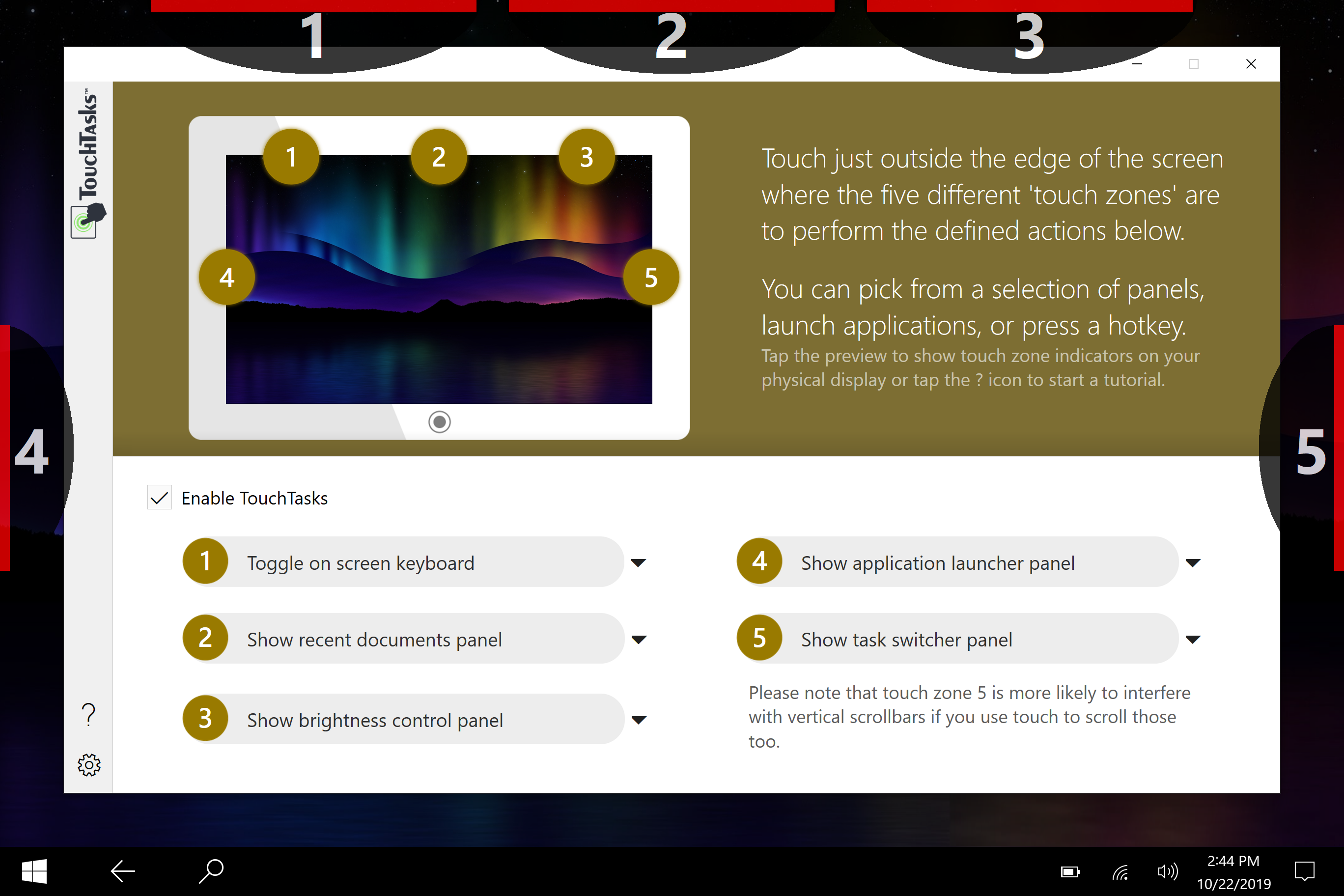
TouchTasks lets you define zones at the edge of your touch screen to do things.  Stardock even includes a few custom applets as examples but it's purpose is to let people decide what they want to do with it:

For example:

Here I have it set up so that if I tape in zone 4, it will bring up a big friendly quick launcher.  But I could just as easily have set it up so that it just launches say OneNote or define a custom hot key on Windows or bring up the Windows start menu or bring up recent documents or basically anything else you might want.

For my use, I have the Start menu to let me go through all the stuff I might need so I have begun to clean up my Surface Pro a bit:


For v1.0, we are mostly testing the waters in seeing how much interest there is by Windows users to make Windows 10 work better as a touch only device.    A lot of other accessibility options could be added in here such as Search or Cortana or a Widget panel.  

I suspect I'm not the only person who would like to see Windows 10 made into a better touch-based OS.  

You can download and try TouchTasks yourself for free.  Just remember to touch outside the display area!

www.touchtasks.com 


Cosmetic and functional planet improvements

Published on Tuesday, October 22, 2019 By Brad Wardell In Galactic Civilizations III

We're working on a wide range of things including one thing that has bugged me a long time: The way planets look.

Ugh.  These just look so bad.

Now improved to:

These will be part of an upcoming free update later this Fall.

We are also going to release a DLC with a bunch of new planet types (with really cool looking surfaces made from scratch to support the new system) that give worlds a little more character both visually and in terms of bonuses/penalties.


GalCiv Dev Journal: October 2019

Published on Tuesday, October 8, 2019 By Brad Wardell In GalCiv III Dev Journals

We're putting the finishing touches on GalCiv III v3.95 which includes both balance changes and new game options and some quality of life updates.

Originally we were going to go right from v3.6 to v4.0 but we've broken the tasks down into smaller chunks, hence v3.7, v3.8, v3.9, v3.91 and now v3.95

But we've also been working on v4.0 which has a heavy modding emphasis. Now that the major expansions to III are over (we will still be releasing DLCs, but all new FEATURE changes will happen in the base game) we are focusing more on content management, quality of life and helping make sure GalCiv III is the best GalCiv game we've ever done.

So how do we imagine enhanced mod support looking?

Here's what we have in mind:

From the main menu you click on Mods.  This takes you to the Mod Manager.

It has 3 pages:

  1. Installed
  2. Available
  3. Create

GalCiv IV-25

The Installed mods simply let you enable and disable mods.

When you click on Available it takes you to a page that has a bunch of categories of mods.  These are just glorified Steam tags.

GalCiv IV-26

The idea here is that you can press a button and it will launch the Steam workshop browser with tags set up.  Just makes it a bit easier for players to go directly to the types of mods they're looking for.

The last page is Create.

Now, this isn't a tool.  Modders will still have to actually to the mod like they do today.  The difference is adding support for what expansions the mod requires to work and what tags your mod requires.

GalCiv IV-27

Based on these settings, it'll create a folder in the documents\my games\gc3crusade\mods\ directory with the proper directory structure worked out.

The directory structure in which GalCiv is setup is a bit complicated.  That was because we didn't want to change the gameplay experience for everyone when an expansion came out.  Only those who voluntarily bought the expansion would have the changed game play and those who didn't want that gameplay changed could effectively opt-out.   This decision has a lot of advantages and disadvantages but one disadvantage is that makes modding much more error prone.

For example, for the Retribution expansion we have our various data files in a directory like this:

GalCiv3\Game\DLC\EXP4_Retribution\Game

If you have Retribution installed, then it uses the files in this directory instead of the files in say

GalCiv3\Game\DLC\EXP3_Intrigue\Game

With mods, we will need to know which files you plan to "replace" which means knowing which version of the game you want your mod to support (i.e. Retribution vs. Intrigue).  So for instance, let's say you want to replace ImprovementDefs.xml.  We need to know WHICH one you want to replace.    But let's say you want to create NEW planetary improvements.  We still need to know which set of improvements your planetary improvements are going to essentially append to.

For those of you who are already experienced at modding GalCiv, let us know what you think along with any improvements to how we are looking to do it that might make it more robust.

Some Sneak Previews for end of the year

Published on Tuesday, October 8, 2019 By Brad Wardell In OS Customization

Lots of exciting things happening this year.  

Stardock is actively hiring software developers to begin revamping all of Object Desktop.  You will begin to see the changes starting in mid November as new and old things alike start being added.

A few things on our plate include:

  1. Updating SoundPackager.  The sounds in Windows 10 are a bit annoying.  Stardock has a lot of audio talent here that we plan to use to revamp the sound packages that it includes as well as put dev resources into updating it.
  2. Updating Keyboard LaunchPad.  This is mostly about updating the UX and feature set to support modern apps as well as changing the defaults short-cuts.  Sorry WinAmp fans!
  3. DeskScapes 10.1.  We are going to be integrating in-app Dream creation (not just DreamMaker but a full on mini app for creating really cool effects and dreams!).
  4. NEW APP.  I can't talk about this yet but it should show up within the next month or so.  It's the biggest new customization app we've put out in years.

And that's just by end of this year!

Stay tuned!


Galactic Civilizations III v3.95 Change Log (Released 10/10/2019)

Published on Tuesday, October 8, 2019 By Brad Wardell In Galactic Civilizations III

Greetings!  

We are pleased to let you know about the exciting changes in v3.95 of Galactic Civilizations III.

This is a big one so stand back!  

Gameplay

  • New game option: On Surrender, transfer all planets.  Defaults to OFF
  • New game option: No FOW in your territory. Defaults to ON
  • "Ascension Victory" no longers requires you to control a majority of the crystals.  
  • Common and Abundant asteroid frequency increased.
  • When a planet gets colonized or a shipyard gets made and it sees if there is a shipyard nearby that would be in the green zone (no penalty), planet automatically becomes a sponsor.
  • Eliminated the map size limitations on map sizes as long as you have at least 8GB of memory.
  • "Nanite Transmitter" now has limited uses.
  • "Nano Fabricator" now gives 100 manufacturing overflow.
  • "Nano Fabricator" now gives a +10% Max Manufacturing bonus to the planet.
  • Dodge value on high-end thrusters reduced by 3%.
  • Tactical battle maximum final dodge increased from 10% to 20% (i.e. a ship always has a 20% chance to hit you).
  • Base relationship penalty for approaching ascension is -2 instead of -1
  • Ascension close to victory threshold lowered from 66% to 50% as there tends to be a feedback loop on accumulating points.
  • Space Rockets moved from default to Militaration tech
  • Retribution: Civilization capital max population increased from 8 to 10
  • Race Trait changes
    • Base Game: 
      • Reduced the effect of the "Popular" race trait
    • Crusade and up
      • Research techs for Drengin no longer have maint cost.
    • All:
      • Port of call is one per player instead of one per planet to align with Retribution balance
      • Productive1 trait now provides 20% instead of 10% social production boost
      • Production2 trait now provides 10% instead of 5%
      • Clever1 now provides 15% research boost instead of 10%
      • Influential1 trait now does 40% influence boost instead of 15%
      • Influential2 trait now does 15% influence boost instead of 10%
      • Economical1 now provides 15% gross income boost instead of 10%
      • Handy1 now reduces Colony Maintenace by 50% instead of 20%
      • Handy2 now reduces Colony Maintenace by 30% instead of 15%
      • Popular1 tourism per planet boost reduced from 2% to 0.4% (it's still pretty huge)
      • Popular2 tourism boost reduced from 1% to 0.2%
      • Traders1 trade boost increased from 20% to 40%
      • Traders2 trade boost increased from 10% to 15%
      • Brutal1 increases soldiering from 20% to 50% now
      • Brutal2 increases soldiering from 10% to 30%
      • Courageous1 trait now boosts resistance from 20% to 50%
      • Courageous2 trait boosted from 10% to 30%
      • SharpEyed1 increases ship accuracy from 20% to 30%
      • Sharpeyed2 increases ship accuracy from 10% to 20%
      • Agile1 increases jamming (dodge) from 20% to 30%
      • Agile2 increases jamming (doge) from 10% to 20%
      • Observant1 increases sensors from 25% to 50% 
      • Observant2 increases sensor range from 15% to 30%

Interface

  • Moved the "planet build queue" over to give the improvement list more room.
  • Moved "Word on the Street" window to the Govern screen.     
  • Tourism on a planet displays decimals if it falls below 1%.
  • The game now provides feedback when you can't select a tech because of an "Age" restriction

Bugs

  • Fixed a rare bug that prevented planets and ships from spawning in the campaigns
  • Fix typos.  Hat tip our discord fans for their help
  • Ambient music no longer plays during the victory movie.


The Dog thread

Published on Saturday, September 28, 2019 By Brad Wardell In Life, the Universe and Everything

When it comes to dogs my views can be summed up by this incident this weekend...

I am at the store and I need a USB-C cable.  They're $9.99.  I call my wife and tell her "I dunno, $10 for a cable, can you just bring the one we have downstate with you?"

However, before I had left the store I bought a $9.99 "Super Premium" dog bone.  

Priorities.

Post your picture of your dog here.

We have two dogs.

First, the new puppy:

This is an "English Creme" retriever.


And this is my baby girl with our 8 year old Entlebucher, Bailey.


Finally, my new PC is working-ish

Published on Saturday, September 28, 2019 By Brad Wardell In Personal Computing

What an adventure...

So I built "Frog-2019" and this time I bought a Fractal Design case that has a USB-C port on the front!  Great.  Well, my first motherboard, an ASROCK X299 Tachi said it had a USB-C front panel on it but when I got it, the actual header on the motherboard was missing.

Ok.  That gets swapped out with an ASUS and now Windows 10 wants activation.  And this was a ridiculous situation.

It said I needed to reactivate.

Image

Ah but there's a link that I changed my hardware.

Image

No go.

I now spend the next HOUR on the phone with Microsoft that involves, I kid you not: Giving them control over my PC so that they can do the following:

  1. Verify I purchased this new motherboard (going to Amazon and seeing it).
  2. Verifying that this is the motherboard in question through looking at msinfo32.
  3. Generating a new key.

Now, mind you, this guy on the phone was pretty technical and professional which means he's probably not cheap to employ.  Similarly, suffice to say, my time isn't cheap either.  Yet this was all wasted over something that everyone else (including Office365) has figured out how to do with regards to licensing.

So now I'm all set.

But wait, not quite.  My front panel USB-C is working on the new motherboard...but the USB 3.1 Gen 1 (i.e USB 3.0) is not working. Why? So I take a look at where the 20 pin connector goes and realize it can't quite get in all the way because the header next to it is too close.  I order a 20 pin extender.  Not because I need an extender but because it's connector is skinnier and hook that up.

Now I'm all set.  I load up my tools, start to debug.

Blue screen.

But I'm getting closer than ever!

Stardock Magazine: September 2019

Published on Tuesday, September 24, 2019 By Brad Wardell In Stardockians

by Brad Wardell, Founder and CEO of Stardock

@draginol on Twitter

Discuss this issue here: https://forums.stardock.com/496950/stardock-magazine-september-discussion

## Contents ##

  • Editorial: Working on Cider v2.0
  • Siege of Centauri
  • IndieDev: How to talk to the press
  • Fun with Start10

## Editorial ##

Stardock is working on v2 of its game engine, Cider. Cider is powered by Oxide’s Nitrous, a technology that allows our engine to be super fast and core-neutral (no easy task).

Just because Nitrous makes it possible to be truly core neutral, it doesn’t just magically make a game core-neutral.  We developed Cider specifically to make it easier for us to create strategy and simulation games with Nitrous.  By narrowing down the use-case (i.e. Cider wouldn’t do anything special for a first person shooter for instance), we can then begin to optimize every frame in a way that makes sense for a strategy game or simulation (i.e. handling lots of entities, AI, physics, decoupled sims).

decoupled_sim_update

Every millisecond counts.  In the above picture, we have 25,000+ space ships (see below) battling it out.    Our job is to make sure the engine can do as many things in parallel as possible.  In the image above, each row is a thread.  Our goal is to have as many rows going at once and in doing so shorten the overall frame time.

This way, when we bring this down to a measly 4,000 space ships, you can get over 1000 frames per second:

image

A key factor for Cider 2.0 is that AI and gameplay elements are now handled as Lua scripts rather than compiled C++. What this means is that it is much easier for us to iterate on gameplay and AI (no recompile needed, just edit the script and refresh).  It also means that modding becomes much more powerful since the scripts are just in plain text.  Don’t like our unit AI? Tweak it, or write your own and share it. 

We also decided to standardize our asset format to be more in line with Ironclad’s Sins of a Solar Empire.  In our internal Cider v2 test, we used Sins assets that the engine auto-converted.  The assets needed a little bit of work to support physically based rendering but as the screenshot above shows, they work well.

It’s going to be awhile before we ship anything with Cider v2.0.  The target platforms for v2 include PC, Stadia (which we already support via Cider Cloud), Linux, Nintendo Switch, XBO, Mac, PS4 and Apple Arcade.  Cider isn’t something we’ll be licensing, but rather it’s designed to give Stardock’s games and software a way to stand out in an increasingly crowded market.

## Siege of Centauri ##

This month, we released our take on the tower defense genre – Siege of Centauri.  This game takes place in the Ashes of the Singularity universe where you are in command of the defenses of Earth’s first interstellar colony and are being attacked by an unknown enemy (spoiler: It’s the Substrate from Ashes).  

The v1.0 launch of this game has been interesting to watch, since it attracted a very different player demographic than Ashes of the Singularity and dealt with some market changes since Ashes’s release (namely, video cards are running hotter and hotter and Nitrous pushes the video card a lot harder than other games do).  So after a bumpy launch (crashes from overheating), we were able to quickly update it with some of the tech we developed for Star Control so it didn't push the hardware so much.

Many hardware enthusiasts can tell you that even a single frame per second can have a huge impact on heat. This is one of the reasons I tend to under-volt my video cards.  I am happy to lose literally a couple frames per second (i.e. like 95 to 93) in exchange for a 20 degree difference in temperature. But I digress.

image

I think the reason people like Siege so much (at least those who didn’t run into a technical issue on release week) is that the game really shows how much the tower defense genre can evolve when coupled with modern tech.

Being able to create and share your own missions with people is something we take for granted in other games, but most tower defense games were released prior to this becoming mainstream.  Similarly, having 1920x1080 resolution as the norm means we can have screens that allow players to configure their towers before missions.  None of these kinds of things on their own are earth shattering but when you put them together you have a game with a lot more depth and replayability.

Get it here: http://www.siegeofcentauri.com 


## IndieDev: How to talk to the press ##

For over twenty-five years I’ve been interacting with the tech and games press. A lot has changed over that time, but the fundamentals have not. The tips here will benefit you in all your communication whether it be to colleagues, a business partner, or potential lead.

Here are the 5 rules I try to remember:

  1. Don’t waste their time.
  2. Don’t editorialize.
  3. Make it convenient for them
  4. Do your research
  5. Know your audience

Let’s walk through each of these.

Don’t waste their time

You get, at most, 250 words.  If you go over that, you’re too long.  Keep it short and to the point.

Don’t editorialize

Just the facts.  Don’t tell them how great your product is.  Give them information as if you, yourself, were conveying it as objectively as you can.

Make it convenient for them

Use formatting (bullet points, numbered lists, etc.) with links to more information.  You have a post, a change log, a set of screenshots? Link to it.  Treat a screenshot as being worth 100 words. So if you put in a screenshot, you should have 100 fewer words in your email.  Give them something to link to if you’re looking for coverage.

Do your research

What is it they cover? What are their interests?  Make sure what you are sending to them is relevant to them. 

Know your audience

Generally, unless you have a strong personal relationship with them, don’t be goofy or jokey.  Be professional.  Invest time into understanding what their area of expertise is and make sure you write for that specific person.

Doing these things won’t guarantee that you get press coverage.  Think of them more as a prerequisite. In my case, I enjoy talking to most of the gaming and tech press, so even if they don’t cover us, it’s still worth doing. 

## Fun with Start10 ##

If you don’t already have Start10, you should get it.  It’s available stand-alone or as part of Object Desktop.

When I set up a new machine, there are certain things I have to have:

  1. Start10
  2. Fences
  3. Groupy
  4. Search Everything
  5. Office

These are the 5 things I need on any PC before I even start to focus on whatever I’m doing on that box (developing, graphics, etc.).  Office and Everything aren’t made by Stardock.

Start10 isn’t just about restoring the classic Start menu - it’s about giving you control over it. Most of our customers for this are companies looking to standardize their start menu across the company or reduce training costs. But really, every PC user should have it. It just makes getting things done quicker.

image

That’s my Start menu.  What does yours look like? Send a screenshot to me @draginol on Twitter!

That’s all for this month!

739 pages 21 22 23 24 25 26 27 28 29 30 Next