Brad Wardell's Blog


Villains of Star Control: Origins is coming to Galactic Civilizations III

Published on Tuesday, August 20, 2019 By Brad Wardell In GalCiv III News

Last year we released Heroes of Star Control: Origins, and it proved to be so successful that we're following it up with Villains of Star Control: Origins DLC. The DLC arrives on August 27th and comes with 4 new playable races, each with their own unique abilities, ship styles, and theme music.

The Star Control: Origins multiverse is filled with beings of all shapes and sizes.  Here is a preview of some of the darker species coming over to Galactic Civilizations III.

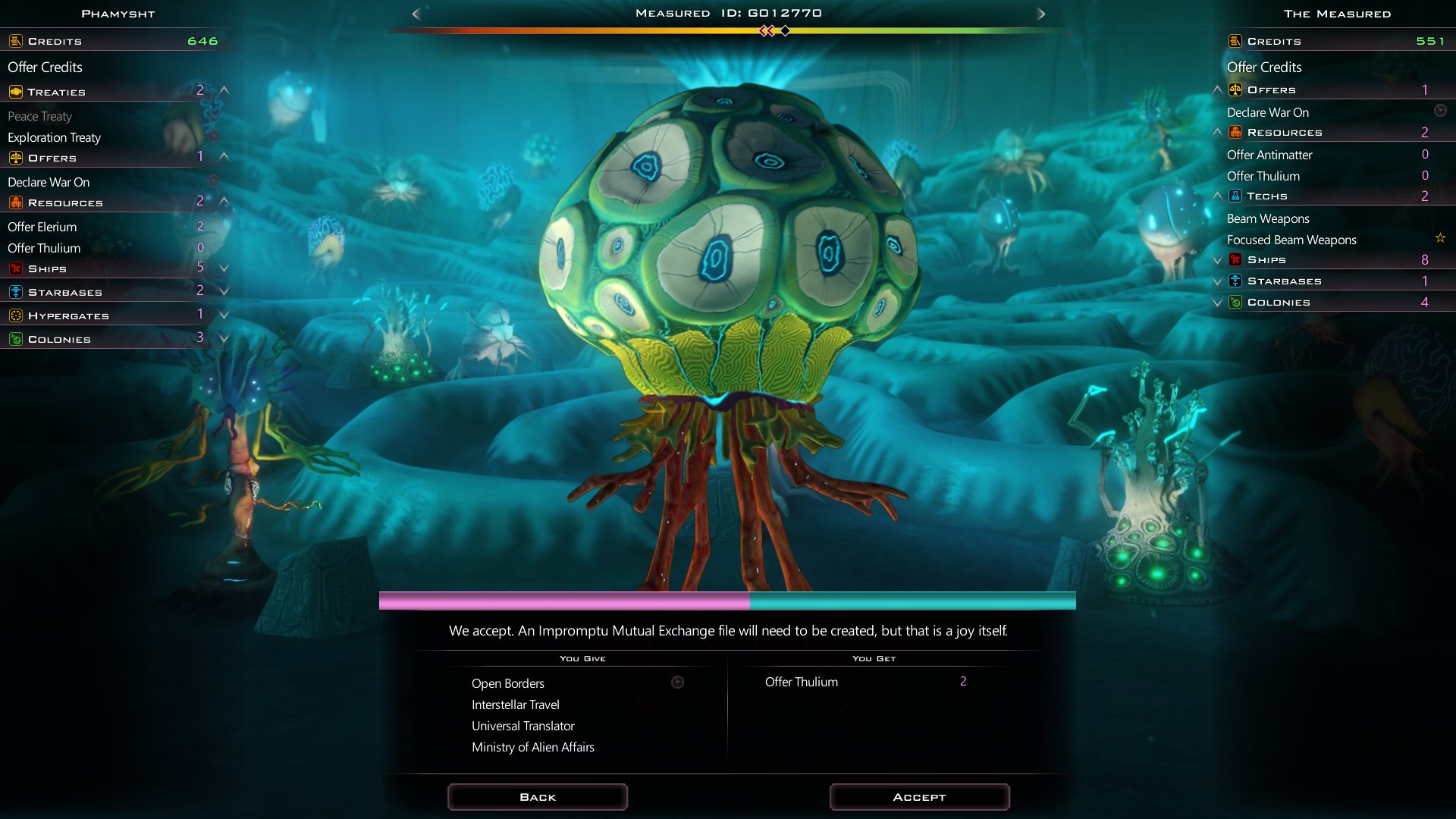
The Measured
The Measured are sentient coral.  They once had a rich, thriving civilization before they were modified by the Scryve (who we will discuss in a moment).  The Measured are the Bureaucrats of the Scryve sector which makes them fit in with the gameplay of Galactic Civilizations III nicely.  They not only get the Bureaucrat ability but receive a new one: Mitotic, which gives them free administrators when they colonize new worlds. 

image


The Phamyst
The Phamyst are the galaxy's most polite cannibals. They find other beings generally intolerable.  The galaxy is a messy place and they are just the ones to bring class and refinement to it. 

image


The Xraki
The Xraki are considered fanatical monsters that came from another dimension by most. But things are not quite as they seem.  The Xraki were once the shock troops of the Scryve Empire, who harvested them and modified them via the Scryve's exclusive access to the only known Origin in the galaxy (a device that allows its user to go into alternative universes). 

image


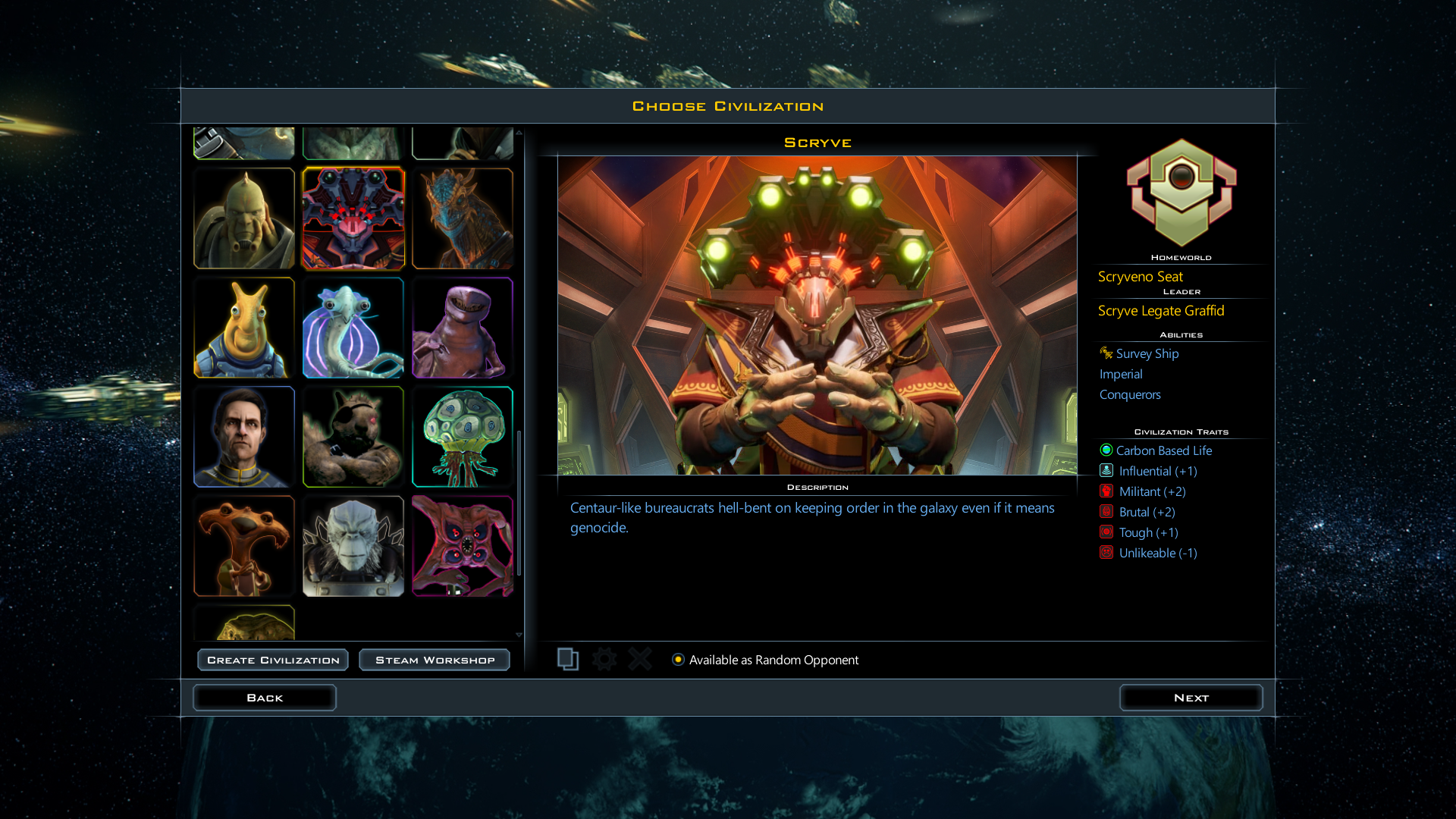
The Scryve
The immortal Scryve were not always villains.  The Scryve Empire was once full of idealism and hope.  Time and events slowly corrupted them.  Now, the once all-powerful Scryve Empire is slowly dying.  They have controlled our part of the galaxy for so long that few species have been left untouched by them.   The Scryve are unlike any villain from the Galactic Civilizations universe.  Where the Drengin are brutal, violent and intolerant, the Scryve are civilized, thoughtful and methodical.   The Scryve could best be described as a people who followed "the ends justify the means" one too many times.

The Scryve are masters at conquering and then holding.  Not only do they have the Conquerors ability, they also receive the new Imperial ability which gives their ships a HP bonus in their territory based on the number of colonies whose zone of control are contiguous with their home planet.

image


Where to get it...

Villains of Star Control: Origins will arrive for Steam, GOG, and Stardock on August 27th for $5.99.  Not only does each new species have their own unique abilities, but they come with their own ship styles, which means lots of new ship parts to play with.

Stardock Magazine: Summer 2019

Published on Wednesday, August 14, 2019 By Brad Wardell In Stardockians

## Contents ##

  • Editorial
  • Tower Defense re-imagined
  • So your kid/nephew/niece wants a career?
  • Start10 and Groupy get dark mode support

by Brad Wardell, CEO of Stardock

## Editorial ##

Greetings! I hope this Summer finds you well.  Unless you're in Australia or New Zealand, in which case:  hope you're hanging in there!

Here at Stardock, the Summer has been dominated by the exciting world of engine upgrading. Every few years, we take several months to refactor, optimize, and update our tech in order to prepare for the next series of software and games.

If you're non-technical, you'll find this boring and can just skip this. 

Our core technology stack sits on Nitrous, an engine developed by Oxide Interactive. It was the first company we co-founded after we sold Impulse to GameStop, and its specific mission was to create this engine.

Here is how most software and games work even today:

image

Your CPU, which might have multiple cores (marketing for multiple CPUs on the same chip). Despite that, only one thread on one core could talk to your graphics card. 

Most engines have a dedicated thread for AI, physics, simulation, and handling user input.  This was all fine when people only had 2 to 4 CPU cores.  But in a world where AMD has just announced a 12 core CPU for $500 you really need software to be designed without fixed tasks for the CPU.  This is what Nitrous did for us. 

With Nitrous, things look more like this:

image

That is, every CPU core could be handling graphics or physics or simulation at a given time.  This is what let us make Ashes of the Singularity with thousands of units and is the same thing that makes Siege of Centauri possible.  Not only does every unit have its own AI task, but every weapon on the unit has its own AI task.  If Nitrous controlled a B-17 bomber, for instance, it would have an AI for every crew member, not just one managing the whole ship.  This allows for much more sophisticated AI possibilities, which is where Stardock is taking this tech in its product phase (next 5 years).

Here's a fancy drawing showing the difference in a space battle:

image

The ship on the left has single AI thread that handles where the ship is flying and what its weapons are firing at.  The ship on the right is Nitrous-based and has an AI thread controlling the ship, an AI thread for firing weapon A, and another AI thread for firing weapon B.  If you have 3 CPU cores free, that means these things happen simultaneously which means faster framerates and having more units.

Cider

On top of Nitrous Stardock has developed Cider which integrates our UI, animation, physics, scripting, and toolchain.  

This Summer, our focus has been on adding Lua support. This scripting language allows us to write our screens, AI, gameplay, etc., in Lua, which anyone can modify.  We've also been standardizing our internal graphics formats so that our future games will be compatible with what we have in Sins of a Solar Empire (plus the Cider material + animation system and Nitrous's Object Space Lighting system), so assets made for Sins of a Solar Empire should work in our new games.

image

Sins of a Solar Empire: Rebellion assets will work across future Stardock games

This system will allow us to streamline our art pipeline, and as Sins is our most popular modded game, it lets us support the fans who have already invested time learning that art pipeline.

## Tower Defense Re-Imagined ##

What started out as an expansion for Ashes of the Singularity evolved into a stand-alone game.  Siege of Centauri is a tower defense game that takes place in the Ashes universe.  It deals with humanity's first colony and their sudden and violent introduction with The Substrate.

Siege_beta-2

With Siege, we're not attempting to reinvent the wheel.  Instead, we wanted to re-imagine how tower defense games would be made if designed in 2019 with the hardware and network capabilities that players now have.

Here are the 3 pillars of this game:

  1. Massive scale. Just so much boom boom boom.
  2. Strategic intervention. Game mechanics that players more directly interact with the battle.
  3. Player-Made Missions. Players can design and share their own custom missions.

The massive scale speaks for itself.  Using Nitrous, we don't just have tens of thousands of units on screen -  each one has its own AI.  You will occasionally see emergent behavior (such as some of them trying to find another way out of the kill zone and fleeing, or trying to find a different path to take). 

The strategic intervention means we can have somewhat larger maps than you normally would get in this genre.  You can, for instance, send down a giant robot to fight enemies in a particular location and then jump to another area and throw down an EMP to knock out enemies threatening to break through elsewhere. 

The last part, Player-made missions, seems like an obvious feature in hindsight. But then again, in order to do that you have to create a scripting system and a full on map editor that people can use to create missions. 

Taken together, we are hoping people will find Siege of Centauri a compelling game.  We'll find out soon, because it comes out next month! 

## So your kid, nephew or niece is going to college ##

If you're reading this, you're probably the guy or gal that everyone comes to to ask for career advice.  You are, after-all, some sort of "computer genius".  I have apparently reached that age where I'm old enough that I'm getting some pretty specific questions on what peoples' kids needs to know in order to succeed after college.

First, let me tell you: unless the kid knows what they want, they don't necessarily need to go to college.  College is a pretty expensive way for someone to figure out what they want to do.  My sons and daughter have had summer jobs doing landscaping, and that helped them decide pretty quickly what they wanted (or at least, didn't want) to do.

For what it's worth, here's my two cents on the matter:

Marketing

  1. Good writing skills. Grammar.
  2. Know how to make outlines.
  3. Know how to structure an article.
  4. Know how to visually communicate in writing.
  5. Remember: What is it? Why do they want it? Where can they get it?
  6. Know Adobe Photoshop, Office, Adobe Premiere.

Any Business degree

  1. Good writing skills.
  2. Know Excel.
  3. How to communicate effectively with as few words as possible.
  4. Remember: Ideas are cheap, execution is what matters.
  5. Know Microsoft Powerpoint.

Computer Science

  1. Good writing skills.
  2. Learn to touch type.
  3. Learn C++, C#, Python.
  4. Take the highest math classes you can handle. They help change they way you think.
  5. Remember: Memory access is now more expensive than minor difference in the "big O".

Art

  1. Know what you plan to do with it, specifically.
  2. Look at ArtStation.com. Those are your competitors.
  3. A school project in your portfolio doesn't count.
  4. Learn how light works.
  5. Get a Wacom tablet.
  6. Learn Maya, Substance Painter, 3D Studio Max, Adobe Photoshop, Adobe After Effects.

For all of them:

  1. Beware of social media. Employers look at it.
  2. It's a worldwide market now. Pick something you're interested in doing in your free time too.
  3. People like solutions, not problems.
  4. Money is only a tool. It is not the end objective.


## Start 10, Groupy, get dark mode ##

Black UIs are the new hotness in UI design. In response, we have been updating our software to explicitly support dark mode, starting with our popular window grouping app, Groupy, and our Start menu replacement, Start10.

image

Groupy with dark mode (Groupy lets you group windows together with tabs)

image

Start10 with dark mode (This is my particular start menu setup, there are lots of options)

These two programs along with our other popular desktop enhancement utilities (like Fences, DeskScapes, Multiplicity, etc.) are available in Object Desktop.
GalCiv III AAR 2019: Whispers of a dying empire

Published on Wednesday, August 14, 2019 By Brad Wardell In GalCiv III Dev Journals

The Setup

Large map, 12 random civilizations. 

The Expedition: the backdrop

image

In 2253, the milky way galaxy had settled to roughly this configuration.

image

Blue: Terran Alliance

Purple: Yor

Red: Drengin Empire

Green: Torians

Yellow: Arceans

Cyan: Altarians

With the other major civilizations being located in the vicinity.

Back in the year 2178, humans invented hyperdrive which made per-ship faster than travel possible.  This technology replaced the ancient stargate technology that the Arceans and Drengin utilized.  It is that technology that allowed for so much of the Orion Spur to be explored.

Continue Reading...

PR Email: Start10 adds Dark Mode support to popular start menu replacement

Published on Tuesday, August 13, 2019 By Brad Wardell In Stardockians

Hi there!

Just wanted to let you know that Stardock is releasing Start10 v1.75 at 1pm EST.  Start10 replaces the Windows 10 (and 8) start menu with one that gives users the option to either go back to the classic start menu (Windows 7) or one that adheres to Windows 10's UI but incorporates the features from the traditional start menu that the default start menu lost.

I've written an article on it that outlines some of the major features that Start10 brings back like jump lists and add program organization, shell integration, etc.  

You can read that article here: https://forums.stardock.com/496477/start10-adds-dark-mode-support-to-bring-back-the-classic-start-menu

A few screenshots:

image


image


image

(click to enlarge)

If you're interested a press copy, please let me know.  

It's a free download at www.start10.com.

Start10 adds dark mode support to bring back the classic Start menu

Published on Tuesday, August 13, 2019 By Brad Wardell In Personal Computing

Stardock will be releasing Start10 v1.75 today which, amongst other things, adds dark mode support.  Start10 is designed to bring the Windows 10 start menu the full power it traditionally had.

I won't pretend to understand the UX team at Microsoft.  It will come as no surprise to those who have been following Microsoft and Stardock for the past twenty years that we've been pursuing often parallel visions of where the Windows desktop should go. When our visions diverge they tend to diverge in a big way and probably the most famous example was the evolution of the Start menu.

Stardock's Start8 was the first, and for awhile, only, program that returned the classic-style start menu.  We're not sure what Microsoft was thinking with Windows 8 but luckily, by Windows 10, they had returned to their senses...mostly.

This past Spring Microsoft introduced "Dark Mode" to Windows 10 which is a visual treat for most of us who spend many hours in front of the computer.  Nevertheless, the Windows 10 Start menu is still...not ideal.

If you have Windows 10 you already know this but let's recap.  Windows 10 with dark mode looks like this:

image

Image from Walter Glenn's terrific article on customizing Windows 10's Start menu

Walter's article is one of the best out there for trying to make the Windows 10 Start menu usable.  The problem isn't just that it's a bad UX, it is also not well implemented.  It's basically divorced from the rest of the Windows shell experience. 

Where Start10 shines

First, as you can see here, it is important that users quickly and easily be able to choose which presentation of the Start menu they want. That includes Microsoft's Windows 10 style.  We want our users to always be able to check out things on Windows 10 easily to make sure that Start10 remains a better solution for them.

image

Start10: Choose between classic, modern and Windows 10

Personally, I prefer the modern style.   When I use Start10, it's not because I'm "afraid of change" in my UX.  I just want the most usable, modern experience, period.  The classic style (Windows 7) isn't a retrograde either.  You can still mix and match UWP programs and such.  It just gives you a bit quicker access to elements of Windows that have become hard to directly access.

image

Start10: Modern Style

vs.

image

Start10: Classic style

Windows 10 at full power

With Start10, you can customize both your taskbar and your Start menu however you'd like both in terms of color and texture.  But cosmetics aside here are some of my favorite features from Start10 that I just can't live without:

image

Jump Lists

One of the best features of Windows was jump-lists.  They're still there.  The OS still has them.  But the default Windows 10 Start men hides them.  They allow you to quickly get to a particular document.

image

Start10: All apps

Whether you organize your Start menu or not, one of the most useful features the start menu was nested folders.  I could organize things like Apps->Graphics->Adobe and quickly go through the Adobe apps.   These days, I tend to use search for anything I remotely use often so I don't organize to that level of detail anymore.  However, it is still very handy to be able to organize utilities and development apps because I often absolutely forget the name of many of my favorite tools (such as Balsamiq Mockups!).  

To be fair, Windows 10 is slowly returning some of these features but with relatively little control over how they're displayed:

image

Windows 10's Start menu for comparison.

This is by no means a comprehensive list of features of Start10.  Version 1.75 adds Dark mode support to the app.  If you don't already have it, definitely go download it at www.start10.com.

More screenshots

image

image

image

image


GalCiv Lore talk

Published on Friday, August 9, 2019 By Brad Wardell In Galactic Civilizations III

Year 2260 galactic situation.

The "fence" marks the beginning of where Hyperdrive works a lot less efficiently due to increased stellar mass density (a lot of this is speculative).

The blue area is the area controlled by the Terran Alliance.  Purple is Yor.  Red is the Drengin Empire and yellow are the Arceans. 

The continued refinement of Galactic Civilizations III

Published on Thursday, August 8, 2019 By Brad Wardell In GalCiv III Dev Journals

Greetings!

Thanks to you guys continuing to buy our DLC we are able to keep developing Galactic Civilizations III with new features and improvements.

The last few updates have been focusing heavily on quality of life and the latest version, v3.8 continues that trend.  Below are some of features we've recently added that we hope you find useful.

Adjust difficulty mid-game

Finding yourself doing really well mid game or struggling more than you thought?

image

Under the options->Gameplay you can now adjust difficulty on the fly and it will update the AI's accordingly!

UI Cleanup

We don't necessarily respond to every post (or even most) but we do read them.  So many of our updates are pretty minor. A text change here. A font tweak there.  Here are a few examples:

image

We now display a little more information about ships than we used to.  For example, tactical speed is now displayed.

image

More information, such as research, is displayed in the planet list.

image

Capturing Ascension crystals now makes it clear how long it will take players to win through that means.

image

The shipyard list displays how much production is going to it.

Immersion

This is hard to quantify but we have been going through the game making small text changes as well as making sure the default ships from every species has a colorful name rather than simply the ship class.

image

Also a better use of fonts to better emphasize who is speaking and what options are.

image

The work continues

We are keen on hearing your thoughts! We hope you like what we've been doing!

Groupy is a superset of Windows Sets anyway

Published on Tuesday, August 6, 2019 By Brad Wardell In Software Blog

Before Microsoft even announced their windows as tabs feature, "Sets", Stardock had released Groupy v1.0.

Groupy is pretty straight forward: We like having our browser windows organized by tabs, why not the rest of the OS experience?

There are a number of popular use cases for Groupy.  For instance, merging multiple Windows explorer windows together with tabs the top.

Groupy-DarkMode

Groupy supports Windows dark mode

I find it particularly helpful that I can just click the + button to get another tab.

Here's how I use Groupy when doing development work.  I have GalCiv and Siege of Centauri and Perforce grouped together.  This is my "Dev" app.

image

I like to think of each of my groups as an "App" in itself.  That is, if I treat Chrome as a single app with lots of tabs for different pages, then my Dev "app" simply has tabs that let me switch between different tasks related to development.

You can try Groupy for yourself at https://www.stardock.com/products/groupy/.  I suspect you'll find it as easy to use as I do.

Galactic Civilizations Summer 2019

Published on Wednesday, July 31, 2019 By Brad Wardell In GalCiv III Dev Journals

We're putting the touches on v3.8.  From here on out, a lot of our effort is going to be on features that improve the game experience, polish and usability.  They're not sexy features but they're much needed imo.

Starting with 3.6, we began work on improving the modding experience.  This is something that's been being further developed in 3.8 and will get more attention after as we try to "unify" the experience further so that people can eventually pass around mods and know they'll "just work".  

We still have the general challenge in that you have Crusade and "base" GalCiv III v1.x.   Crusade changes the economic system to a citizen based system so that's a big challenge in reconciling in terms of mods.

There won't be any more expansions for GalCiv III.  Future gameplay improvements will be made to the Cruade base (i.e. as long as you have Crusade these will work).   But we do have new DLC coming over the coming year.

If you have any questions, feel free to ask them here. Cheers!

739 pages 21 22 23 24 25 26 27 28 29 30 Next